Guntermann & Drunck GmbH Operating Instructions
CATVision (MC)
11.2.2 Conncetion with CATVision-CPU
For establishing a connection between ATX module CV-Power and
CATVision-CPU please use the delivered cable PowerCord-2.
Plug the 3-pole jack of the cable in the 3-pole flange connector of
CATVision-CPU on the back of the device.
(3-pole flange connector)
Then plug the RJ9 connector in the RJ-9 jack of the ATX module CV-
Power.
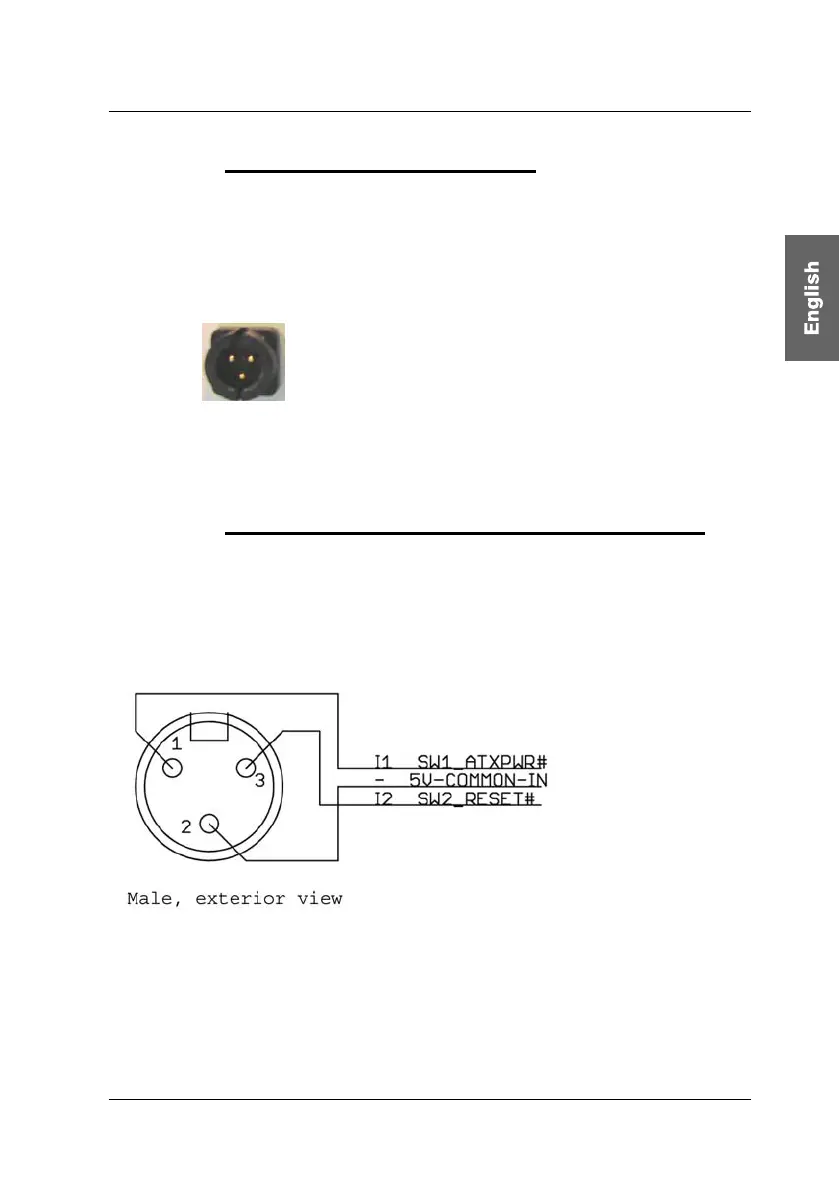
11.2.3 Connection of the key switch with CATVision-CON
Before connecting the key switch with CATVision-CON the key switch has to
be connected with the delivered 3-pole cable jack.
From the following illustration you can see which wire has to be connected with
which PIN.
page 65



 To Next Page