AFR-24S User Manual
2.8 Desktop Flexible Media Support System (machine only)
The following installation of desktop flexible media support system is only used in the
machine individually without assembling with auto feeder.
Step 1
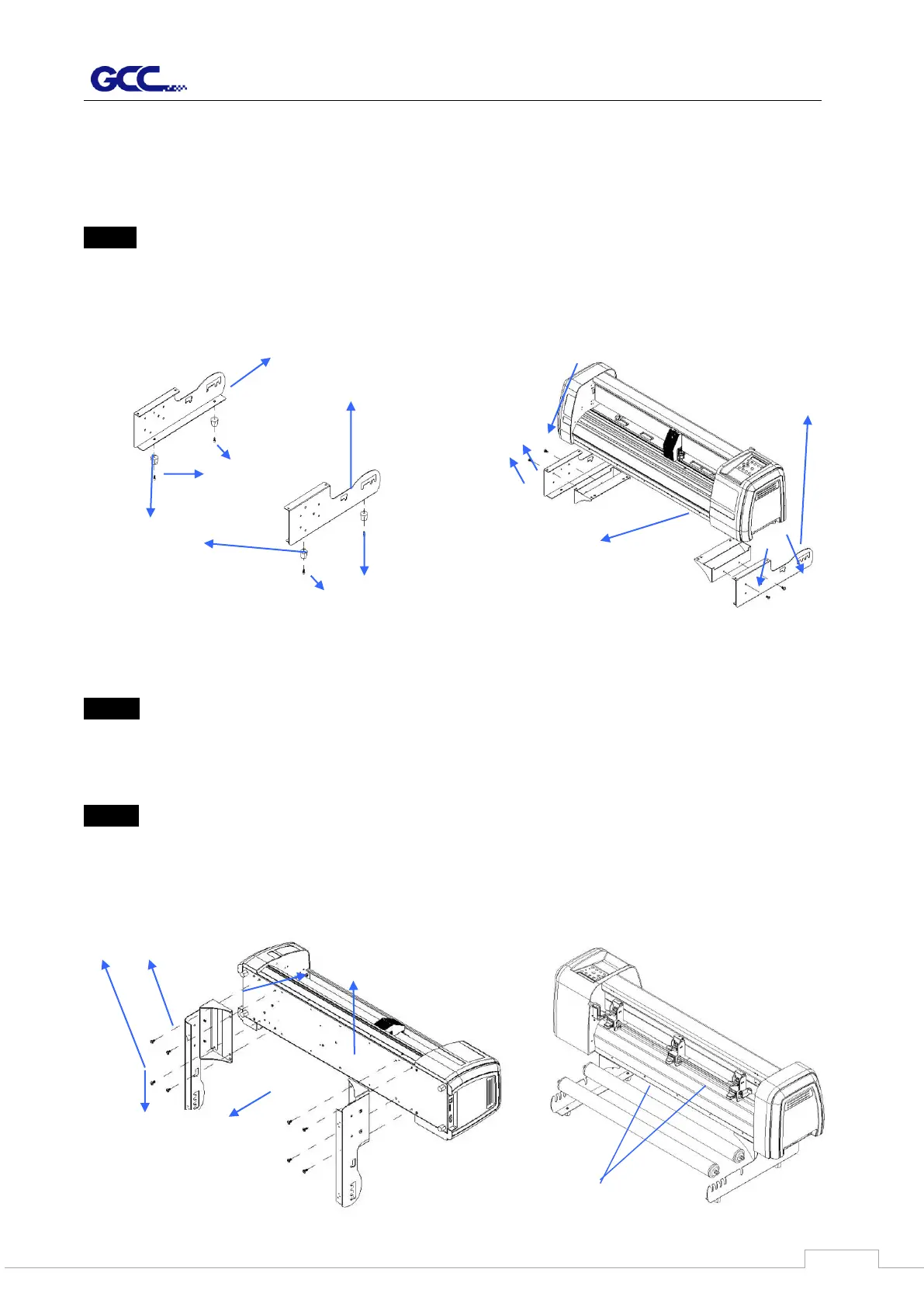
Put the 4 Plastic Foot under the Roll Holder Support and insert the M4 screw into the hole of
Plastic Foot and tighten them with the M4 L-shape screw driver. (Figure 2-13)
Step 2
Position the Desktop Support Brackets beside the Roll Holder Support and insert M6 screws
into the Roll Holder Support and tighten them with M6 L-shape screw driver. (Refer to Figure
2-14).
Step 3
Put the bottom of machine in lateral, and position the Roll Holder Assembly beside the
bottom of the machine. Then, insert the M6 screws into the holes of Roll Holder support
assembly and tighten them with M6 L-shape screwdriver. Like Figure 2-15.



 To Next Page