17
Optical safety edge
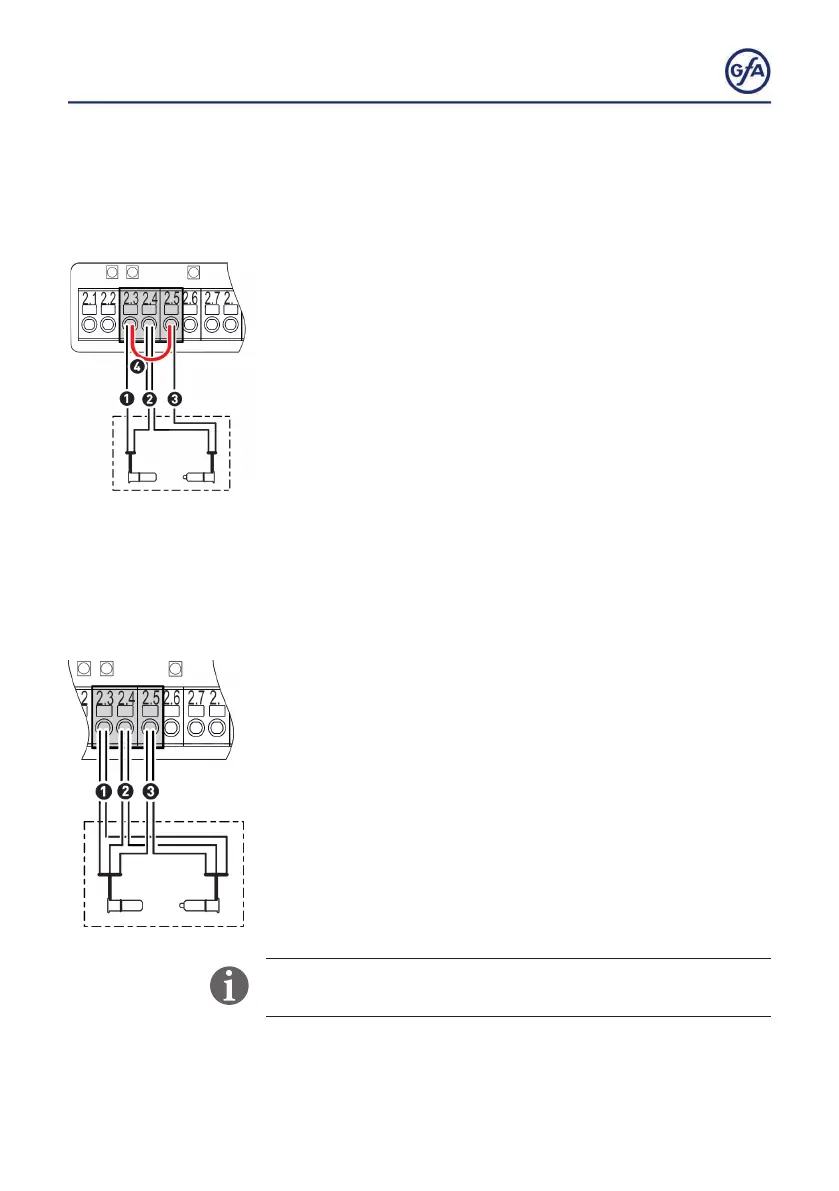
Connect an optical safety edge with 2 or 3 wires as follows:
Optical safety edge with 2 wires:
▪ Install the product according to the manufacturer‘s instructions.
▪ Connect the brown cable (1) to terminal X2.3.
▪ Connect the green cables (2) to terminal X2.4.
▪ Connect the white cable (3) to terminal X2.5.
▪ Install a jumper (4) between terminals X2.3 and X2.5.
▪ You can connect a second safety edge to terminals X2.6 and
X2.8 in the same way.
▪ Activate the safety edge after completion of the electrical
installation with menu item
0.1.
Optical safety edge with 3 wires
▪ Install the product according to the manufacturer‘s instructions.
▪ Connect the green cables (1) to terminal X2.3.
▪ Connect the white cables (2) to terminal X2.4.
▪ Connect the brown cables (3) to terminal X2.5.
▪ You can connect a second safety edge to terminals X2.6 and
X2.8 in the same way.
▪ Activate the safety edge after completion of the electrical
installation with menu item
0.1.
If the safety edge is activated or damaged, fault indication F 2.9
appears.



 To Next Page