H E Y E R P a s i t h e c
Rev. 0.2 Draft – 12/09 HEYER Pasithec, Operator’s manual 21 / 106
3.4.3 Indicator
AC indicator The indicator lights up when AC power is in use;
the indicator is dark when the AC power fails.
3.4.4 Navigator Knob
The user can adjust the rotary knob to select the menu item and modify the setup. It can be rotated
clockwise or counter-clockwise and pressed like other buttons. The knob may be used to select
options on the screen, in the system menu, and in the parameter menu.
The rectangular mark on the screen that moves with the rotation of the knob is the “cursor”. The
cursor can be used to select any menu item on which it lands.
Operating method:
Move the cursor to the item you wish to select
Press the knob
One of the following four situations will happen:
If the background color of the cursor becomes a contrasting color, the content in the
frame can change with the rotation of the knob.
A pull down menu or dialogue box may appear on the screen
The original menu will be replaced by the new menu.
Save setup
3.4.5 Screen Layout
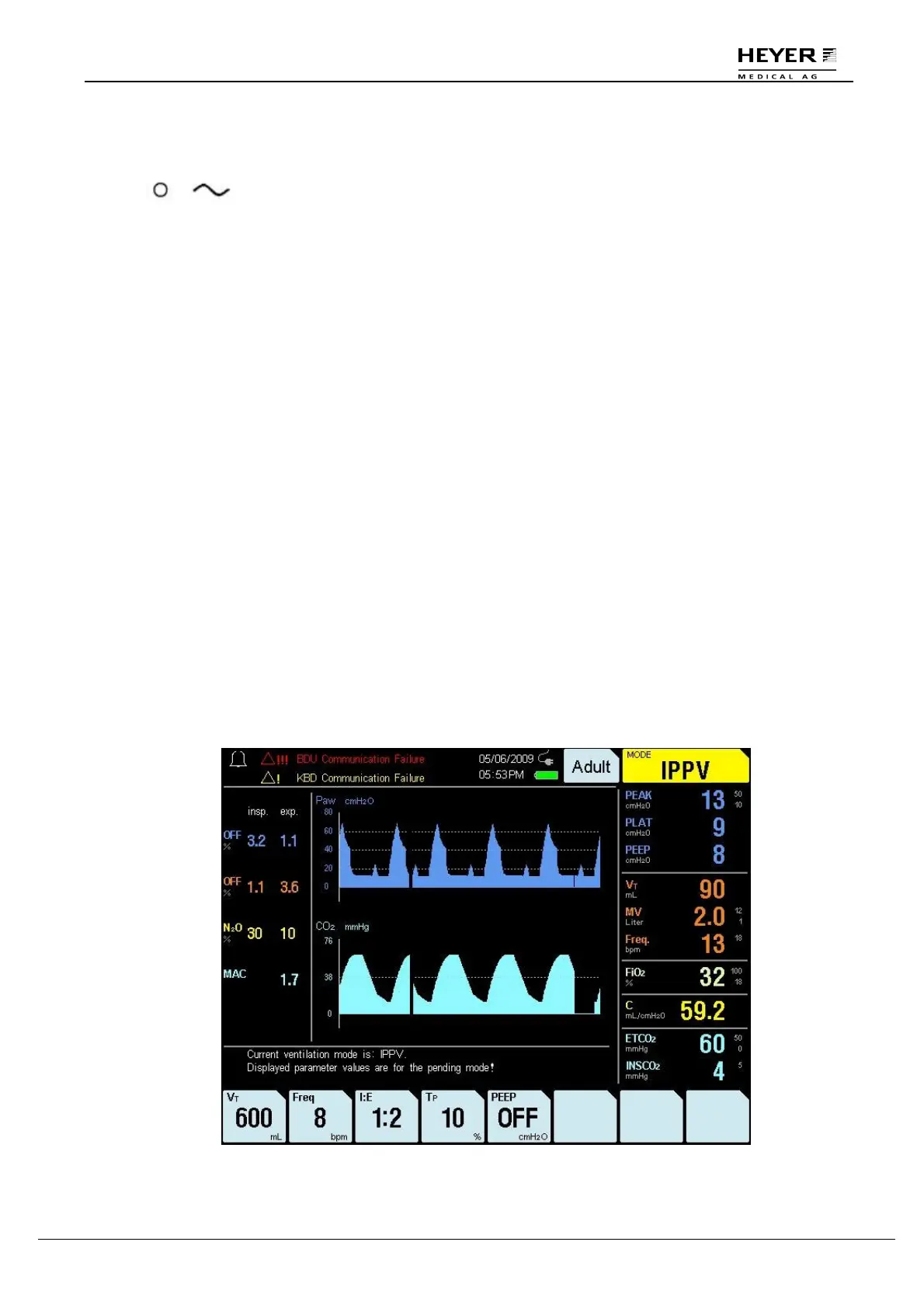
The display of the ventilator is a color TFT, which can display the monitoring and setting parameters,
waveforms, and alarm information on the screen. See Fig. 3-7.
The screen has three areas: information area, monitoring area, and parameter setup area.
Figure 3-7 Display screen layout



 To Next Page