Server Side Include (SSI) 40
Doc: HMSI-27-309, Rev. 3.11Anybus Communicator PROFINET User Manual
printf
This function includes a formatted string, which may contain data from the input and output data areas,
on a web page. The formatting of the string is similar to the C-language function printf().
Syntax:
<?--#exec cmd_argument="printf(’String to write’, Arg1, Arg2, ..., ArgN)"-->
Like the C-language function printf() the “String to write” for this SSI function contains two types of
objects: Ordinary characters, which are copied to the output stream, and conversion specifications, each
of which causes conversion and printing of the next successive argument to printf. Each conversion
specification begins with the character % and ends with a conversion character. Between the % and the
conversion character there may be, in order:
• Flags (in any order), which modify the specification:
- which specifies left adjustment of the converted argument in its field.
+ which specifies that the number will always be printed with a sign
(space) if the first character is not a sign, a space will be prefixed.
0 for numeric conversions, specifies padding to the field with leading zeroes.
# which specifies an alternate output form. For o, the first digit will be zero. For x or
X, 0x or 0X will be prefixed to a non-zero result. For e, E,f, g and G, the output will
always have a decimal point; for g and G, trailing zeros will not be removed.
• A number specifying a minimum field width. The converted argument will be printed in a field
at least this wide, and wider if necessary. If the converted argument has fewer characters than the
field width it will be padded on the left (or right, if left adjustment has been requested) to make
up the field width. The padding character is normally space, but can be 0 if the zero padding flag
is present.
• A period, which separates the field width from the precision.
• A number, the precision, that specifies the maximum number of characters to be printed from a
string, or the number of digits to be printed after the decimal point for e, E, or F conversions,
or the number of significant digits for g or G conversion, or the minimum number of digits to
be printed for an integer (leading 0s will be added to make up the necessary width)
• A length modifier h, l (letter ell), or L. “h” Indicates that the corresponding argument is to be
printed as a short or unsigned short; “l” indicates that the argument is along or unsigned long.
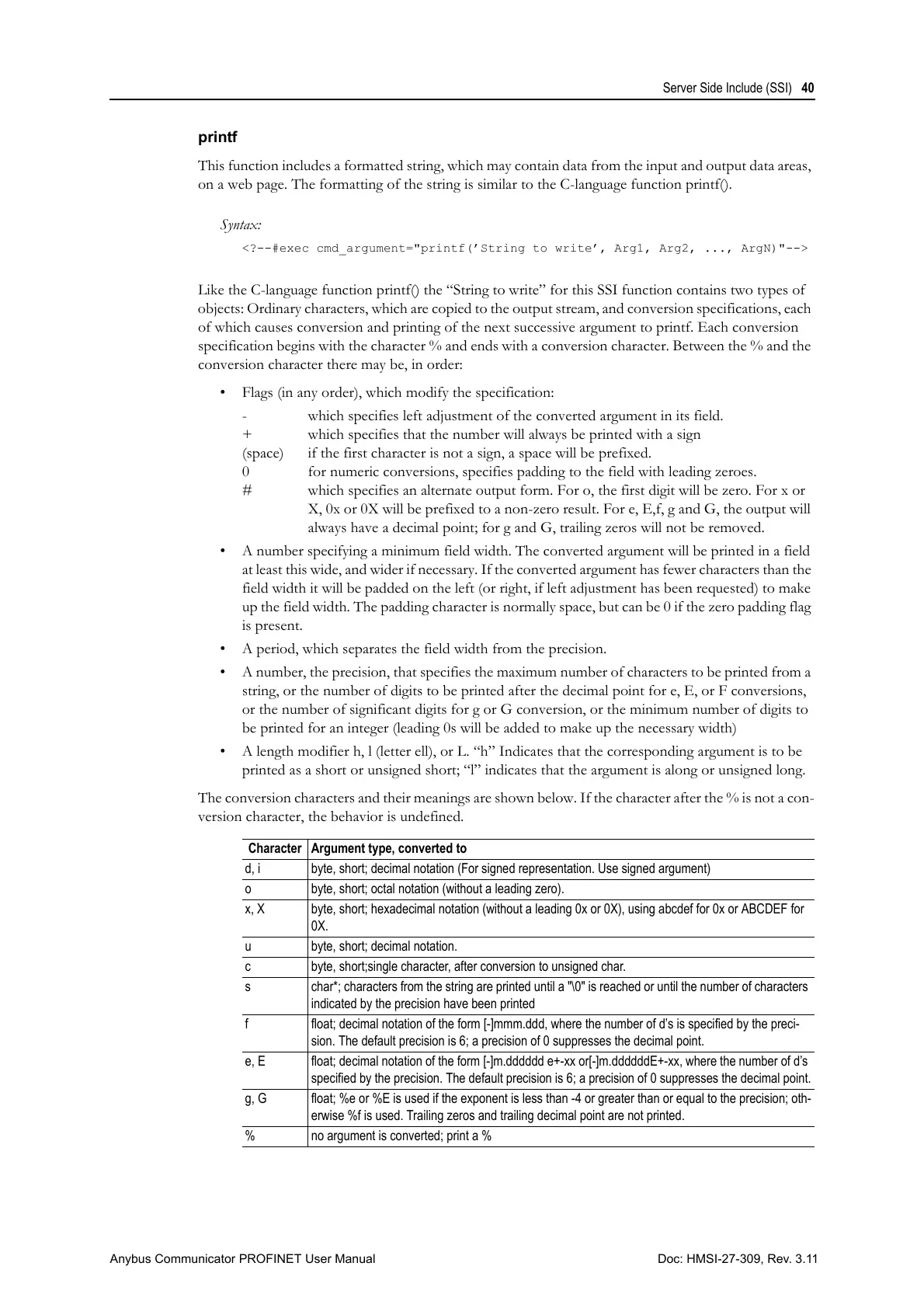
The conversion characters and their meanings are shown below. If the character after the % is not a con-
version character, the behavior is undefined.
Character Argument type, converted to
d, i byte, short; decimal notation (For signed representation. Use signed argument)
o byte, short; octal notation (without a leading zero).
x, X byte, short; hexadecimal notation (without a leading 0x or 0X), using abcdef for 0x or ABCDEF for
0X.
u byte, short; decimal notation.
c byte, short;single character, after conversion to unsigned char.
s char*; characters from the string are printed until a "\0" is reached or until the number of characters
indicated by the precision have been printed
f float; decimal notation of the form [-]mmm.ddd, where the number of d’s is specified by the preci-
sion. The default precision is 6; a precision of 0 suppresses the decimal point.
e, E float; decimal notation of the form [-]m.dddddd e+-xx or[-]m.ddddddE+-xx, where the number of d’s
specified by the precision. The default precision is 6; a precision of 0 suppresses the decimal point.
g, G float; %e or %E is used if the exponent is less than -4 or greater than or equal to the precision; oth-
erwise %f is used. Trailing zeros and trailing decimal point are not printed.
% no argument is converted; print a %



 To Next Page