Transactions 34
Doc: HMSI-27-309, Rev. 3.11Anybus Communicator PROFINET User Manual
6.5 Transaction Editor
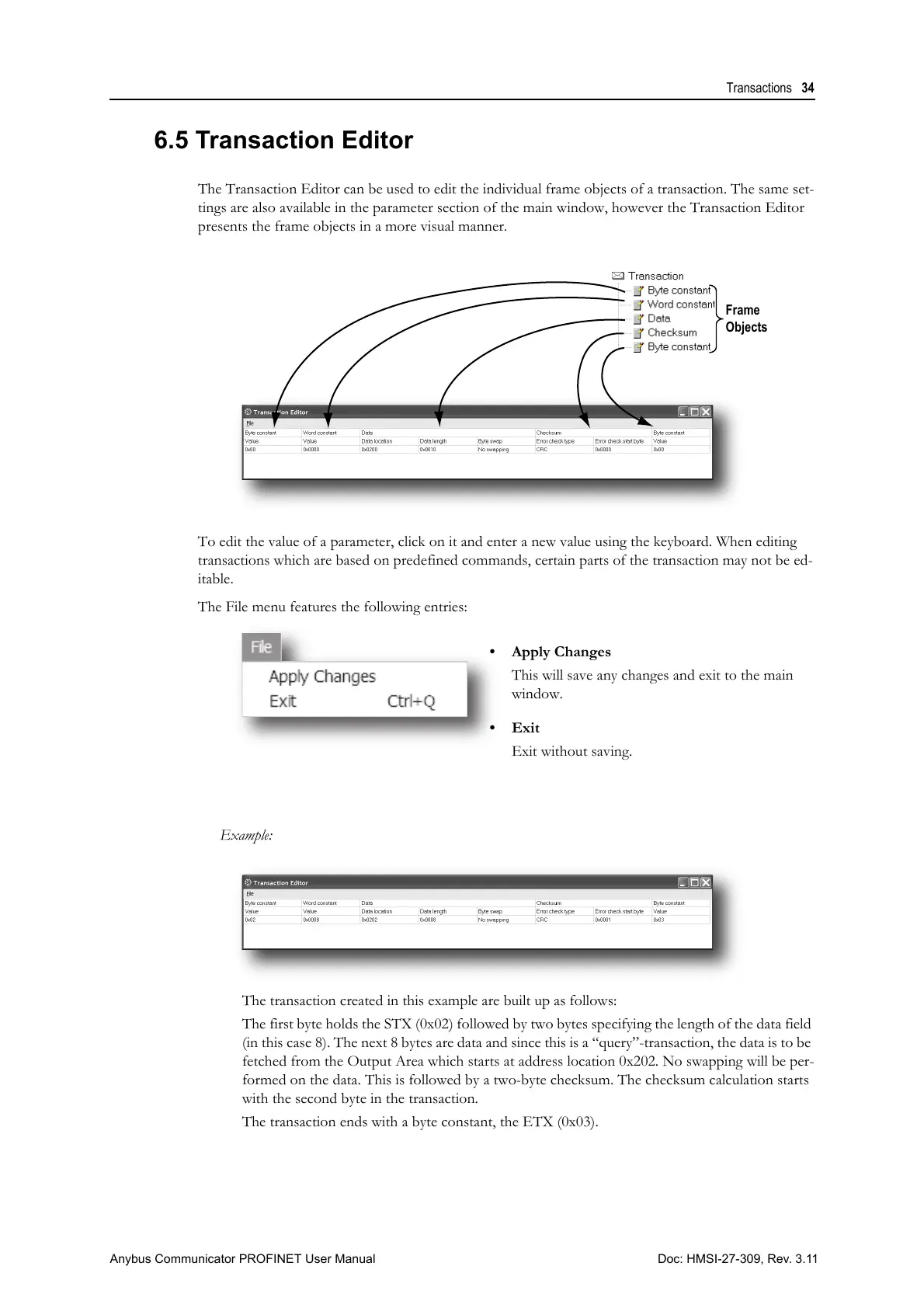
The Transaction Editor can be used to edit the individual frame objects of a transaction. The same set-
tings are also available in the parameter section of the main window, however the Transaction Editor
presents the frame objects in a more visual manner.
To edit the value of a parameter, click on it and enter a new value using the keyboard. When editing
transactions which are based on predefined commands, certain parts of the transaction may not be ed-
itable.
The File menu features the following entries:
Example:
The transaction created in this example are built up as follows:
The first byte holds the STX (0x02) followed by two bytes specifying the length of the data field
(in this case 8). The next 8 bytes are data and since this is a “query”-transaction, the data is to be
fetched from the Output Area which starts at address location 0x202. No swapping will be per-
formed on the data. This is followed by a two-byte checksum. The checksum calculation starts
with the second byte in the transaction.
The transaction ends with a byte constant, the ETX (0x03).
• Apply Changes
This will save any changes and exit to the main
window.
• Exit
Exit without saving.



 To Next Page