EasyManua.ls Logo

Hologic ThinPrep - Page 88

Hologic ThinPrep
172 pages
Print Icon
To Next Page IconTo Next Page
To Previous Page IconTo Previous Page
Loading...
USER INTERFACE
3.20
ThinPrep
®
Integrated Imager Operator’s Manual
3
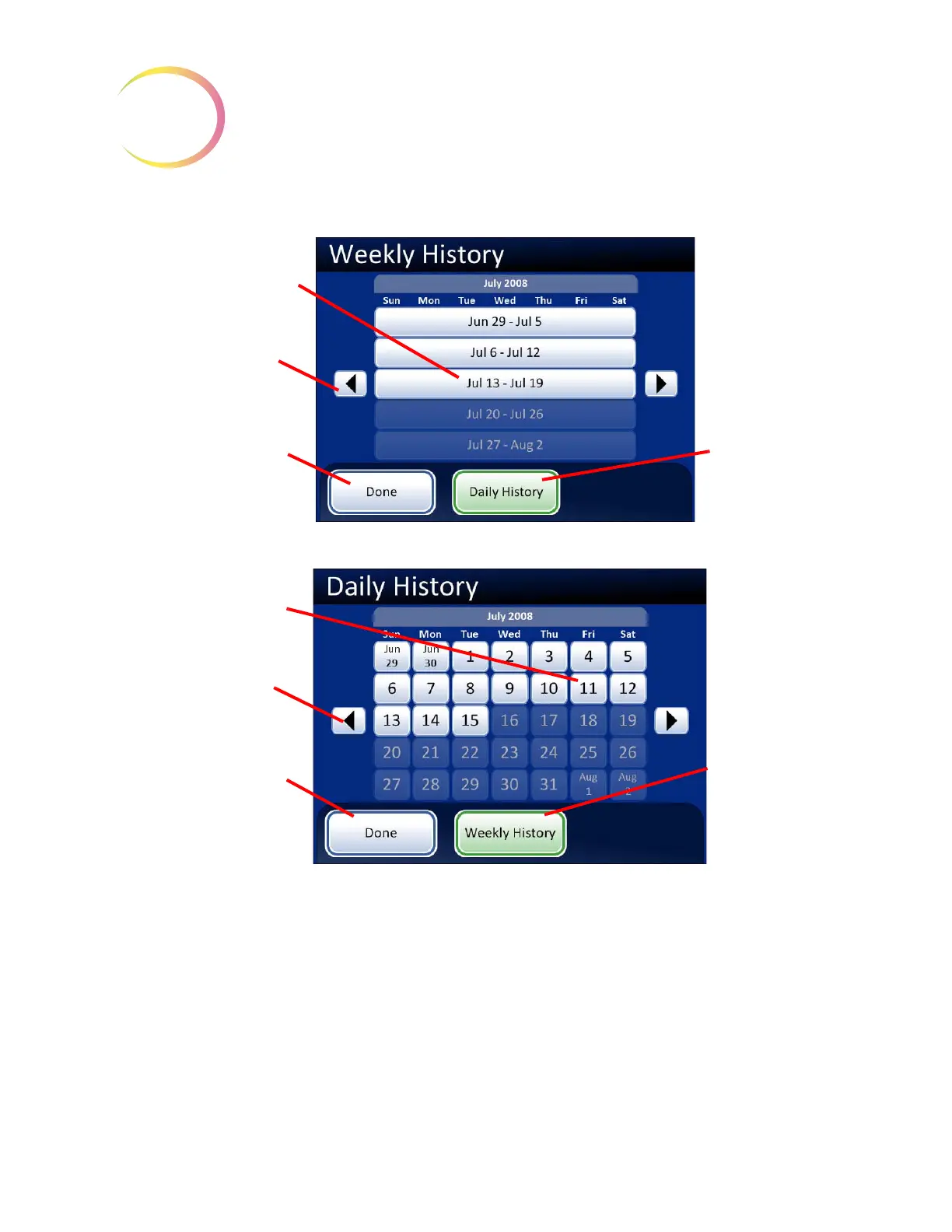
Figure 3-31 Weekly/Daily History Selection Screens
Press the
Done
button on the History screen to generate the report, displayed on the following page.
The default view is the Usage Summary screen. It can be changed to the Usage Details screen.
Weekly History Screen
Select which week to view
by touching on any week.
Use the scroll arrow to
change to a different
month.
Press
Done
to view the
report.
Daily History
button, to switch
to Daily History
screen
Daily History Screen
Select which day to view
by touching the date.
Use the scroll arrow to
change to a different
month.
Press
Done
to view the
report.
Weekly History
button, to switch
to Weekly His-
tory screen

Table of Contents

Related product manuals