ThinPrep
®
Integrated Imager Operator’s Manual
3.21
USER INTERFACE
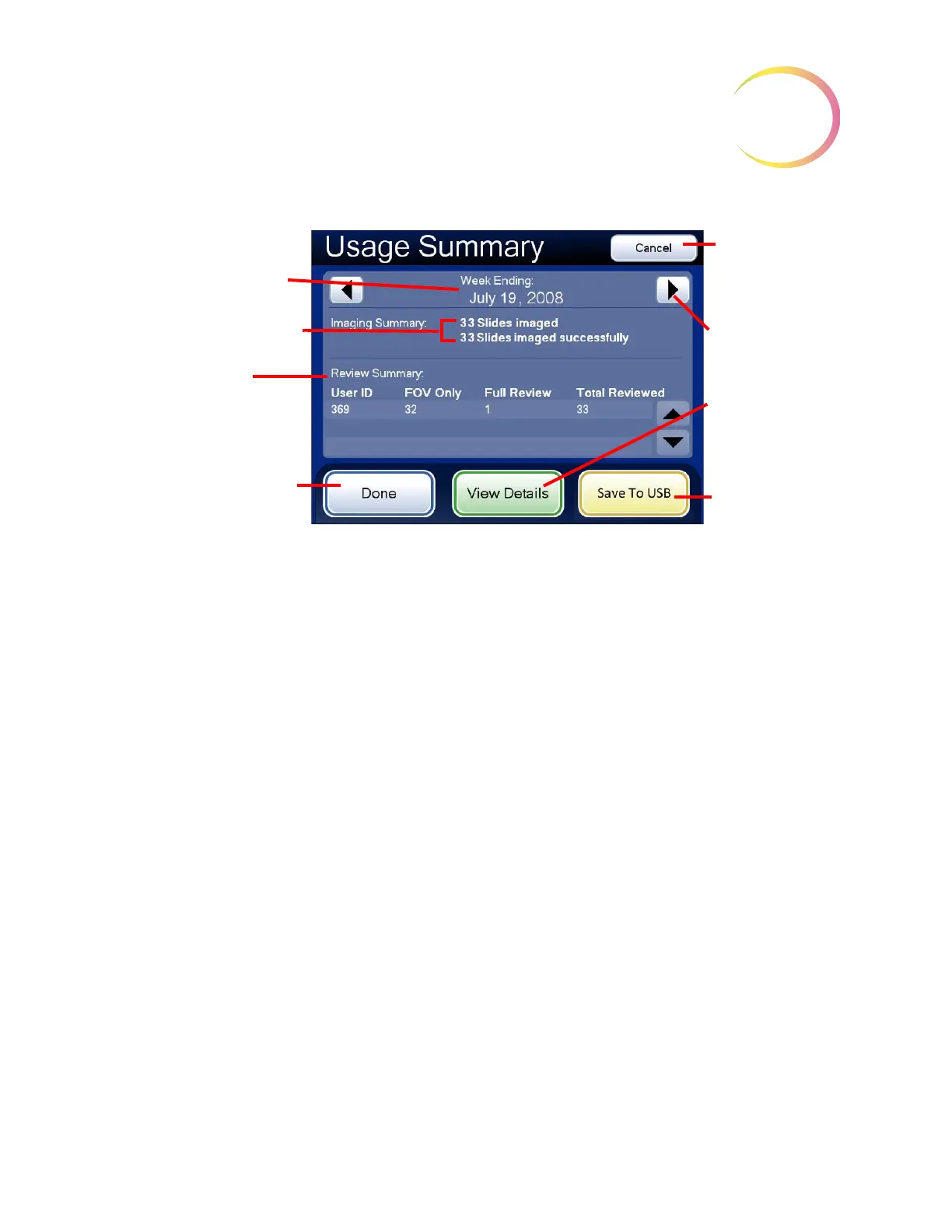
Figure 3-32 Usage Summary Screen (A Weekly History is Shown)
The Usage Summary screen lists a total of all slides imaged in that week (or day) and how many of
those slides were imaged successfully.
Note:
Slides not imaged successfully may have failed due to a biological quality which prevented
successful imaging, or a fiducial mark error or a system error. Cancellation by the operator
during imaging is not included in the total.
The Review Summary lists:
• All users logged on to the Integrated Imager that week (or day)
• How many slides in total were reviewed
• How many slides were Auto Locate only in the “FOV Only” column (fields of view presented
by the Integrated Imager)
• How many slides were a full slide review in the “Full Review” column (Auto Locate plus
Auto Scan of the entire cell spot)
This summary may be saved to a USB key by pressing the
Save to USB
button.
A detailed list of the slides reviewed is displayed by pressing the
View Details
button. Refer to the
following section.
Summary Screen
The time period for this
summary
Summary of slides imaged
Summary of slides
reviewed
Done
button, to return to
Reports and Logs screen
Cancel
button, to
return to Calen-
dar Screen
Scroll to different
week (or day)
View Details
changes display
to Details screen
Save to USB



 To Next Page