USER INTERFACE
3.22
ThinPrep
®
Integrated Imager Operator’s Manual
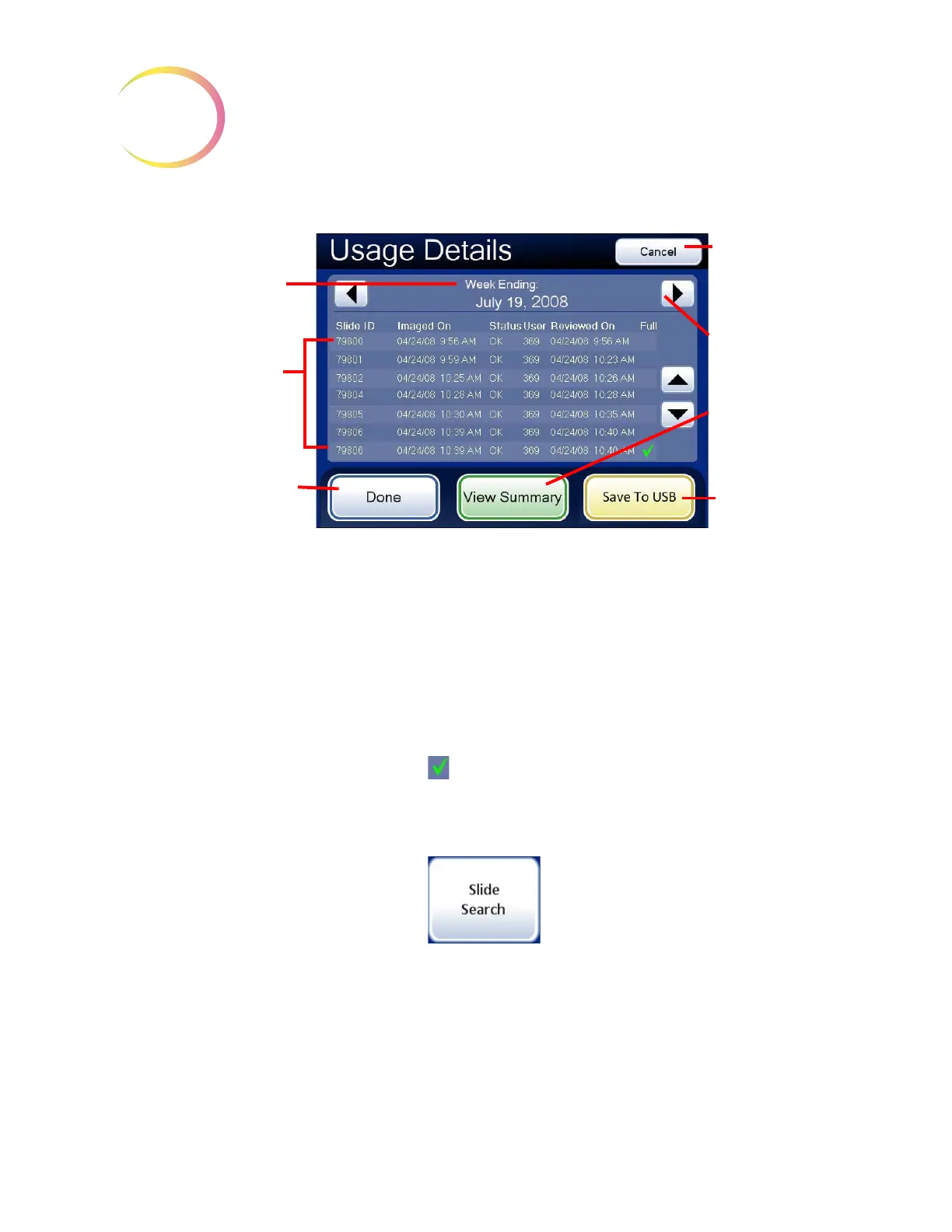
Figure 3-33 Usage Detail Screen (A Weekly History is Shown)
The Usage Details displays all slide review activity for that week (or day). For every slide, it lists:
• The slide ID number
• Date and time the slide was imaged
• The status of the image (OK or Fail)
• The user ID (who was logged into the Integrated Imager)
• Date and time the review took place (the time being the completion time)
• Full review of the slide conducted ( )
This summary may be saved to a USB key by pressing the
Save to USB
button.
Slide search
Figure 3-34 Slide Search Report Button
A specific slide number or range of slide numbers can be searched for in the database. After pressing
the
Slide Search
button, a keypad will display. See Figure 3-35.
Details Screen
The time period for this
summary
Individual slides listed
Done
button, to return to
Reports and Logs screen
Cancel
button,
to return to
Reports and
Logs screen
Scroll to different
week (or day)
View Summary
changes display
to Summary
screen
Save to USB



 To Next Page