10-1
10Transmitting Data from the 12-Lead Option
This chapter provides instructions for transmitting 12-Lead ECGs and Event
Summaries using the 12-Lead option of the HP CodeMaster 100. You can transmit
using a landline or cellular phone with data link. The HP CodeMaster 100 supports
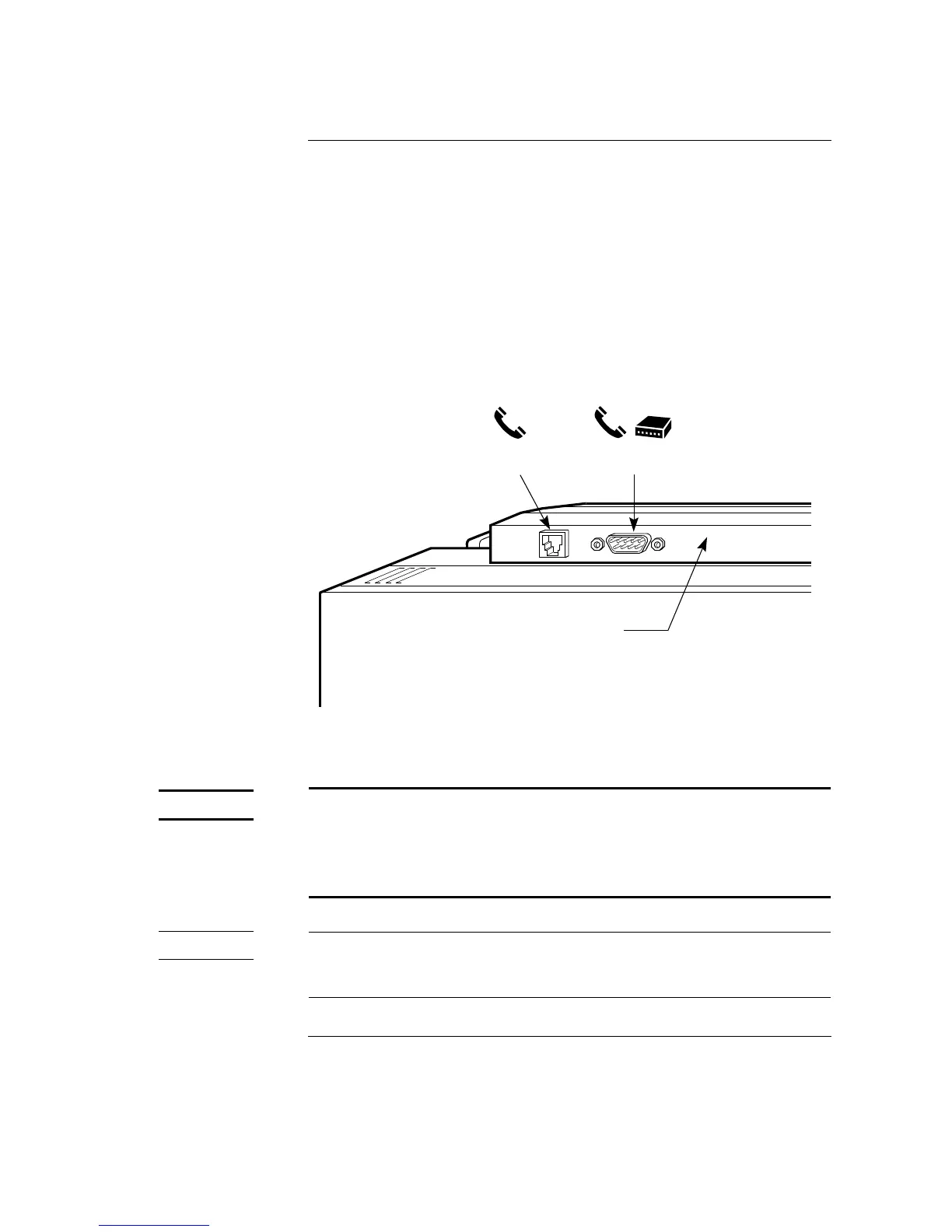
data transmission from either an internal modem with an RJ11C connector (in US,
UK, and Canada only) or an external modem via the RS-232 port. See Figure 10-1.
Figure 10-1
10-1
Modem Connections (Rear View of CodeMaster 100 with the 12-Lead Option) 10-1
The connection of an external modem or other telecommunications
equipment may increase leakage currents beyond levels that are acceptable
in a patient care environment. Always request that local safety personnel
verify that multiple connected equipment comply with local requlatory
standards before putting such equipment into service.
This product complies with United States, Canadian, and United Kingdom telecom
regulatory standards for internal modems. See “Telecom Regulatory Information”
on page -xv for further details.
Phone
Connector (RJ11C)
Modem/Direct
Connector (DB9)
Rear View
of 12-Lead Bezel



 To Next Page