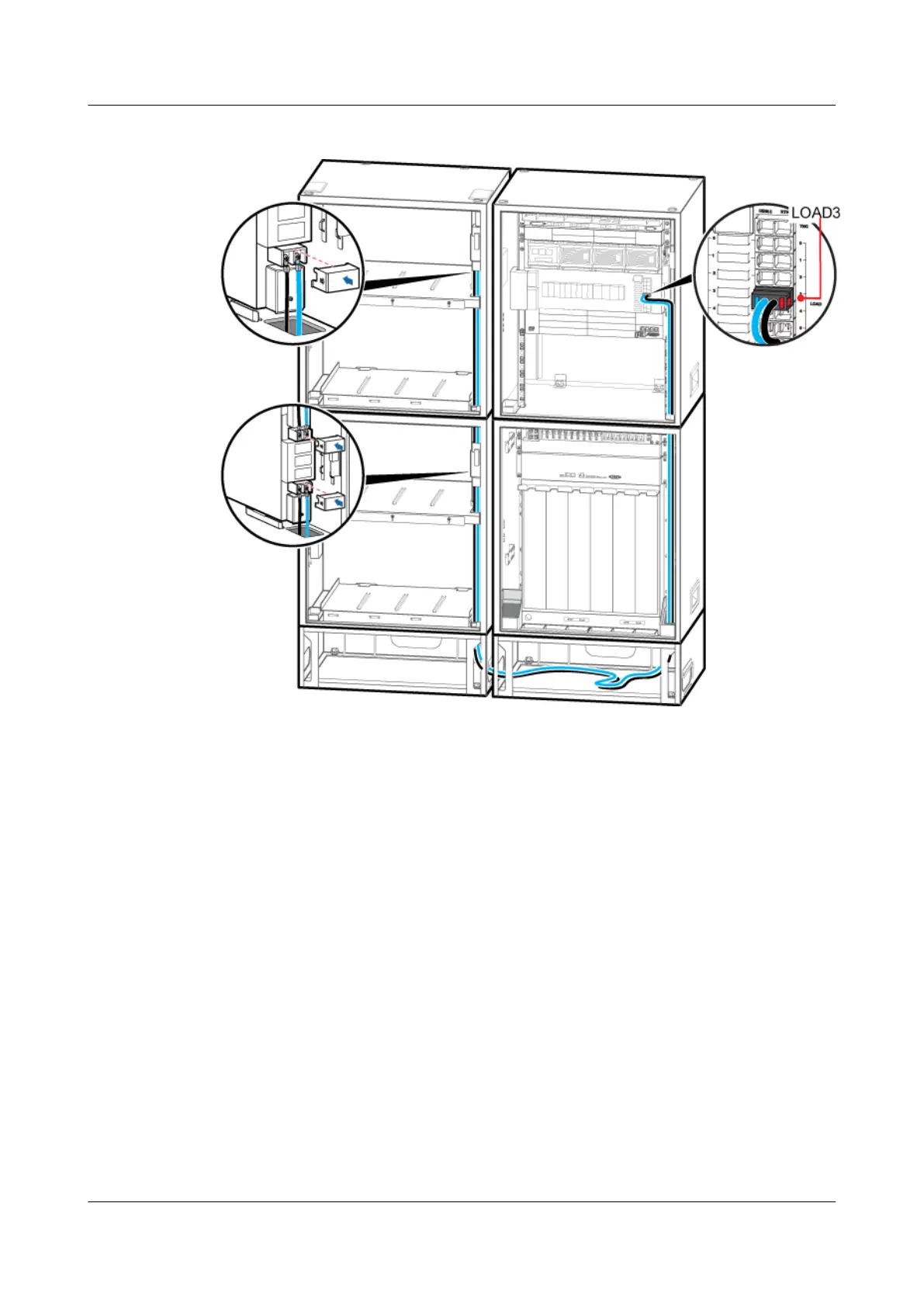
Figure 12-13 Installing the power cable for the fan in the IBBS200D
2. Link the OT terminal at one end of the power cable for the cascaded fans in the IBBS200D
to the RTN(+) and NEG(-) wiring terminals near the TEC/FAN label in the power
distribution box in the upper IBBS200D/IBBS200T, and then link the OT terminal at the
other end to the RTN(+) and NEG(-) wiring terminals near the TEC/FAN label in the power
distribution box in the lower IBBS200D, as shown in Figure 12-13.
Step 4 Install the power cable for the heating film in the IBBS200D. If the IBBS200D is not configured,
skip this step.
1. Link the OT terminal at one end of the power cable for the heating film of the upper
IBBS200D to the L1 and N1 terminals in the junction box on the left of the APM30H, and
then link the OT terminal at the other end to the L and N terminals in the junction box on
the left of the corresponding IBBS200D for the heating film, as shown in Figure 12-14.
BTS3900A(Ver.B)
Installation Guide 12 Installing the Cables
Issue 01 (2011-10-25) Huawei Proprietary and Confidential
Copyright © Huawei Technologies Co., Ltd.
97












 To Next Page