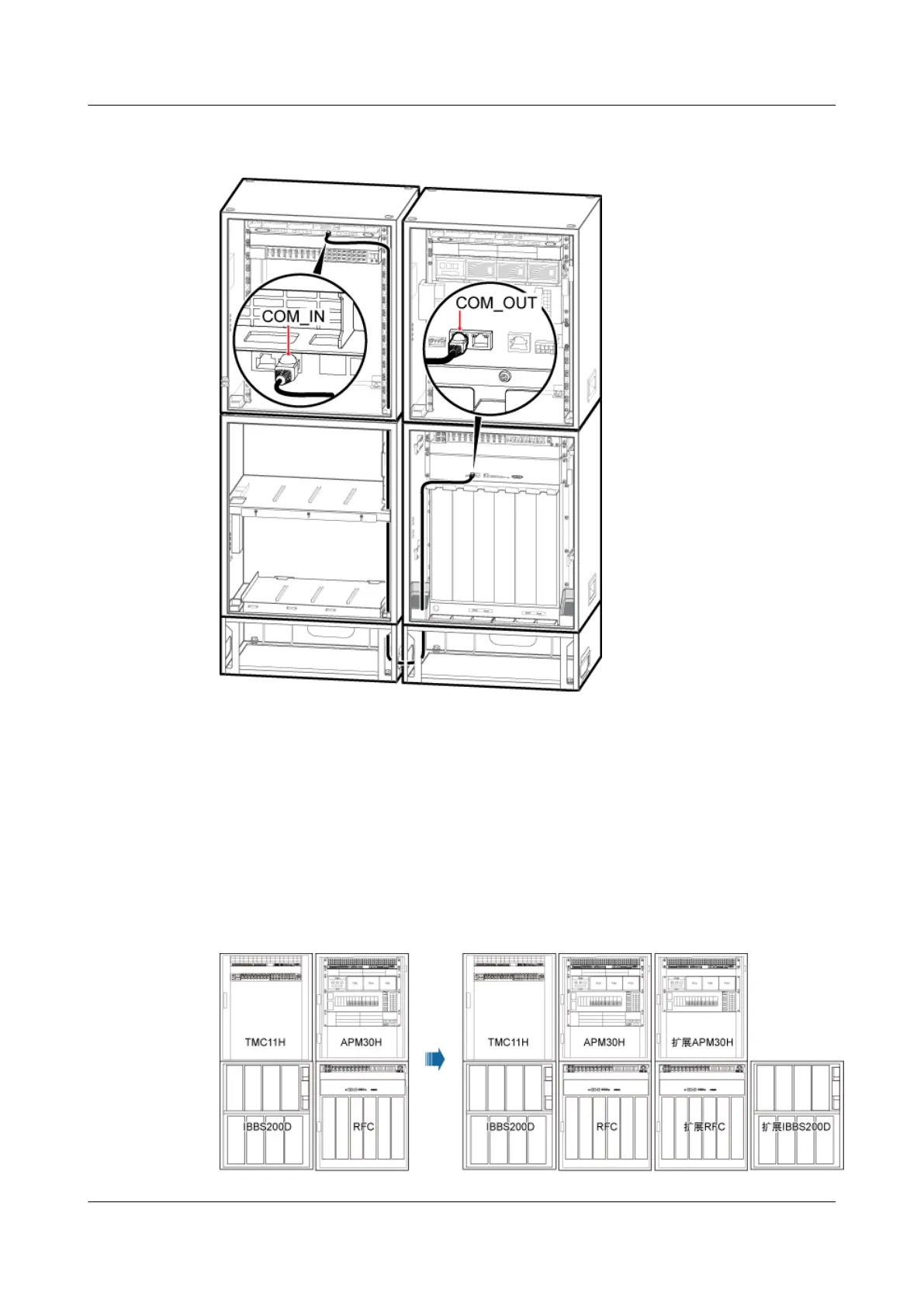
Figure 12-40 Installing the monitoring signal cable in the scenario of 1 RFC+1 APM30H+1
IBBS200D/IBBS200T+1 TMC11H (2)
Step 3 Attach labels to the installed cables. For details, see Attaching an L-Shaped Label.
Step 4 Run each cable that leave the cabinet in a PVC corrugated pipe, and then tie the pipe to the cable
hole in the cabinet.
Step 5 If two RFCs, two APM30Hs, two IBBS200Ds/IBBS200Ts, and one TMC11H are configured
on site, three more monitoring signal cables are required. Figure 12-41 shows the configurations
of the cabinets.
Figure 12-41 Configurations of two RFCs, two APM30Hs, two IBBS200Ds/IBBS200Ts, and
one TMC11H
BTS3900A(Ver.B)
Installation Guide 12 Installing the Cables
Issue 01 (2011-10-25) Huawei Proprietary and Confidential
Copyright © Huawei Technologies Co., Ltd.
125












 To Next Page