Cable List One End The Other End Remarks
EMUA monitoring
signal cable
DB9 male connector RJ45 connector Black
Procedure
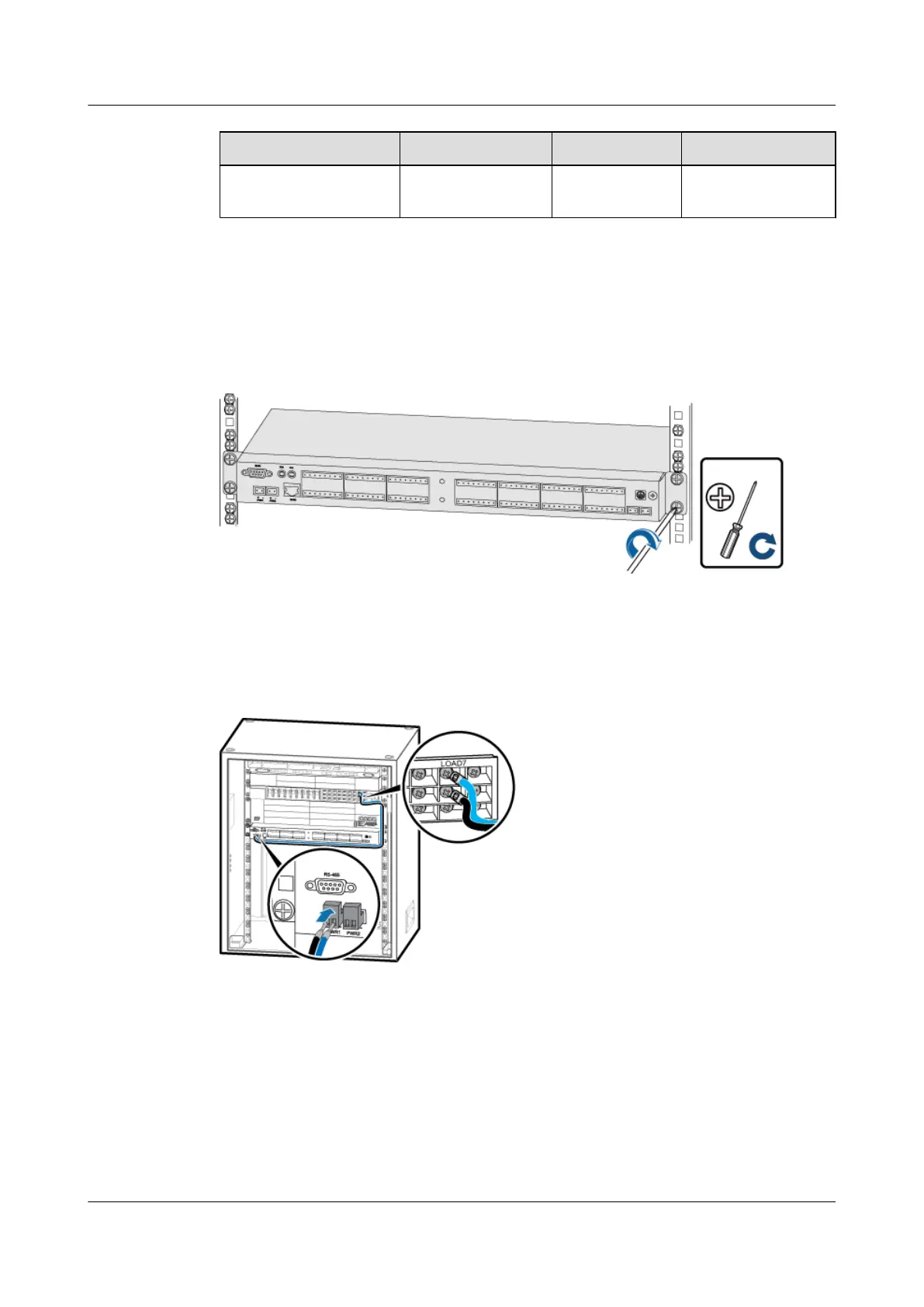
Step 1 Use four screws to install the EMUA in the TMC11H cabinet, as shown in Figure 11-11.
Figure 11-11 Installing the EMUA in the cabinet
Step 2 Figure 11-12 shows the connection of the power cable for the EMUA.
Figure 11-12 Installing the power cable for the EMUA
1. Install corresponding connectors on both ends of the power cable. For details, see
Assembling the OT Terminal and the Power Cable and Assembling the Cord End Terminal
and the Power Cable.
2. Connect the cord end terminal at one end of the power cable to the transfer terminal of the
wiring terminal labeled PWR1 of the EMUA power cable.
3. Connect the OT terminal at the other end of the power cable to the DC output terminal
labeled LOAD7 on the DCDU-03.
BTS3900A(Ver.B)
Installation Guide 11 Installing Optional Modules
Issue 01 (2011-10-25) Huawei Proprietary and Confidential
Copyright © Huawei Technologies Co., Ltd.
65












 To Next Page