Setup mode
Chapter 4 OPERATION MANUAL
V1.3.0en/06.07.15//14.06 Liability for errors and misprints excluded. CC®
3
additional RS485 interface is added to your temperature control unit. Optionally you can integrate
the temperature control unit in a Profibus environment. For more information, see the pages from
70, section »Interfaces and software update«.
The capacity adjustment of the temperature control unit is optimized so that the specified pro-
cesses are run through in the fastest possible time. This increases the productivity of the system as
a whole and thus saves energy in the long term.
4.2.1 Select temperature control: Internal or process
PROCEDURE
Go to the “Categories Menu”.
Tap on the category “Temperature Control”.
Tap on the category “Process/Internal”.
Choose between the entries “Internal” and “Process (Cascade)”.
Confirm your choice by tapping on “OK”.
4.2.2 Temperature control to internal temperature
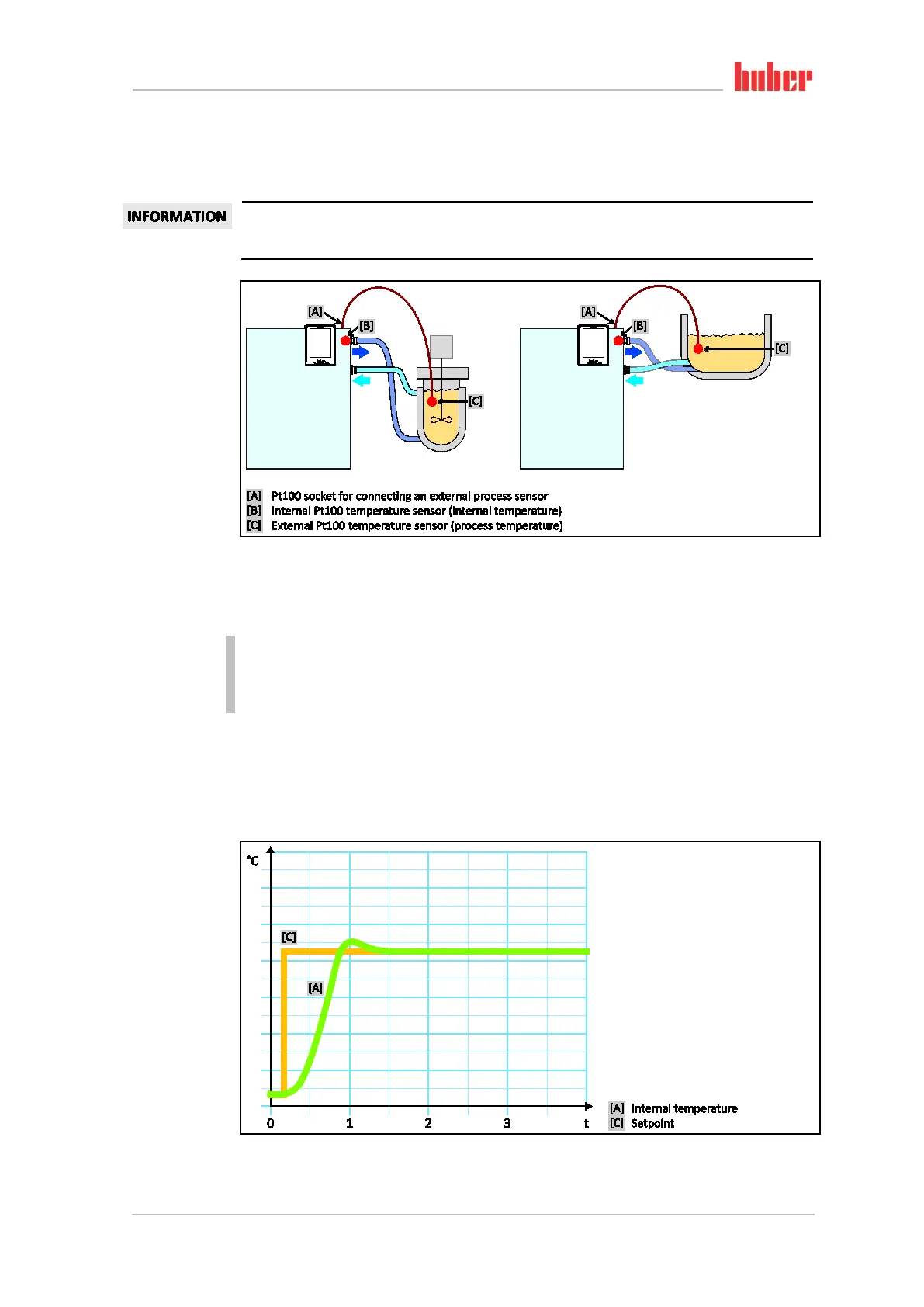
With internal temperature control, a control circuit is used to control the temperature at the inter-
nal Pt100 temperature sensor. This Pt100 temperature sensor is built into the device and is located
close to thermal fluid outlet (forward flow) or in the bath tank.
Diagram of tempera-
ture control circuit
Representation of an
optimum internal
temperature control



 To Next Page