4-3: Operating Instructions Operating Instructions: 4-2
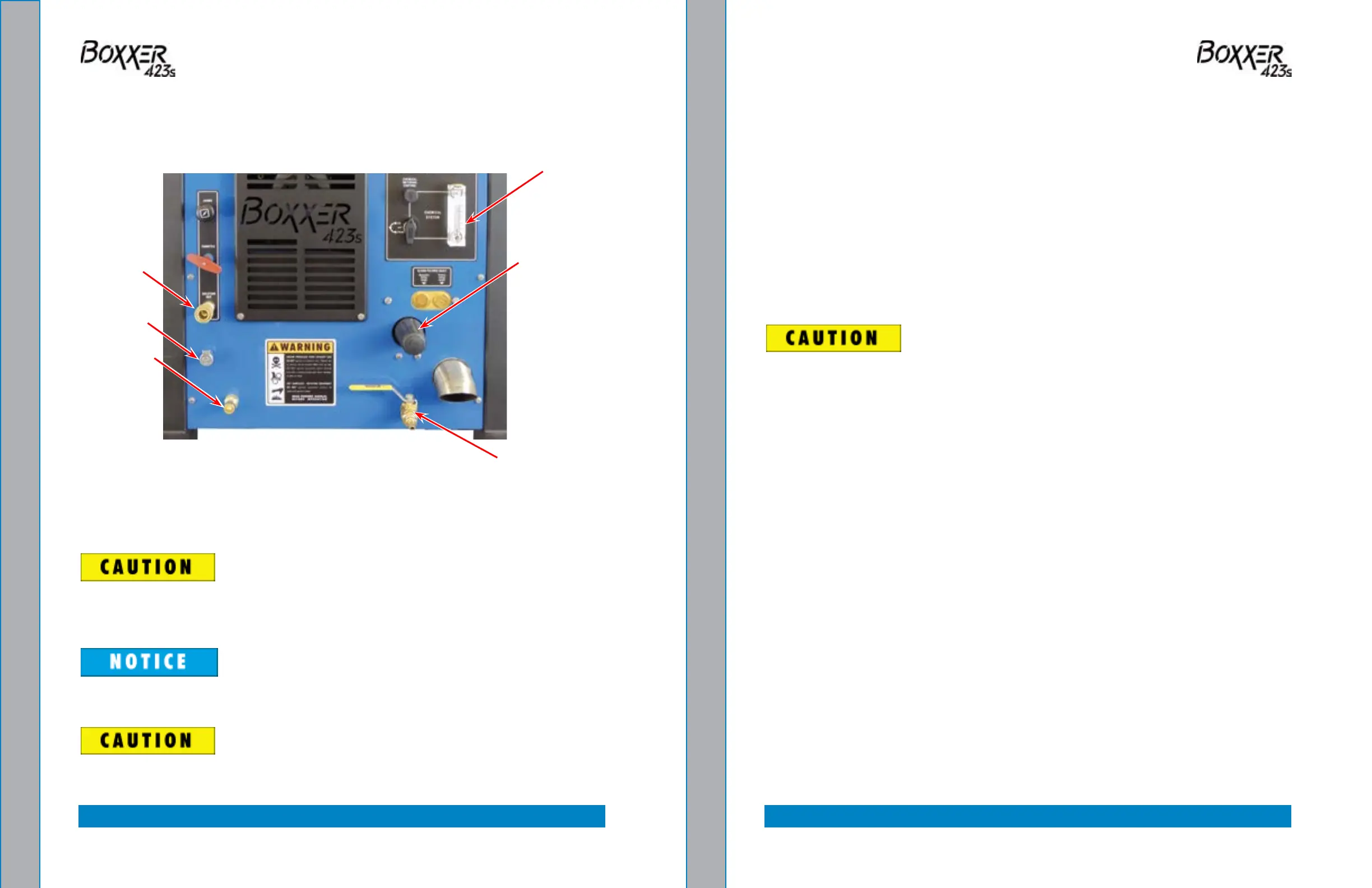
The lower dash houses the controls for:
• Water pressure
• Chemical system
• Water box drain
The lower dash assembly also houses the blower lube port and the solution out port
where the wand/tool connects to the Boxxer 423s (see Figure 4-2).
To ensure proper operation of the exhaust diverter system, the Boxxer 423s must
have a minimum of 10” Hg vacuum. If the vacuum level is lower than 10” Hg, the
exhaust diverter will remain in “Divert” mode.
Photographs and illustrations included in this document can represent optional
equipment as well as standard equipment.
Never perform cleaning operations when the truckmount engine is running at
the IDLE throttle position. To do so will increase the risk of serious component or
engine damage.
Figure 4-2. Boxxer 423s Lower Dash Assembly
START UP PROCEDURE
1. Perform all daily periodic maintenance as specied in this Owner’s Manual.
2. Connect a garden hose to supply water to the truckmount (see Figure 4-2). If the
Pump-In feature is used on your system, push the “PUMP-IN SYSTEM” switch to
the “ON” position.
3. Connect the cleaning wand or tool to the length of hose required to perform the
cleaning job.
4. Start the truckmount with:
a. The “THROTTLE” cable in the “IDLE ” position.
b. Pull the “CHOKE” cable out if the engine is cold.
c. The “PUMP CLUTCH” switch in the “OFF ” position.
5. After the engine starts, allow the truckmount to run in “IDLE ” for 2 - 3 minutes to
warm up. Gradually push on the “CHOKE” as the engine warms up.
Never clean when the Boxxer 423s is in the IDLE mode. Failure to follow this
caution may result in serious component or engine damage.
6. Pull the “THROTTLE” cable all the way out and lock into place.
7. Press the “PUMP CLUTCH” switch to the “PUMP ON HEAT MODE” position for
carpet cleaning or upholstery cleaning; for high pressure washing, press “PUMP ON
NO HEAT”.
8. Set the “TEMPERATURE CONTROL” dial to the desired position.
a. Set to the “WARM” position for upholstery cleaning.
b. Set to the “HOT” position for carpet cleaning.
9. If the Automatic Pump-Out option is included in your system’s conguration, press
the. “AUTO PUMP-OUT” switch to the “ON” position.
Blower Lube
Port
Solution
Out
Chemical
System
Pressure Regulator
Adjustment
(By-Pass) Valve
Incoming
Fresh Water
Water Box Drain


 To Next Page