Home
IBM
Laptop
ThinkPad 760ED
Hardware Maintenance Manual
Page 299
IBM ThinkPad 760ED - Page 299
717 pages
Manual
Save Page as PDF
To Next Page
To Next Page
To Previous Page
To Previous Page
Loading...
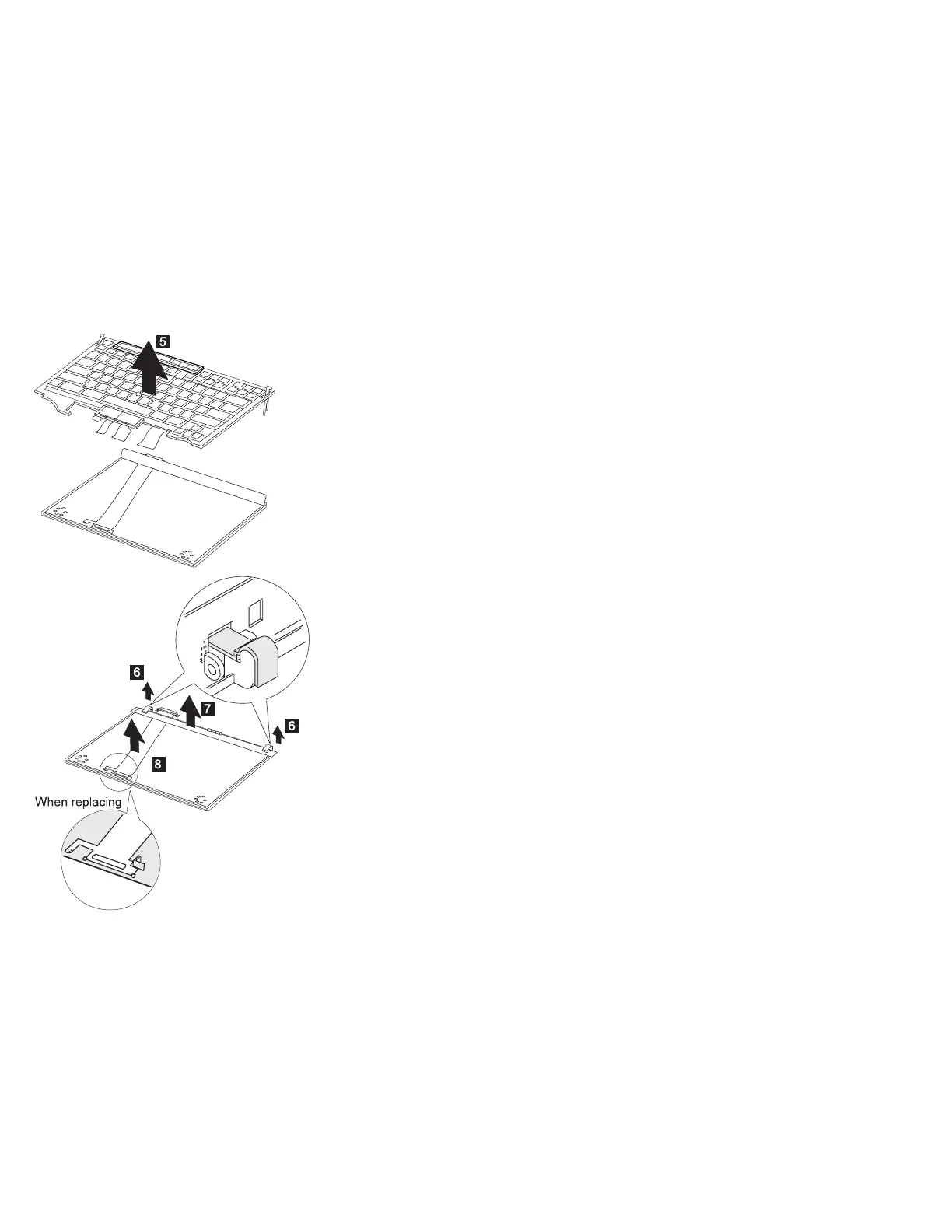
Notes:
1.
When
removing
the
latch
from
the
keyboard
base
.6/
,
push
both
ends
of
the
latch
simultaneously.
2.
When
replacing
the
keyboard
cable,
place
the
cable
correctly,
as
shown
by
the
artwork
in
the
circle.
286
IBM
Mobile
Systems
HMM
298
300
Table of Contents
Main Page
Introduction
14
Mobile Computer Descriptions
15
Drive and Diskette Compatibility Matrix
18
Important Service Information
19
FRU Replacement Strategy
19
Hard Disk Drive Replacement Strategy
20
How to Use Error Messages
20
How to Read POST Error Messages
20
Safety Notices (Multi-lingual Translations)
21
Safety Information
28
General Safety
28
Electrical Safety
29
Safety Inspection Guide
30
Handling Electrostatic Discharge-Sensitive Devices
32
Grounding Requirements
32
Laser Compliance Statement
33
ThinkPad 380, 385 (2635)
36
Read This First
38
Checkout Guide
42
Memory Checkout
43
System Board Checkout
44
Keyboard/Auxiliary Input Device Checkout
44
TrackPoint III Checkout
45
Diskette Drive Test
45
Status Indicator Checkout
46
Power Systems Checkout
46
Common Device Checkout
49
Power Management Features
51
Symptom-to-FRU Index
53
Numeric Error Codes
53
Diagnostic Error Codes
56
Beep Symptoms
59
No Beep Symptoms
59
LCD-Related Symptoms
60
Keyboard/TrackPoint III-Related Symptoms
60
Indicator-Related Symptoms
61
Power-Related Symptoms
61
Function/Audio-Related Symptoms
62
Peripheral-Device-Related Symptoms
62
Infrared-Related Symptoms
63
Other Symptoms
63
Intermittent Problems
63
Undetermined Problems
64
Related Service Procedures
65
Status Indicators
65
How to Run the Diagnostics
67
Error Log
68
Checking the Installed Devices List
68
How to Run a Low-Level Format
68
PC Test Card LED
69
Fn Key Combinations
69
Product Overview (380, 385)
70
FRU Removals and Replacements
71
1010 Battery Pack
72
1020 DIMM Card / Backup Battery
73
1030 Keyboard Unit
74
1040 CD-ROM/FDD Assembly
76
1045 FDD
78
1046 CD-ROM
81
1050 Speaker / Microphone
83
1060 Hard Disk Drive
85
1070 LCD Unit
90
1080 System Board Assembly
94
1090 Upper Shield Case
96
1100 Sub Card
97
1110 Lower Shield Case
98
1120 PCMCIA Slot
100
1130 Fan
101
2010 LCD Front Cover
103
2020 LCD Panel
105
2030 LCD Inverter Card
108
2040 LCD Misc. Parts
109
Locations
114
Front View
114
Rear View
115
Bottom View
116
Parts Listing 380, 385 (2635)
117
Models 380/380D/385/385D
117
Models 380E/380ED/385E/385ED
119
LCD FRU (DSTN) Models 380/380D/385/385D
121
LCD FRU (TFT - Type 1) Models 380/380D/385/385D
122
LCD FRU (TFT - Type 2) Models 380/380D/385/385D
123
LCD FRU (FRSTN) Models 380E/380ED/385E/385ED
124
LCD FRU (TFT - Type 1) Models 380E/380ED/385E/385ED
125
LCD FRU (TFT - Type 2) Models 380E/380ED/385E/385ED
126
Common/Option Parts List
128
ThinkPad 560, 560E (2640)
134
Read This First
136
Checkout Guide
140
Memory Checkout
141
System Board Checkout
142
Keyboard or Auxiliary Input Device Checkout
142
TrackPoint III Checkout
143
Diskette Drive Checkout
143
Status Indicator Checkout
144
Power Systems Checkout
144
Port Replicator Checkout
147
Power Management Features
148
Symptom-to-FRU Index
151
Numeric Error Codes
151
Diagnostic Error Codes
155
FRU Codes
156
Beep Symptoms
157
No Beep Symptoms
157
LCD-Related Symptoms
158
Keyboard or TrackPoint III Related Symptoms
158
Indicator-Related Symptoms
159
Power-Related Symptoms
159
Function-Related Symptoms
160
Peripheral-Device-Related Symptoms
160
Infrared-Related Symptoms
161
Other Symptoms
161
Intermittent Problems
161
Undetermined Problems
162
Related Service Procedures
163
Status Indicators
163
Running the Diagnostics
164
Displaying the Error Log
165
Checking the Installed Devices List
165
Running a Low-Level Format
166
Checking the PC Test Card LED
166
Fn Key Combinations
166
Product Overview (560, 560E)
167
FRU Removals and Replacements
169
1010 Backup Battery
170
1020 DIMM (If Installed)
171
1030 Battery Pack
172
1040 Frame
173
1050 Keyboard Unit
176
1060 LCD Assembly
180
1070 Speaker
181
1080 Hard Disk Drive
182
1090 PCMCIA Slot Assembly
183
1100 System Board
184
2010 LCD Front Cover
186
2020 LCD Panel
188
2030 Inverter Card
192
2040 LCD Cable and Hinges
194
Locations
196
Front View
196
Bottom View
197
Rear View
198
Parts Listing 560, 560E (2640)
199
LCD FRU (DSTN)
202
LCD FRU (TFT) - TFT 1
203
LCD FRU (TFT) - TFT 2
204
Common and Option Parts List
206
ThinkPad 760 (9546, 9547)
212
Read This First
215
Checkout Guide
218
Memory Checkout
219
System Board and CPU Card Checkout
221
Keyboard and Auxiliary Input Device Checkout
222
DSP Card Checkout
223
Audio (ESS) Card Checkout
223
TrackPoint III Checkout
223
Fan Checkout (Models 760XL/760XD)
224
Game Port Checkout
225
Diskette Drive Test
225
LCD Information Panel Checkout
226
Power Systems Checkout
226
Power Management Features
233
Port Replicator Power Overload
235
Symptom-to-FRU Index
236
Numeric Error Codes
236
FRU Codes
240
Beep Symptoms
241
No Beep Symptoms
242
LCD-Related Symptoms
243
Keyboard/TrackPoint III-Related Symptoms
243
Indicator-Related Symptoms
244
LCD Information Panel-Related Symptoms
244
Power-Related Symptoms
244
Function/Audio-Related Symptoms
245
DSP-Related Symptoms
246
ESS-Related Symptoms
246
Peripheral-Device-Related Symptoms
246
Infrared-Related Symptoms
247
Other Symptoms
247
Intermittent Problems
247
Undetermined Problems
248
Related Service Procedures
249
Status Indicators
249
LCD Information Panel
249
How to Run the Diagnostics
250
Error Log
251
Checking the Installed Devices List
251
Password Combinations (POP, HDP, PAP)
252
How to Run a Low-Level Format
252
PC Test Card LED
252
Fn Key Combinations
253
Product Overview (760)
254
Model 760C or 760CD
254
Model 760E or 760ED
255
Model 760L or 760LD
256
Model 760EL or 760ELD
257
Model 760XL or 760XD
258
FRU Removals and Replacements
259
1010 Rear Connector Door
260
1020 Diskette Drive/CD-ROM Drive
261
1030 Battery Pack
263
1040 Hard Disk Drive
264
1050 DIMM
265
1060 Top Cover
269
1070 Keyboard Unit
270
1080 LCD Unit
271
1090 Front IR
272
1095 Rear IR
274
1100 System Board Assembly
275
1125 Upper Shield
279
1110 Video Card/Fan (Model Unique)
280
1135 External Diskette Drive Connector
284
1120 DC/DC Card
285
1130 DSP Card/ Audio (ESS) Card
287
1140 CPU Card
290
1150 System Board and PCMCIA Slot Assembly
292
1160 Palm Rest
295
1170 Keyboard, Information Panel
296
1180 Keyboard Cable
298
1190 Keyboard Card
300
1200 Backup Battery, Speaker, Standby Battery
301
LCD Unit, 12.1 SVGA (P/N 29H9226 ASM P/N 29H9029)
304
1010 LCD Cover
304
1020 LCD Panel, Interface Cable Assembly
306
1030 Hinges
308
LCD Unit, 12.1 SVGA (P/N 29H9226, ASM P/N 73H6599)
309
2010 LCD Cover
309
2020 LCD Panel
311
2030 Interface Cable Assembly, Hinges
313
LCD Unit, 10.4 SVGA (P/N 29H9227)
315
3010 LCD Cover
315
3020 LCD Panel, Interface Cable Assembly
317
3030 Hinges
319
LCD Unit, 10.4 VGA (P/N 46H5355)
320
4010 LCD Cover
320
4020 LCD Panel
322
4030 Interface Cable Assembly, Hinges
324
LCD Unit, 11.3 DSTN (P/N 39H6232)
325
5010 LCD Cover
325
5020 LCD Panel
327
5030 Interface Cable Assembly, Hinges
329
LCD Unit, 12.1 XGA
330
6010 LCD Cover
330
6020 LCD Panel
332
6030 Interface Cable Assembly, Hinges
334
LCD Unit, 12.1 SVGA (P/N 82H8496)
336
7010 LCD Cover
336
7030 LCD Panel
338
7040 Interface Cable Assembly, Hinges
340
LCD Unit, 12.1 SVGA (P/N 11J8867, ASM P/N 11J8855)
342
8010 LCD Cover
342
8020 LCD Panel
344
8030 Interface Cable Assembly, Hinges
346
LCD Unit, 12.1 SVGA (P/N 46H5725, ASM P/N 46H5723)
348
9010 LCD Cover
348
9020 LCD Panel
350
9030 Interface Cable Assembly, Hinges
352
Locations
354
Front View
354
Rear View
355
Inside View
356
Bottom View
357
Power-On Password Connector
358
Parts Listing 760 (9546, 9547)
359
Model 760CD
362
Model 760E (CD Nonupgradable Type)
366
Model 760E (CD Upgradable Type) or 760ED
370
Model 760L
375
Model 760LD
378
Model 760EL or 760ELD
382
Model 760XL
387
Model 760XD
391
LCD Unit, 12.1 SVGA (P/N 29H9226, ASM P/N 29H9029)
395
LCD Unit, 12.1 SVGA (P/N 29H9226, ASM P/N 73H6599)
397
LCD Unit, 10.4 SVGA (P/N 29H9227)
399
LCD Unit, 10.4 VGA (P/N 46H5355)
401
LCD Unit, 11.3 DSTN (P/N 39H6232)
403
LCD Unit, 12.1 XGA (P/N 46H5735)
405
LCD Unit, 12.1 XGA (P/N 46H5735, ASM P/N 46H5731)
407
LCD Unit, 12.1 SVGA (P/N 82H8496)
409
LCD Unit, 12.1 SVGA (P/N 46H5725)
411
LCD Unit, 12.1 SVGA (P/N 11J8867, ASM P/N 11J8855)
413
Common or Option Parts List
415
ThinkPad 765D (9546), 765L (9547)
422
Read This First
424
Checkout Guide
428
Memory Checkout
429
System Board and CPU Card Checkout
430
Keyboard or Auxiliary Input Device Checkout
431
DSP Card Checkout (Model 765D)
432
Audio (ESS) Card Checkout (765L)
432
TrackPoint III Checkout
432
Game Port Checkout
433
Diskette Drive Checkout
433
LCD Information Panel Checkout
434
Fan Checkout
434
Power Systems Checkout
435
Common Device Checkout
441
Power Management Features
442
Symptom-to-FRU Index
445
Numeric Error Codes
445
Diagnostic Error Codes
449
Beep Symptoms
453
No Beep Symptoms
453
LCD-Related Symptoms
454
Keyboard or TrackPoint III Related Symptoms
455
Indicator-Related Symptoms
455
LCD Information Panel-Related Symptoms
455
Power-Related Symptoms
456
Function/Audio-Related Symptoms
456
DSP-Related Symptoms
457
ESS-Related Symptoms
457
Peripheral-Device-Related Symptoms
457
Infrared-Related Symptoms
459
PCMCIA-Related Symptoms
459
Other Symptoms
459
Intermittent Problems
460
Undetermined Problems
460
Related Service Procedures
461
Status Indicators
461
Running the Diagnostics
462
Displaying the Error Log
463
Checking the Installed Devices List
463
Password Combinations (POP, HDP, PAP)
464
Running a Low-Level Format
464
Checking the PC Test Card LED
464
Fn Key Combinations
464
Product Overview (765D, 765L)
466
FRU Removals and Replacements
467
1010 Rear Connector Door
468
1020 Diskette Drive or CD-ROM Drive
469
1030 Battery Pack
471
1040 Hard Disk Drive
472
1050 DIMM (If Installed)
474
1060 Top Cover
476
1070 Keyboard Unit
477
1080 LCD Unit
478
1090 Front IR
479
1100 Rear IR
482
1110 System Board, DIMM Adapter Card
483
1120 Upper Shield
486
1130 External FDD Connector
487
1140 Video Card
488
1150 Fan and Video Cable (765D-Unique)
490
1160 Modem Holder, DC/DC Card, Inverter Card
491
1170 DSP Card or ESS Card
493
1180 Lower Shield Case
494
1190 CPU Card
495
1200 PCMCIA Slot Assembly
497
1210 Shield Cover (Right, Left)
499
2010 Palm Rest
500
2020 Palm Rest Rear Cover
501
2030 Keyboard Card
502
2040 Keyboard and Information Panel
504
2050 Keyboard Cable
506
2060 Backup Battery, Speaker, Standby Battery
507
3010 LCD Front Cover
510
3020 LCD Misc. Parts
511
3030 LCD Panel
512
3040 Center Cover Assembly
514
3050 Hinges
515
Locations
516
Front View
516
Rear View
517
Inside View
518
Bottom View
518
Parts Listing 765D (9546), 765L (9547)
519
LCD FRU
522
13.3 XGA, 11J8133
523
13.3 XGA, NEC 11J9654
523
Keyboard FRU
524
Common and Option Parts List
527
ThinkPad 770 (9548, 9549)
534
Read This First
536
Checkout Guide
541
Audio Checkout
542
Diskette Drive Checkout
542
Fan Checkout
543
Game Port Checkout
543
Indicator Panel Checkout
543
Keyboard or Auxiliary Input Device Checkout
544
Memory Checkout
545
Modem (DSP) Checkout
546
Power Systems Checkout
546
System Board and CPU Card Checkout
551
TrackPoint Checkout
551
Power Management Features
553
Symptom-to-FRU Index
555
Numeric Error Codes
555
Diagnostic Error Codes
559
Beep Symptoms
564
No Beep Symptoms
564
Audio-Related Symptoms
565
CD-ROM-Related Symptoms
565
DVD-Related Symptoms
566
Function-Related Symptoms
568
Indicator-Related Symptoms
569
Indicator Panel-Related Symptoms
569
Infrared-Related Symptoms
570
Keyboard- or TrackPoint III-Related Symptoms
570
LCD-Related Symptoms
571
Modem (DSP)-Related Symptoms
571
PC Card-Related Symptoms
572
Peripheral-Device-Related Symptoms
572
Power-Related Symptoms
573
Other Symptoms
573
Intermittent Symptoms
573
Undetermined Problems
574
Related Service Procedures
575
Status Indicators
575
Indicator Panel
575
Running the Diagnostics
576
Displaying the Error Log
577
Checking the Installed Devices List
577
Password Combinations (POP, HDP, PAP)
578
Running a Low-Level Format
578
Checking the PC Test Card LED
578
Fn Key Combinations
579
Product Overview (770)
580
FRU Removals and Replacements
581
1010 Battery Pack
582
1020 UltraBay II Device or 2nd Battery Pack
583
1030 DVD Adapter Card
584
1040 Hard Disk Drive
585
1050 Backup Battery or DIMM
587
1060 Keyboard Unit
588
1065 Keyboard, Keyboard Bezel, Indicator Panel
590
1070 Center Cover and Hinge Cover
592
1080 Eject Lever and Power Switch
594
1090 LCD Unit
598
1100 Standby Battery
599
1110 Upper Shield
600
1120 Speaker
602
1130 Video Card
603
1140 Modem Card
604
1150 DC/DC Card
605
1160 Fan
608
1170 CPU Card
609
1180 PC Card Slot
611
1190 System Board
612
2010 LCD Front Cover
614
2020 LCD Panel Assembly
616
2030 Inverter Card
618
2050 Hinge and LCD Latch
619
Locations
620
Front View
620
Rear View
621
Bottom View
622
Parts Listing 770 (9548, 9549)
623
LCD FRU
626
Common and Option Parts List
627
SelectaDock III (3547-003)
634
Read This First
635
General Preparation
637
Checkout Guide
638
Power Supply
639
Checking the Installed Devices List
641
External Keyboard
642
External Monitor
643
Printer
644
USB Device
644
How to Run the Diagnostics
645
Symptom-to-FRU Index
653
Numeric Error Codes
654
Diagnostic Error Codes
656
Adapter-Related Symptoms
659
Audio-Related Symptoms
659
Beep Symptoms
660
Indicator-Related Symptoms
660
Keyboard-Related Symptoms
660
MIDI/Joystick-Port-Related Symptoms
661
PC Card-Related Symptoms
661
Peripheral-Device-Related Symptoms
661
Power-Related Symptoms
662
SCSI Device-Related Symptoms
662
Sound Blaster-Related Symptoms
662
UltraBay II Tray-Related Symptoms
663
USB Related Symptoms
663
Wake Up on LAN-Related Symptoms
664
Intermittent Symptoms
664
Other Symptoms
665
Undetermined Problems
666
Product Overview (3547-003)
667
Status Indicator
667
FRU Removals and Replacements
669
1010 Port Replicator
670
1020 Option Card Cover and Option Card
671
1030 PC Card
672
1040 UltraBay II
673
1050 Device Space Bay Frame
674
1060 Upper Cover
675
1070 Bracket
677
1080 Speaker Assembly
678
1090 Power Supply
679
1100 Cables
680
1110 DC-DC Card
681
1120 USB Card
682
1130 Shield Cover
683
1140 Main Card Assembly
684
1150 Audio Card, Main Card, and Riser Card
685
Locations
686
Front View
686
Side View
688
Rear View
689
Parts Listing SelectaDock III (3547-003)
690
Common Devices Checkout
694
External Diskette Drive Test
695
External Display Self-Test
695
External Keyboard/Auxiliary Input Device Checkout
696
Fax/Modem Checkout
697
Printer Checkout
699
Port Replicator Checkout
700
TrackPoint Checkout
701
TV Tuner
702
Miscellaneous Information
708
Acronyms, Abbreviations and Terms
708
Send Us Your Comments!
710
Do You Need Technical References?
711
Problem Determination Tips
712
Phone Numbers, U.S. and Canada
713
Notices
715
Trademarks
715
Other manuals for IBM ThinkPad 760ED
User Manual
716 pages
Instruction Manual
331 pages
Manual
331 pages
Related product manuals
IBM ThinkPad 760E
331 pages
IBM ThinkPad 701 Series
508 pages
IBM ThinkPad 755 Series
508 pages
IBM ThinkPad 600
222 pages
IBM ThinkPad T21
182 pages
IBM ThinkPad 380
247 pages
IBM ThinkPad R30
218 pages
IBM ThinkPad R51
9 pages
IBM ThinkPad 560
717 pages
IBM ThinkPad A21m
158 pages
IBM ThinkPad 600e
222 pages
IBM ThinkPad 310E
199 pages










 To Next Page