98
7
VOICE RECORDER FUNCTIONS
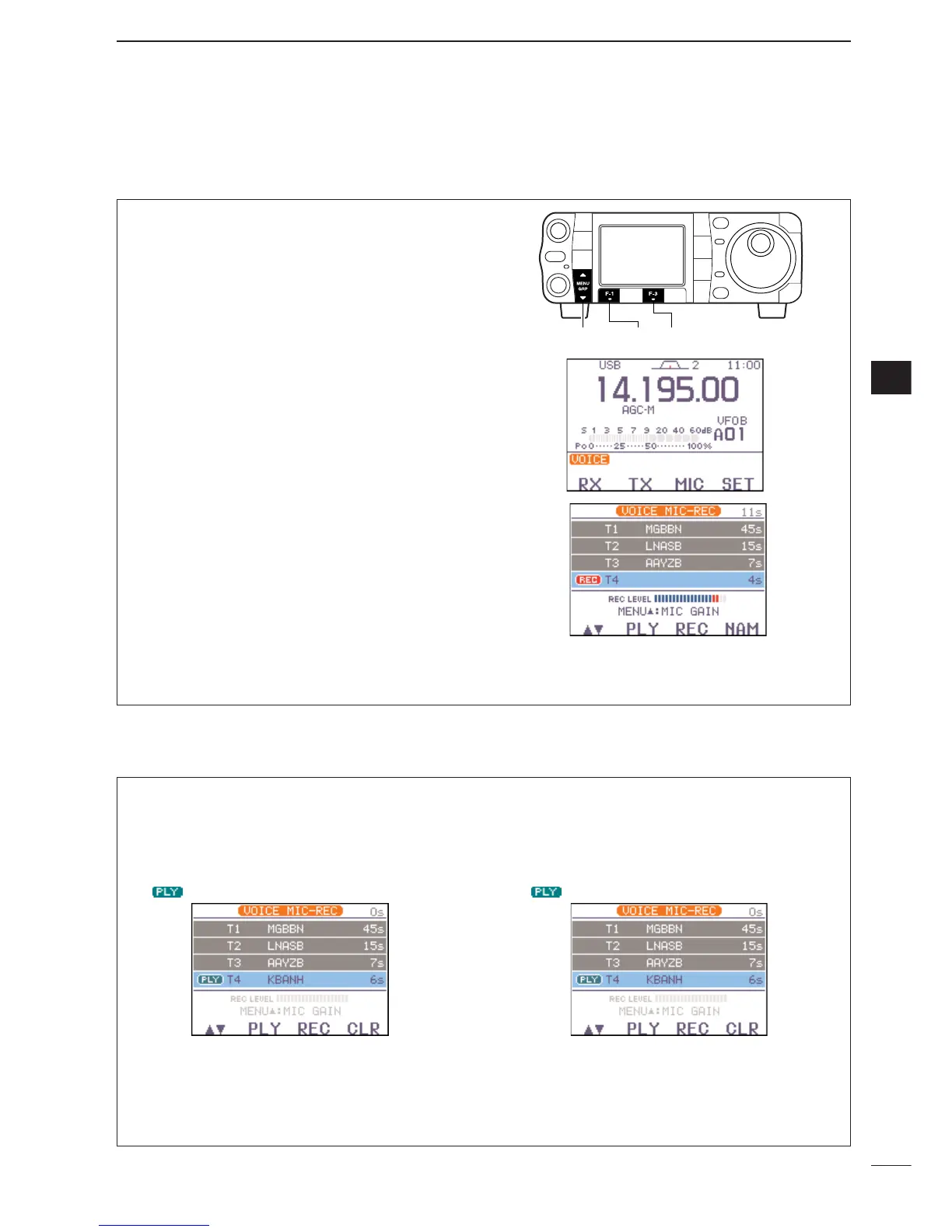
To transmit a message using a voice recorder, record
the desired message in advance as described below.
q Select
S
-
1
.
w Push [F-1
VO
] then [
Z
(
MENU
/
GRP
)] to select the
voice root menu.
•If the voice root menu appears, skip the pushing
[
Z
(
MENU
/
GRP
)]. The voice starting menu can be
changed in the miscellaneous (others) set mode.
e Push [F-3
MIC
] to select the voice memory
recording mode.
r Push [
Y
(
MENU
/
GRP
)] then rotate [DIAL] to adjust
the mic gain control so that the “
REC LEVEL
” in-
dicator reads within maximum.
•Speak into the microphone without pushing [PTT].
•Push [F-4
DEF
] to select the default mic gain.
•Push [
Z
(
MENU
/
GRP
)] to exit the mic gain adjustment
condition.
t Push [F-1
≤≥
] to select the desired memory chan-
nel, then push and hold [F-3
REC
] for 1 sec. to
start recording.
•Speak into the microphone without pushing [PTT].
• Previously recorded contents are cleared.
y Push [F-3
REC
] again to stop recording.
•Recording is automatically terminated when the total
time of recorded messages, T1–T4, becomes 90 sec.
u Push [
Z
(
MENU
/
GRP
)] twice to exit the voice mem-
ory screen.
■ Recording a message for transmit
7
D Recording
D Confirming/Erasing the recorded message
• Playing the recorded contents
q Call up the voice memory recording mode as de-
scribed in steps q to e as shown above.
w Push [F-1
≤≥
] to select the desired memory chan-
nel, then push [F-2
PLY
] to start playback.
• “ ” appears.
e Push [F-2
PLY
] again to stop playback, if desired.
r Push [
Z
(
MENU
/
GRP
)] twice to exit the voice mem-
ory mode
•Erasing the recoded contents
q Call up the voice memory recording mode as de-
scribed in steps q to e as shown above.
w Push [F-1
≤≥
] to select the desired memory chan-
nel to be erased, push [F-2
PLY
] to start playback.
• “ ” appears.
e Push and hold [F-4
CLR
] for 1 sec. to erase the
contents.
r Push [
Z
(
MENU
/
GRP
)] twice to exit the voice mem-
ory mode.



 To Next Page
 Loading...