68
4
RECEIVE AND TRANSMIT
4
D
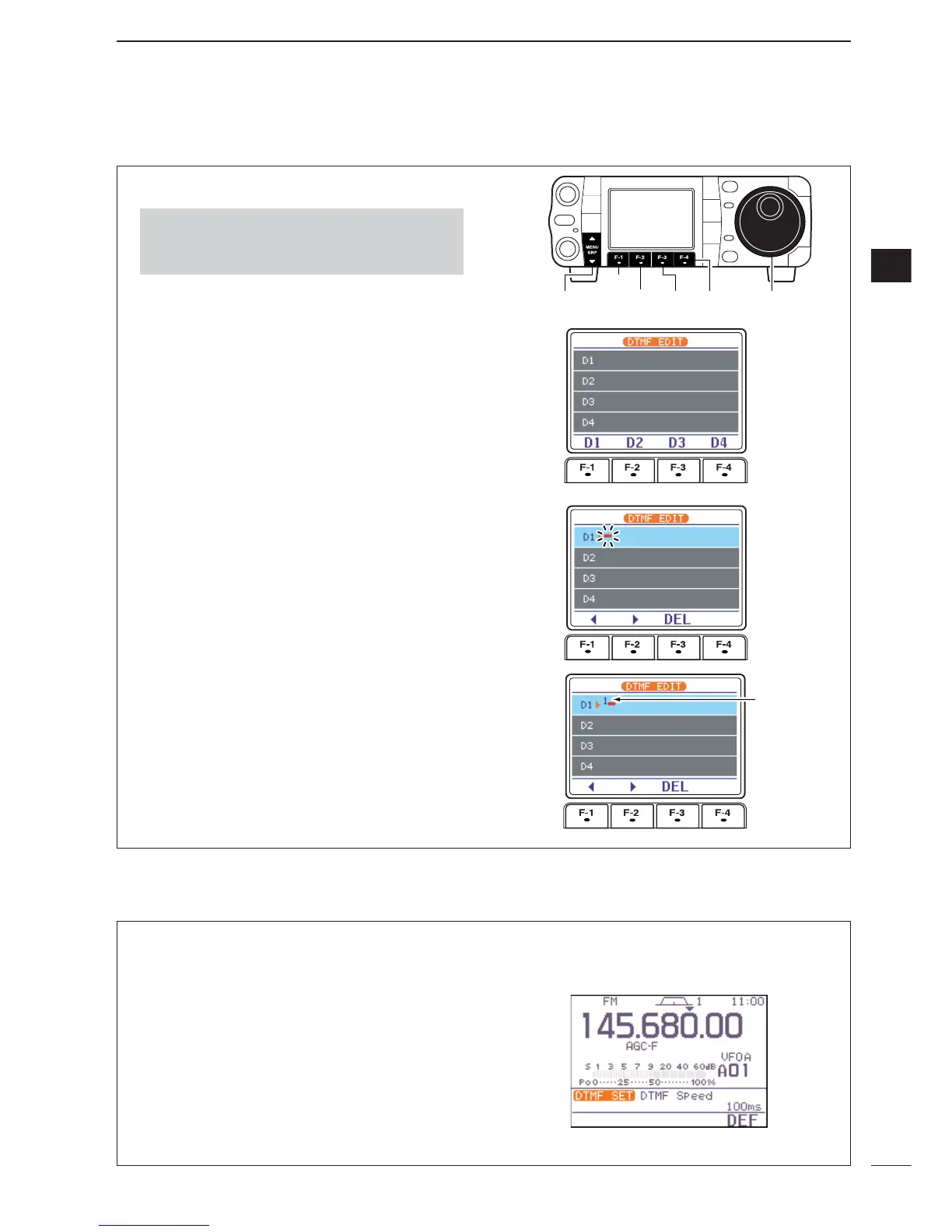
Programming a DTMF code
q Push [MODE] to select FM mode.
w Select
S
-
1
.
e Push [F-2
DTM
] then [
Z
(
MENU
/
GRP
)] to select the
DTMF root menu.
•If the DTMF root menu appears, skip pushing
[
Z
(
MENU
/
GRP
)]. The DTMF starting menu can be
changed in the miscellaneous (others) set mode. (see
p.136)
r Push [F-2
EDT
] to enter the DTMF edit menu.
t Push [F-1
D1
] — [F-4
D4
] to select the desired
DTMF memory channel.
y Select the desired code by rotating [DIAL].
•Push [F-1
Å
] or [F-2
Ç
] for cursor movement.
•Push [F-3
DEL
] to delete the selected code.
u Repeat steps t and y until the desired contents
are input.
i Push [
Z
(
MENU
/
GRP
)] to return to memory channel
selection mode, then select the next memory chan-
nel and repeat steps t and u for code input, if de-
sired.
o Push [
Z
(
MENU
/
GRP
)] twice to exit the keyer edit
mode.
•Push and hold [MENU/GRP] for 1 sec. once or twice
to select the menu group
S
.
•Push [MENU/GRP] momentarily one or more times to
select the menu
S
-
1
.
The rate at which DTMF memories send individual
DTMF characters can be set to accommodate oper-
ating needs.
q Select the DTMF root menu as described above.
w Push [F-4
SET
] to enter the DTMF set mode.
e Rotate [DIAL] to set the desired DTMF speed.
•Four rates are available: “100 ms” is the fastest; “500
ms” is slowest.
•Push [F-4
DEF
] for 1 sec. to select the default rate.
r Push [
Z
(
MENU
/
GRP
)] twice to exit the DTMF set
mode and return to the normal FM mode display.
D DTMF speed



 To Next Page
 Loading...