20
3
BASIC OPERATION
• 1 Hz and 10 Hz tuning steps
When neither the quick tuning step or programmable
tuning step “
Z
” appear, rotating the main dial
changes the frequency in increments of 1 or 10 Hz.
These tuning steps are only available in SSB, CW
and RTTY modes.
q Select SSB, CW or RTTY mode if necessary.
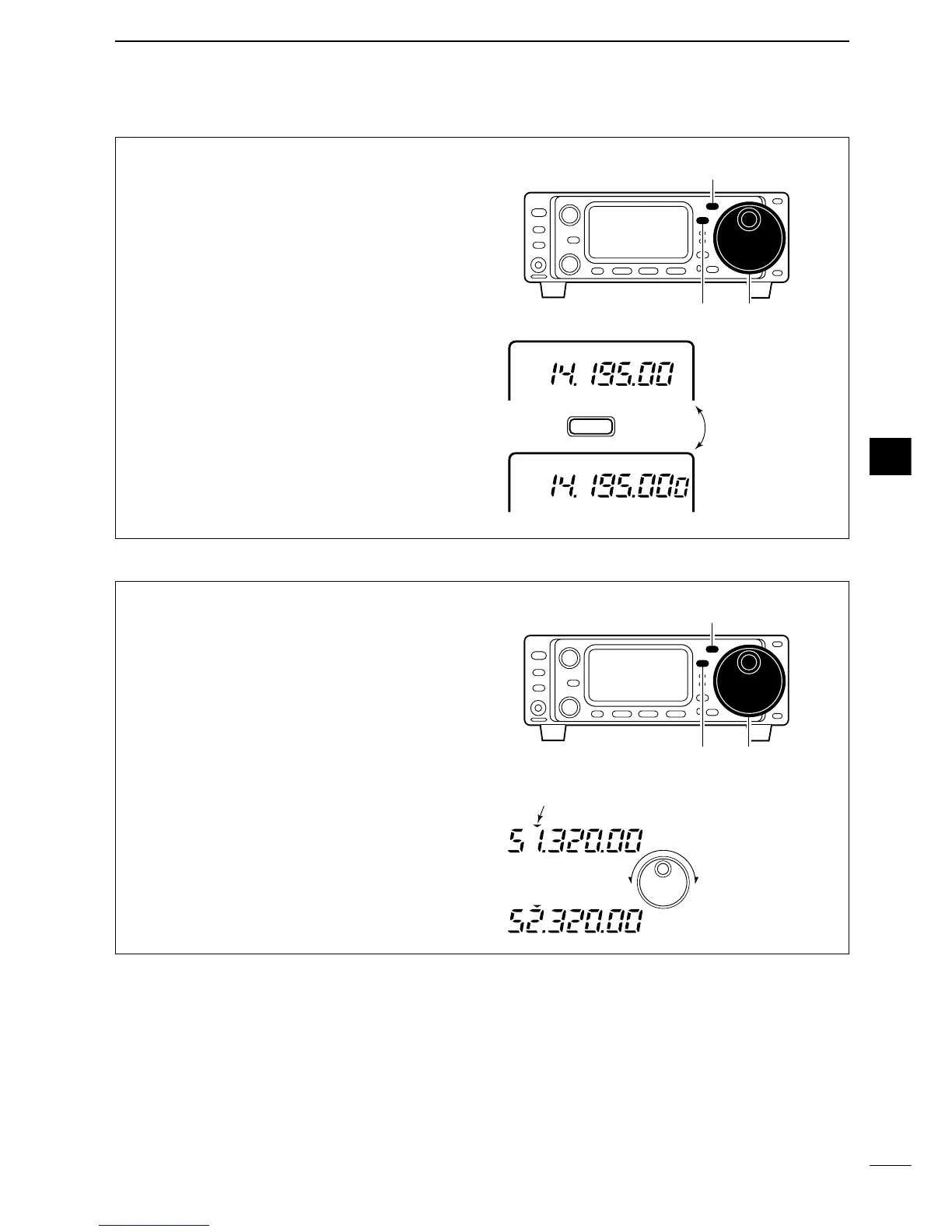
w Push [TS] for 1 sec. to toggle between the 1 Hz
and 10 Hz step settings.
•When the 1 Hz step is selected, the 1 Hz digit appears
in the frequency indication; when the 10 Hz step is se-
lected, the 1 Hz digit disappears from the frequency in-
dication.
•Rotating the main dial changes the frequency 1 Hz or
10Hz tuning step.
• 1 MHz quick tuning step
The quick tuning step function allows you to change
the frequency in 1 MHz steps when rotating the main
dial. This function is only available in FM and AM
modes.
q Select FM or AM mode if necessary.
w Push [TS] momentarily to toggle between the 1
MHz tuning step and the programmable tuning
step.
•“
Z
” appears above the 1 MHz indicator when the 1
MHz tuning step is selected.
•Rotating the main dial changes the frequency 1 MHz or
set tuning step.


 To Next Page