44
8
DSC OPERATION
New2001
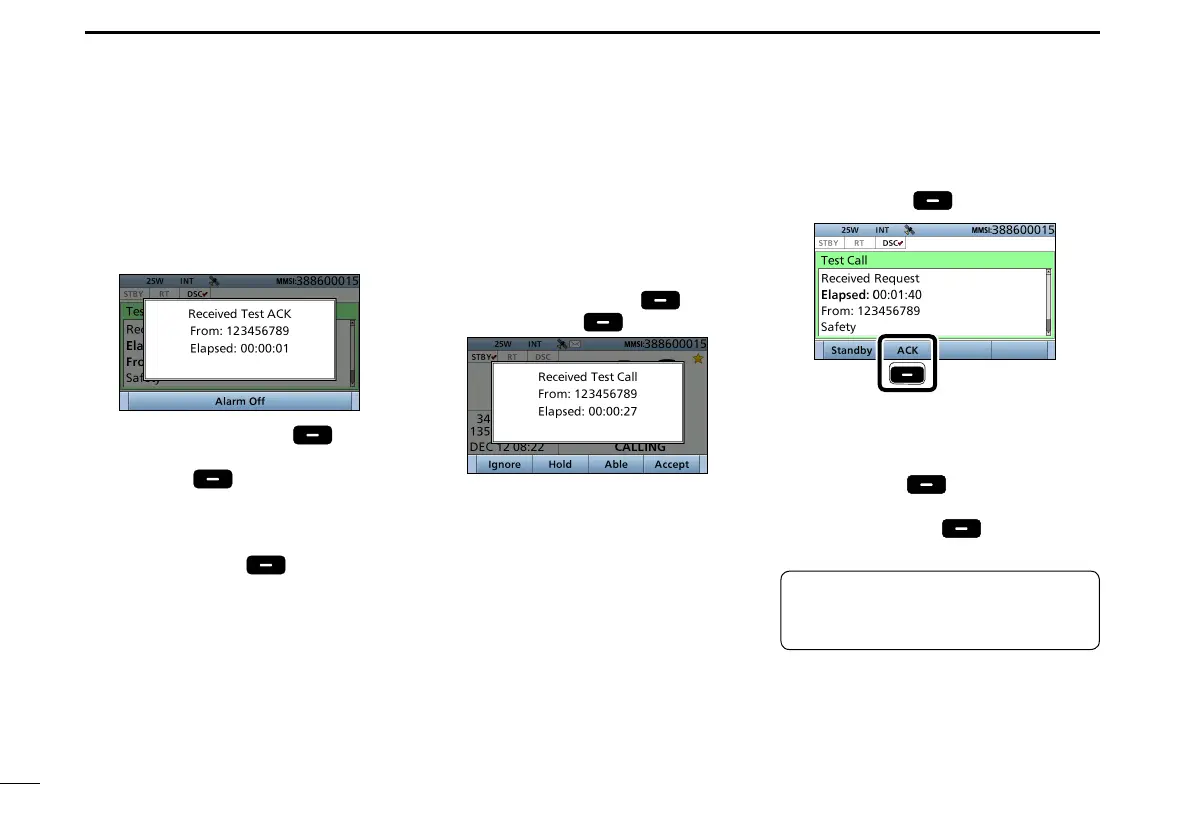
8. When the acknowledgement is
received:
• Alarm sounds.
• The following screen is displayed.
9. Push any [Alarm Off] .
10. Push any [Close Call RCVD
Window]
.
• Enters the DSC Task mode.
11. Rotate [CH/ENT] to view the
received message log.
12. Push [Standby]
to return to
the Main screen.
1. When a Test call is received:
• Alarm sounds.
2. Push any [Alarm Off]
.
3. Push [Accept]
.
• Enters the DSC Task mode.
D Sending a Test call acknowledgement
TIP: When “Test ACK” is set to “Auto,”
the transceiver automatically sends
the acknowledgement. (p. 58)
When a Test call is received, you can
send an acknowledgement.
4. Push [ACK]
.
Push
• The call contents screen is displayed.
L Rotate [CH/ENT] to view the call
contents.
5. Push [Call] to send the
acknowledgement.
6. Push [Standby]
to return to
the Main screen.
■ Sending a Non-Distress call (Continued)


 To Next Page