38
7
DSC OPERATION
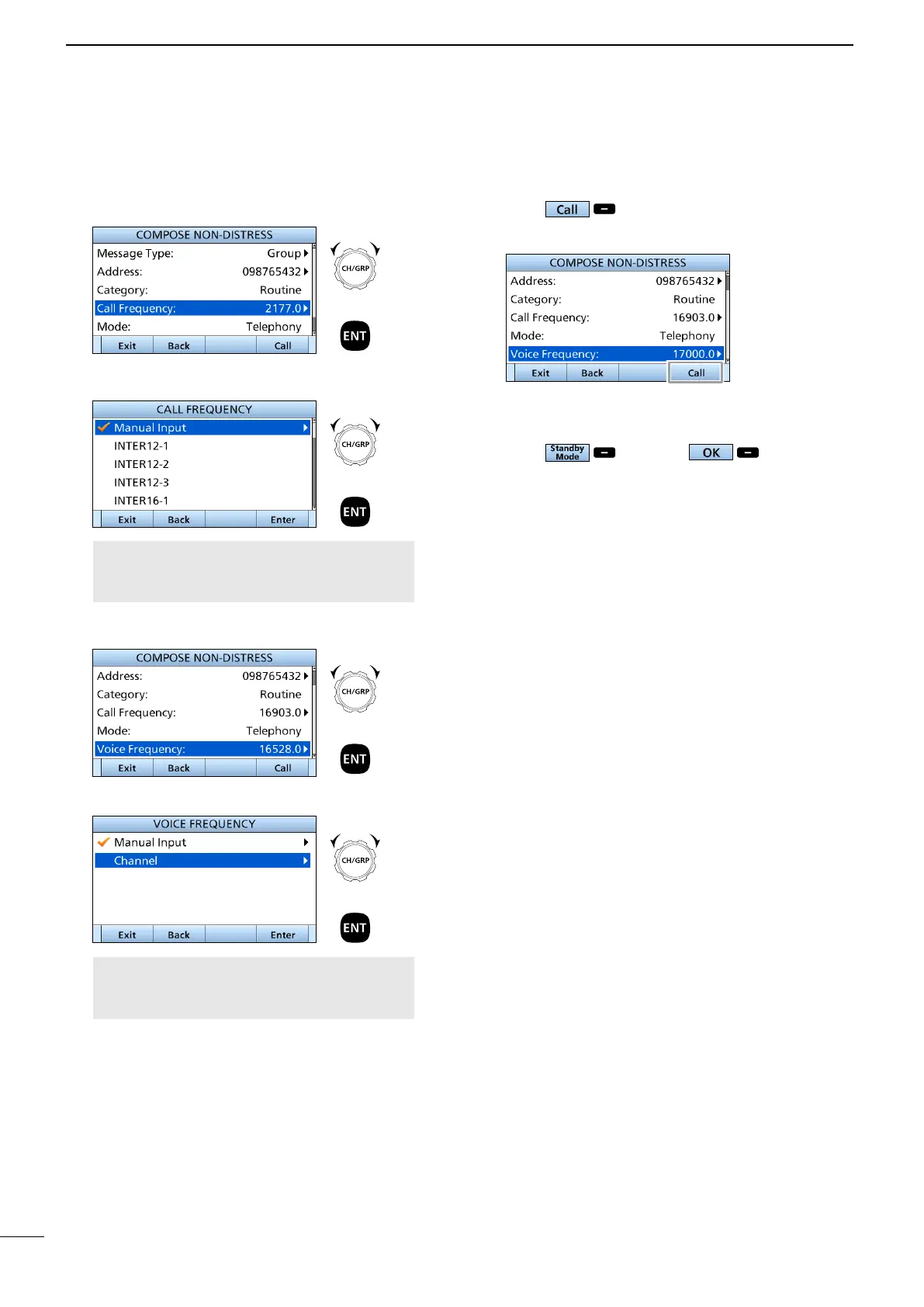
10. Push to send a Group call.
• “Transmitting Group Call” is displayed, and then
“Group Call” is displayed.
L See pages 27 and 28 for details of the Software Key
functions in the DSC Task mode.
11. Hold down [PTT] to talk.
12. Push , and then to return to
the Main screen.
■ Sending DSC calls (other)
D Sending a Group call (continued)
6. Select “Call frequency.”
7. Select a Call frequency, or “Manual Input.”
NOTE: When you select “Manual Input” in
this step, push the Keypad key to manually
enter a Call frequency.
8. Select “Voice Frequency.”
9. Select a voice frequency, or “Manual Input.”
NOTE: When you select “Manual Input” in
this step, push the Keypad key to manually
enter a voice frequency.
+
Push
Rotate
+
Push
Rotate
+
Push
Rotate
+
Push
Rotate



 To Next Page