WindO/I-NV4 User’s Manual 31-9
1 External Memory Devices
31
External Memory Devices
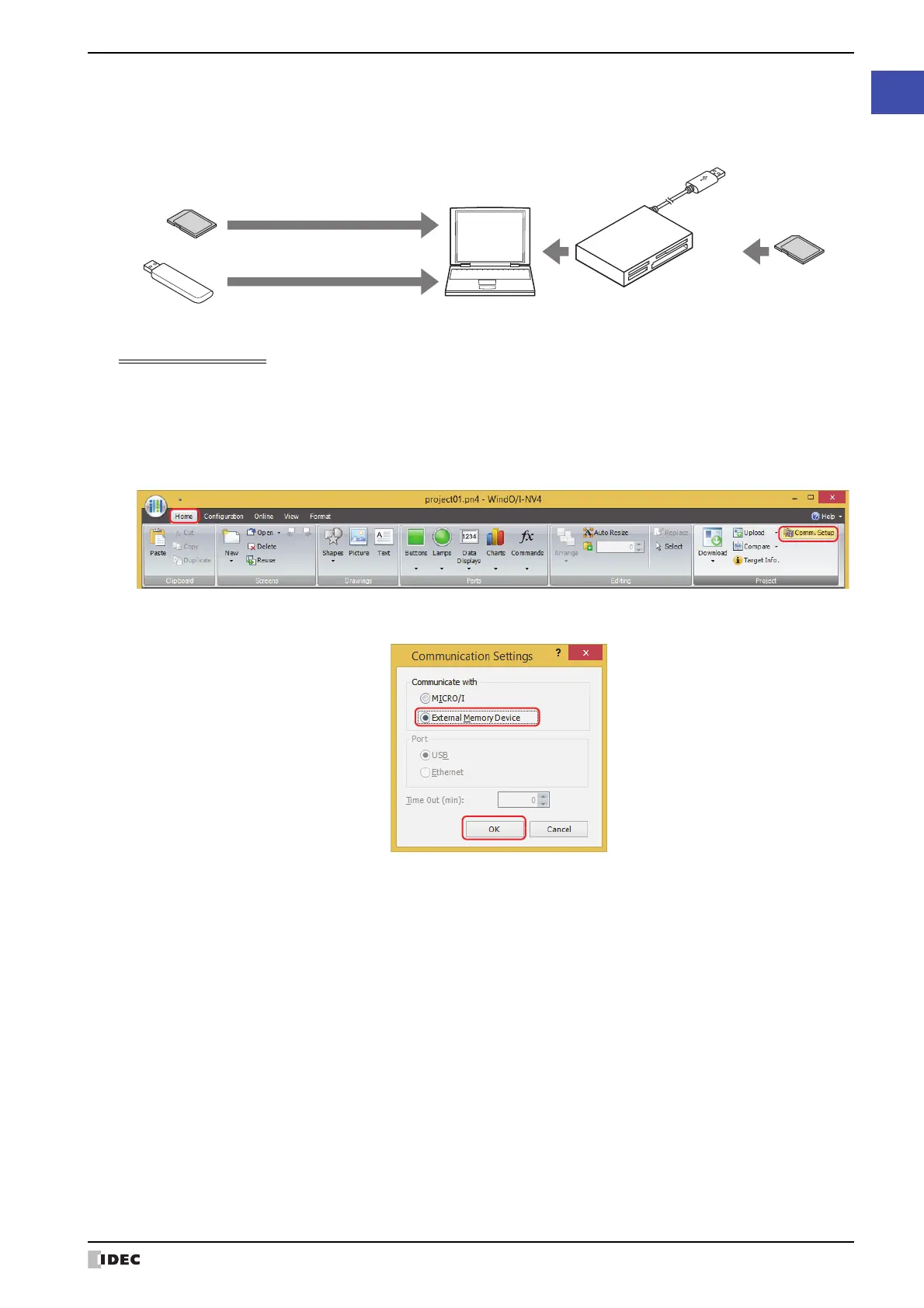
● Using WindO/I-NV4 to read and write to an external memory device inserted in the computer
When using an SD memory card
*1
, insert it into the computer's memory card slot or via a memory card reader/writer.
When using a USB flash drive
*2
, insert the USB flash drive in the computer’s USB port.
Communication settings
To read and write to the external memory device inserted in the computer using WindO/I-NV4, the external memory
device must be specified as the communication device. Configure the communication settings as follows before
downloading or uploading.
1 On the Home tab, in the Project group, click Comm. Setup.
The Communication Settings dialog box appears.
2 Under Communicate with, select External Memory Device, then click OK.
*1 HG5G/4G/3G/2G-V, HG4G/3G, HG2G-5F only
*2 HG2G-5T, HG1G/1P only
Computer
Through an external
memory card reader/writer
SD memory card
USB flash drive
SD memory card
To USB port
To SD memory card slot



 To Next Page
 Loading...