3 HG2G-5T, HG1G
35-52 WindO/I-NV4 User’s Manual
3.9
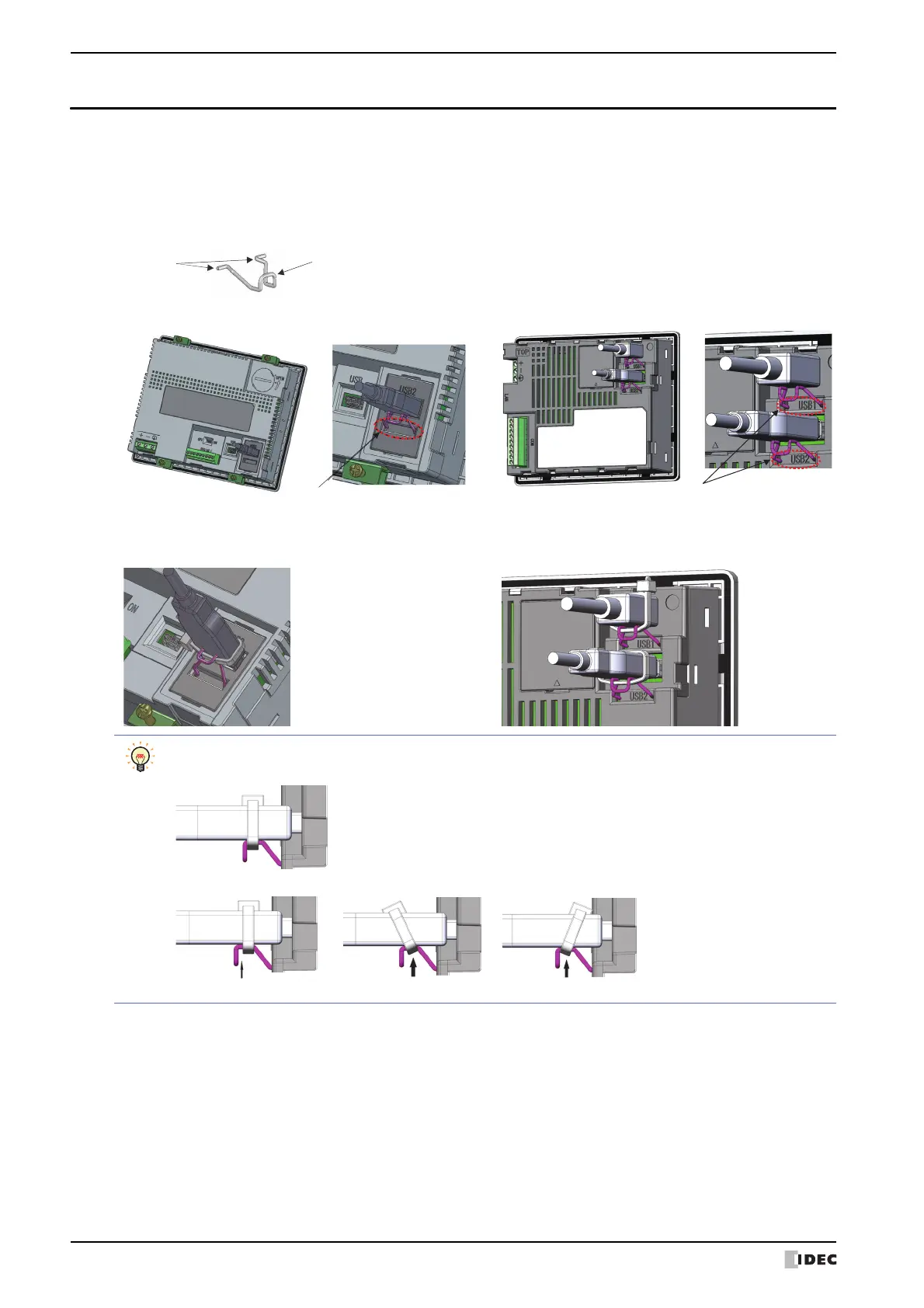
USB Cable Lock Pin Attachment
When using the USB device, attach the USB Cable Lock Pin to prevent disconnecting the USB cable from the HG2G-5T
*1
,
HG1G.
1 Insert the USB cable into the USB2 port.
2 Strain the [Edge part] of the USB Cable Lock Pin, and insert the [Edge part] to the 2 holes lower the USB2 port.
3 Fasten the USB Clamp Band around the USB cable and the [Clamp part], secure them tightly.
*1 Only USB2 for HG2G-5T
Fasten the USB Clamp Band without the space between the [Clamp part] and it, and the inclination.
OK
NG NG
With a gap
Slanted
Slanted
NG



 To Next Page
 Loading...