4 Pattern Palette
A-6 WindO/I-NV4 User’s Manual
● Patterns and gradations
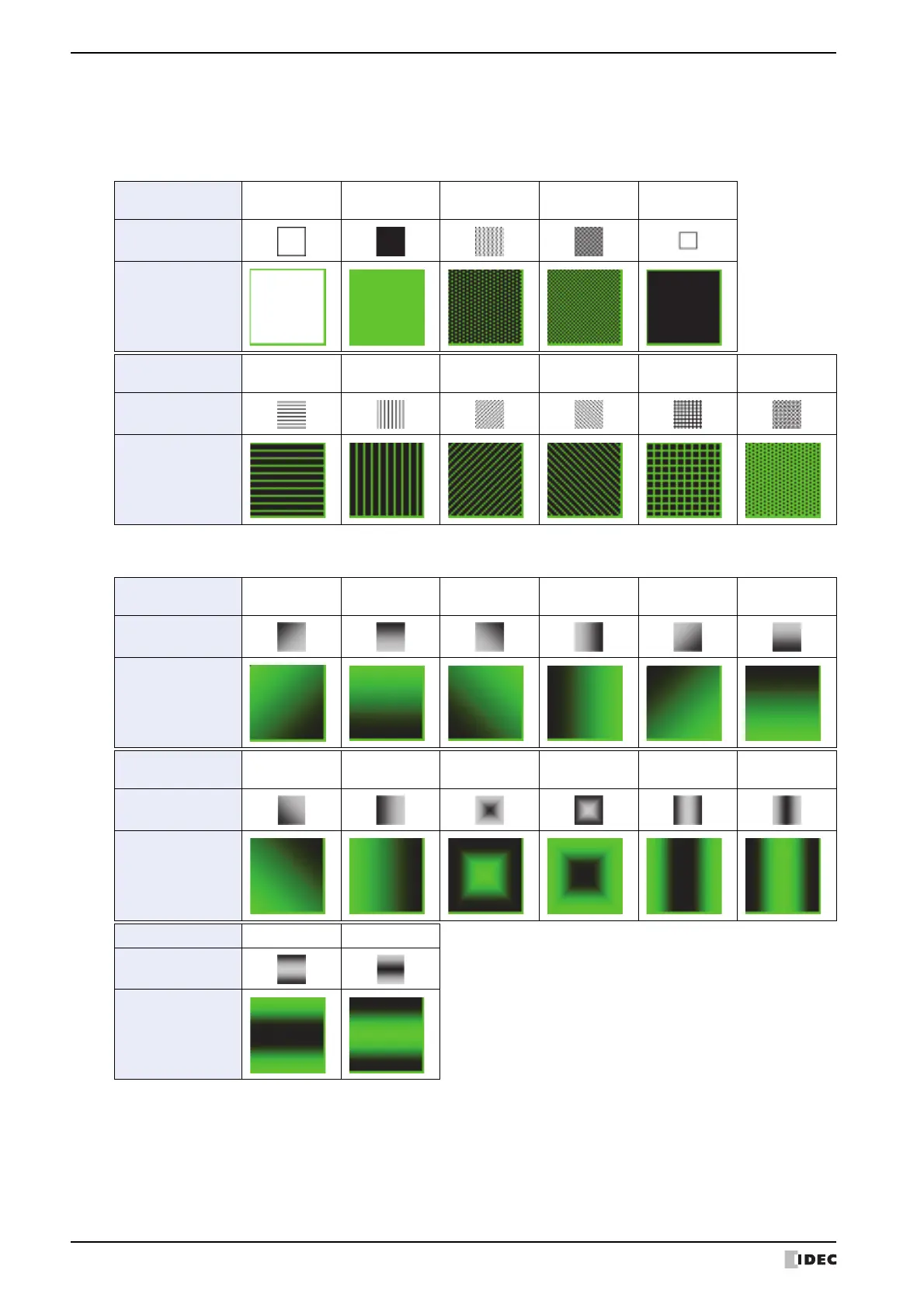
These patterns and gradations are available on WindO/I-NV4. When 024 on the Foreground Color and 000 on the
Background Color are selected for the Rectangle, the display images are as follows:
■ Patterns
■ Gradation
*1 None can only be applied to drawing objects. Selecting None is the same as not applying any color at all.
Pattern name
None
*1
Foreground
100%
Foreground
25%
Foreground
50%
Background
100%
Pattern buttons
Display sample
Pattern name
Horizontal
lines
Vertical lines
Slant
Upwards
Slant
Downwards
Crosshatch Tint
Pattern buttons
Display sample
Gradation name
Diagonal up 1
Horizontal 1
Diagonal
down 1
Vertical 1
Diagonal up 2
Horizontal 2
Gradation buttons
Display sample
Gradation name
Diagonal
down 2
Vertical 2 Central 1 Central 2 Vertical 3 Vertical 4
Gradation buttons
Display sample
Gradation name Horizontal 3 Horizontal 4
Gradation buttons
Display sample



 To Next Page
 Loading...