2 Select logical device
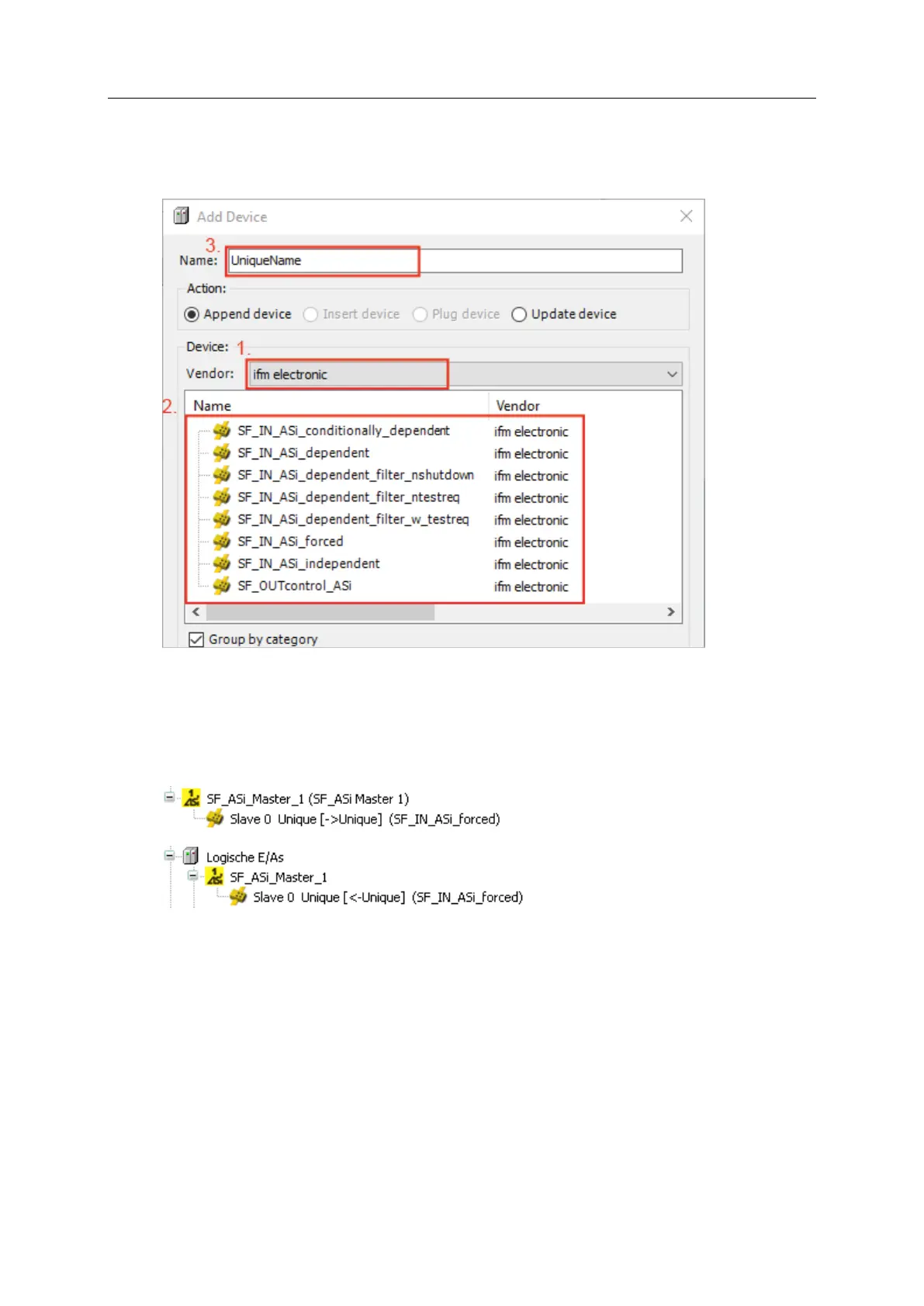
► Select [Project] > [Add Device...].
> A dialogue window appears.
► Set the following values in the area [Device]:
1. [Vendor]: ifm electronic
2. Table: Select the required logical device (→ Remark)
3. [Name]: Enter unique name for the logical device
► Apply the set values with [Add Device].
> CODESYS adds the logical device to the following positions of the device tree:
– in the standard area as sub-element of the safety node of the selected AS-i network
– in the safety extension area as sub-element of the node [Logical I/Os]
► Close the dialoge window with [Close].
3 Assign AS-i address
► In standard area of device tree:
Double click on the added logical device
> Editor window shows the tab with configuration options of the logical device.
► Select tab [Safe ASi IO Configuration].
> Table shows parameters of the logical device.
► Enter the address of the safe AS-i slave in column [Value].
> Logical device is coupled to the safe AS-i slave.
> Symbol in the device tree shows assigned AS-i address.
4 Optional: Add more logical devices
► Repeat steps 1 to 3 to add additional logical devices to device tree.



 To Next Page