Multitron - Operating Manual
Maintenance and Cleaning
20 August 2020 Page 131 of 158
Procedure 1. Open the device door all the way.
2. Remove the tray.
3. Turn off the power switch and pull out the plug.
4.
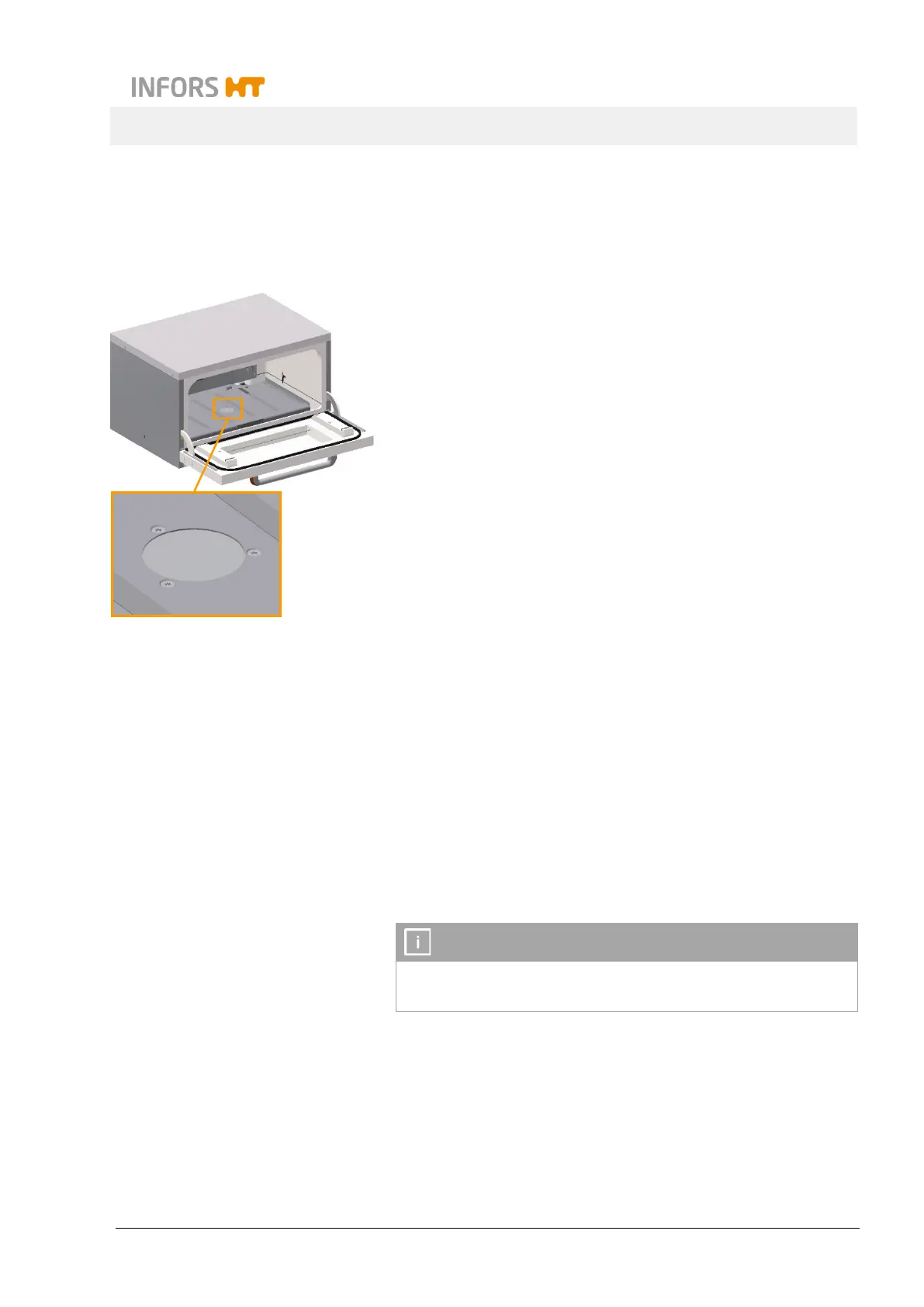
Loosen the three screws (hexalobular M6x12) in the centre of ta-
ble using the screwdriver provided.
Make sure you do not lose the screws. Otherwise, replace them
only with screws of the same length.
5. Tilt the table up by a maximum of 30°.
6. Hold the table in its tilted up position (or, ideally, get a second
person to do so), or use a suitable object to hold it there.
7. Clean the base tray with a mild detergent.
8. Thoroughly dry the floor pan using paper towels.
9. Carefully place the table on its rotary axis. When doing so, align
the rotary axis so that the threaded holes on the table are posi-
tioned directly over the holes on the rotary axis.
10. Insert the screws and tighten them (tightening torque:
10 Nm).
INFORMATION
If any of the screws are lost or damaged, make sure that they are
only replaced with original screws (M6x12).


 To Next Page