Multitron - Operating Manual
Operation
Page 92 of 158 20 August 2020
7.4.2 Setting the Parameter Setpoints
To set the parameter setpoints, proceed as follows:
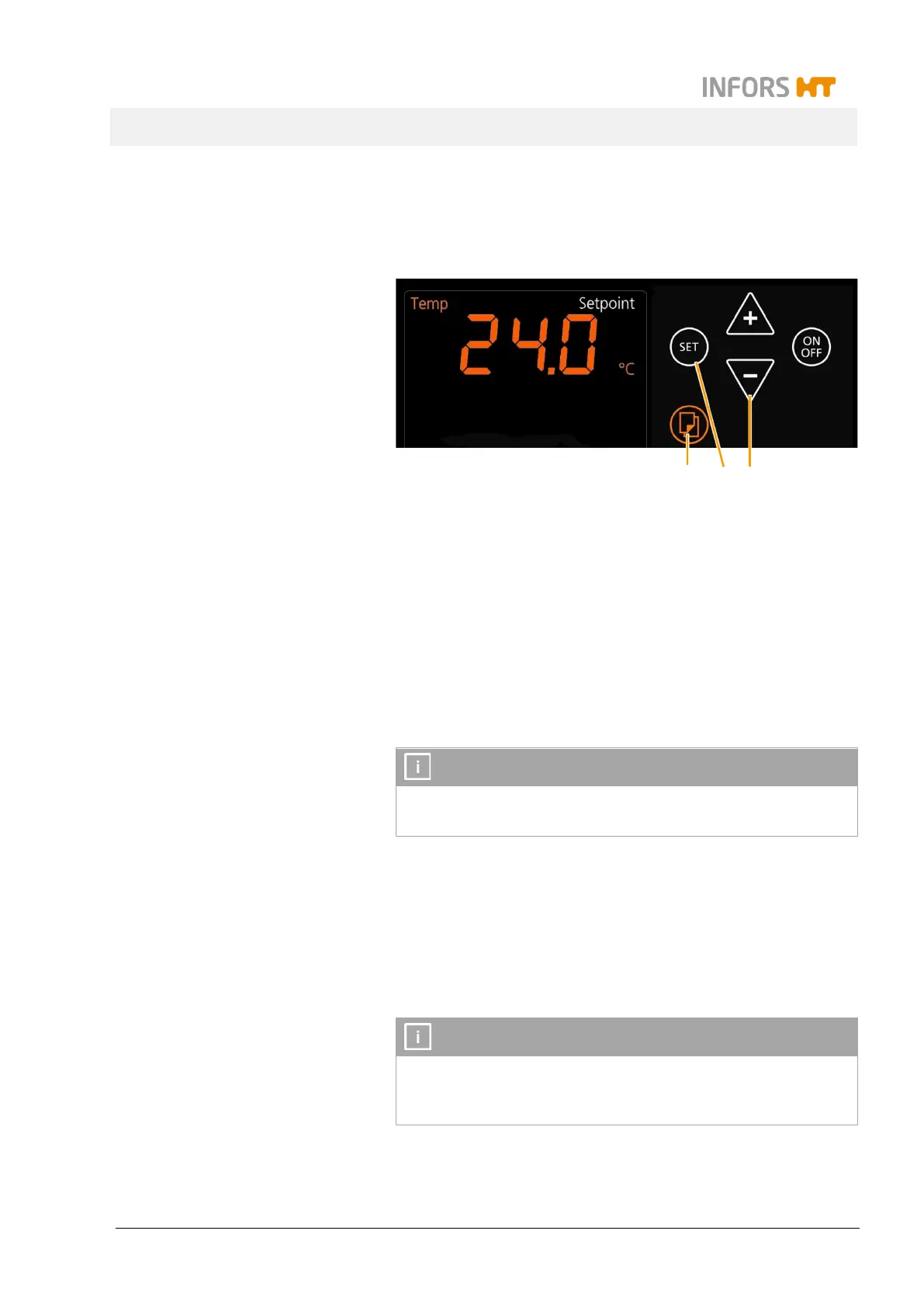
Procedure 1. Select the desired pair of parameters with the Select key (1).
The alphanumeric display field shows the current values of the
selected parameter pair.
2. To activate programming, tap the SET key (2) in the upper or
the lower setting key area, depending on which parameter set-
point should be set.
The alphanumeric display field shows last set setpoint of the pa-
rameter. The
Setpoint
sign indicates, that the parameter setpoint
can be set.
INFORMATION
The
Setpoint
sign lights up for 10 seconds. If you do not make an
entry in that time, you have to tap the SET key again.
3. Use the Plus or Minus key (3) to set the desired setpoint of the
selected parameter.
After approx. 10 seconds the
Setpoint
sign disappears and the
new setpoint is saved. You can speed up this process by tapping
the Select key.
INFORMATION
The entered value is saved automatically. A separate confirmation
is not necessary. If the parameter is already activated, the changes
1
2
3


 To Next Page