Multitron - Operating Manual
Operation
Page 84 of 158 20 August 2020
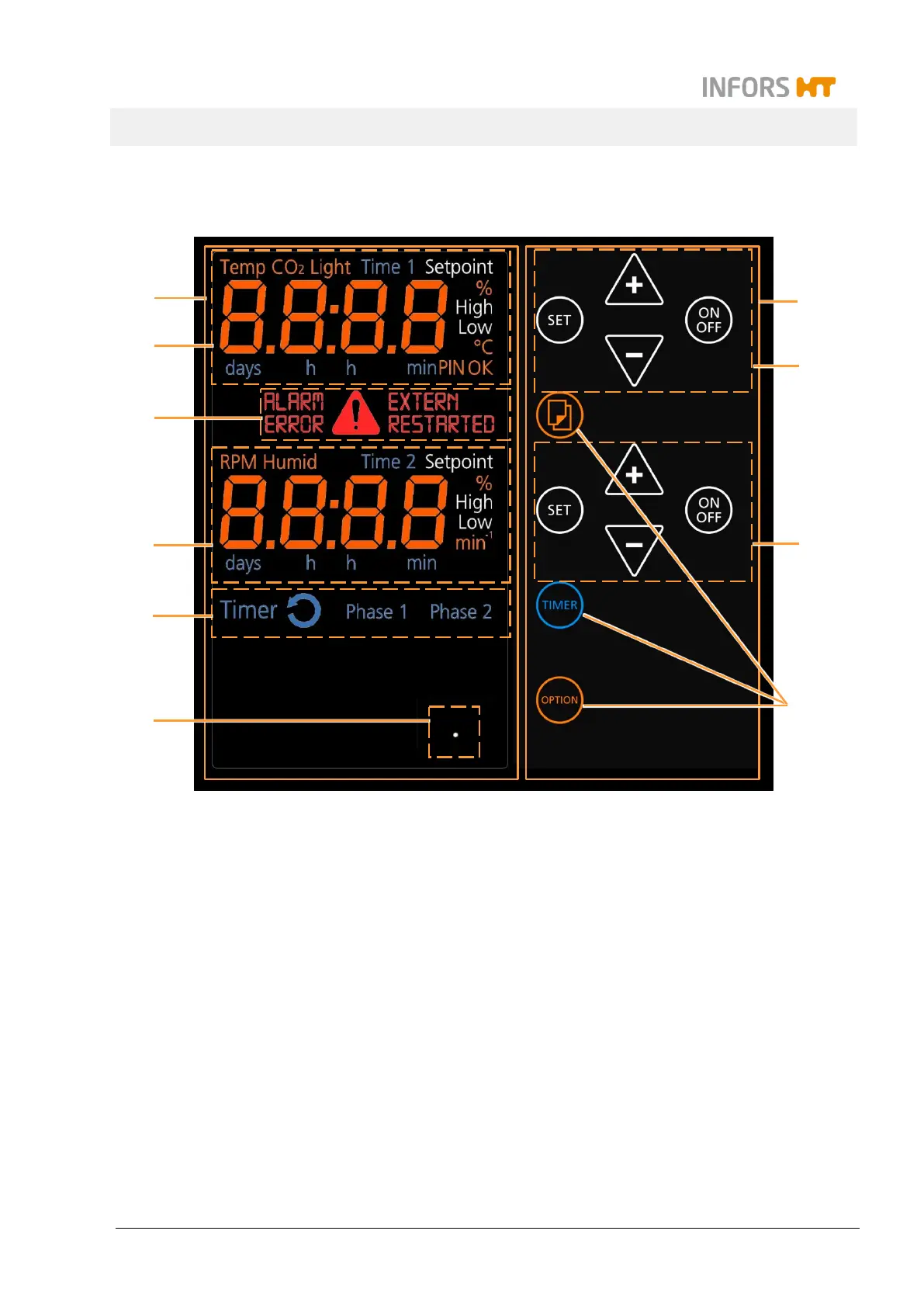
7.3 Overview about the Display und Controls
1 Complete display area
2 Upper display: Parameter setpoints and actual
values (
temperature
,
CO
2
,
light
); time (timer 1)
3 Error and warning messages, alarm
4 Lower display: Parameter setpoints and actual
values (
RPM
,
humidity
); time (timer 2)
5 Display area for the timer function
6 Display for the ethernet function when the de-
vice is operated via ethernet
7 Complete operating panel
8 Upper operating panel: For setting the
parameters (
temperature
,
CO
2
,
light
), time
(timer 1)
9 Lower operating panel: For setting the
parameters (
RPM
,
humidity
), time (timer 2)
10 Further operating keys (selection, TIMER and
OPTION)
Parameters in gray are only available when the
according option is installed.


 To Next Page