42
Ioline FlexJet Service Manual
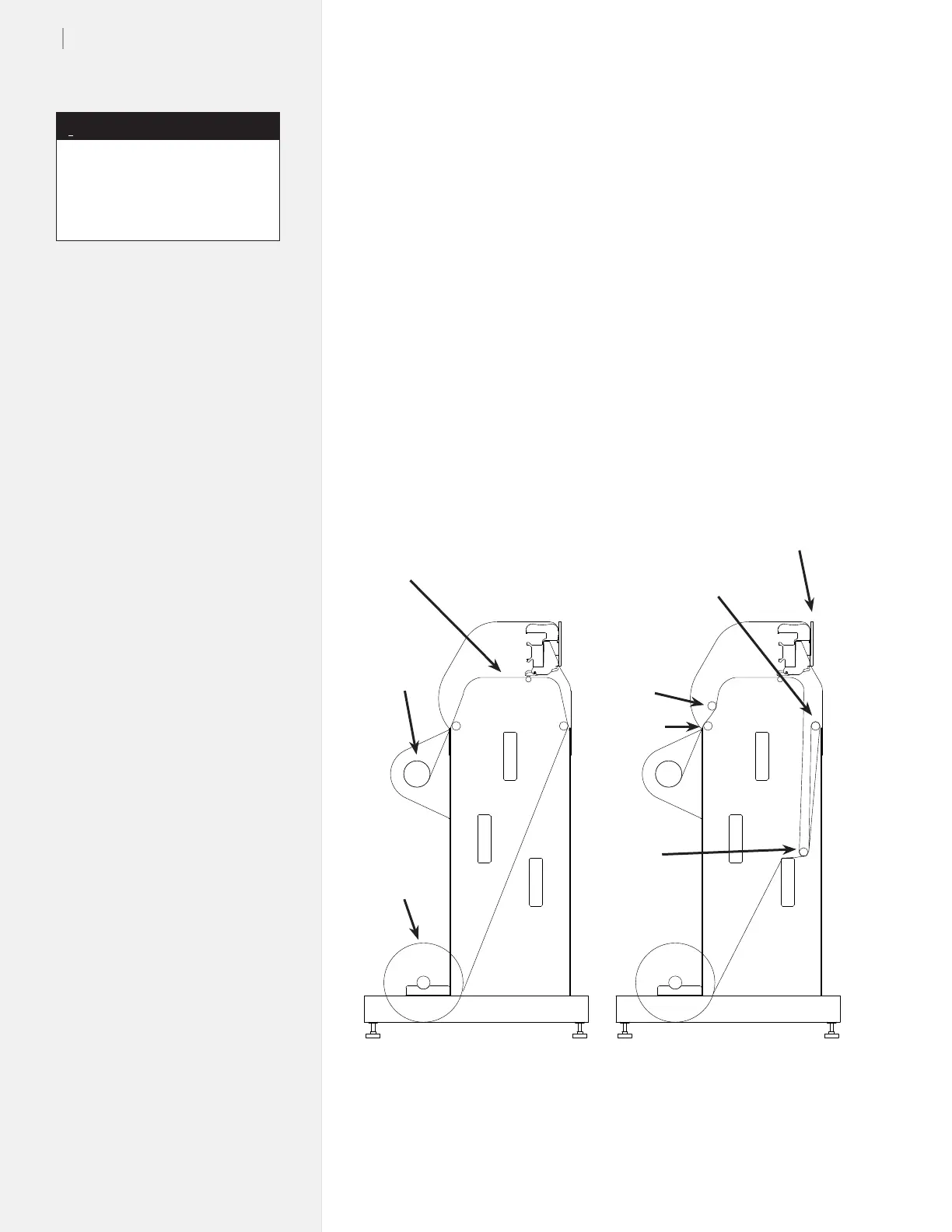
Rear Top Bar
Figure 21. The correct paper feeding path on the Ioline FlexJet Printer.
Platen
Take-up
Shaft
Feed Roll
Proper Paper Path
After Loading
Front Top Bar
Pinchwheel Lever
Paper Path when Ready to Plot
and Dancer Bars installed
Front
Dancer Bar
Rear (Heavy)
Dancer Bar
Paper problems
Regular or intermittent paper tearing
Common situations that cause paper tearing while the FlexJet is operat-
ing include:
n The paper was incorrectly loaded in the machine.
n The rear, heavy dancer bar was not loaded in the FlexJet after
the paper was loaded.
Figure 21 represents the proper paper path. The diagram on the left
shows the paper after it is inserted properly and taped to the take-up
shaft. The illustration on the right shows the result after the dancer
bars are inserted.
The paper path and instructions
for printing to the oor is illus-
trated in the FlexJet User Guide,
Figure 25.
Note
i



 To Next Page