36
Ioline FlexJet Service Manual
OK
n l
p
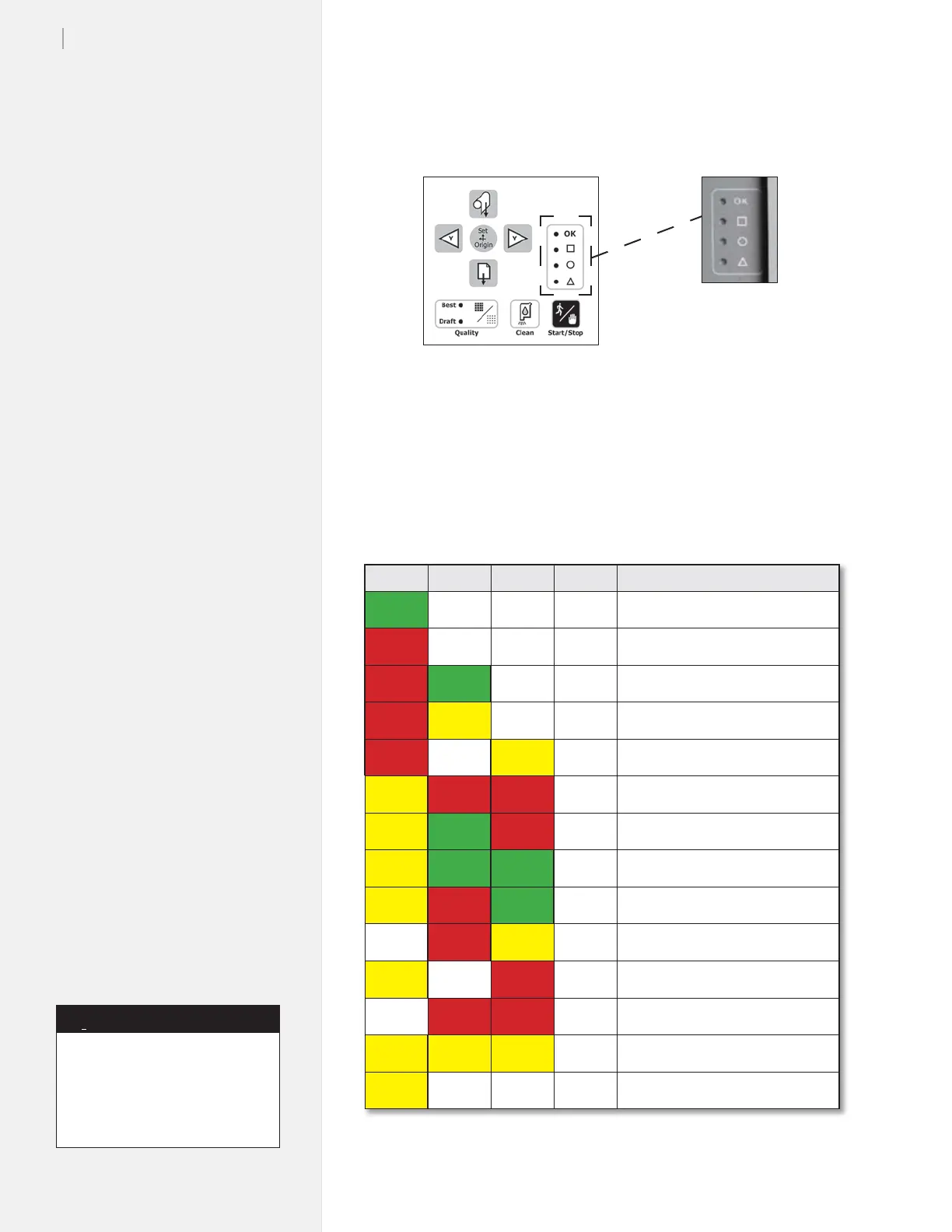
Problem/Status
G OFF OFF OFF Ready to Print, Origin Set
R OFF OFF OFF Paused / Ofine, Keypad Active
R G OFF OFF Power on reset nished.
R Y-Blink OFF OFF Cover open (obsolete)
R OFF Y-Blink OFF Paper Feed Out / Jammed
Y-Blink R R OFF X- (paper) axis jam
Y-Blink G R OFF Y- (carriage) axis jam
Y-Blink G G OFF TU (take-up) jam
Y-Blink R G OFF SS (Service Station) jam
OFF R Y-Blink OFF Buffer Overow
Y-Blink OFF R OFF Init from EPROM failed
OFF R R OFF File syntax error
Y-Blink Y-Blink Y-Blink OFF Printer ready to receive rmware
Y-Blink OFF OFF OFF Motors off / System Stop
Legend
G = Green light
R = Red light
Y = Yellow light
Y-Blink = Blinking yellow light*
OFF = Unlit
Figure 20. Keypad LED error codes.
Keypad error codes
Figure 19. LED lights
on the keypad.
If keypad errors are not shown on
the chart to the left, update the
rmware. For more information,
please contact Ioline Customer
Service.
Note
i
* First generation FlexJet keypad
lights do not blink.



 To Next Page