52
Ioline FlexJet Service Manual
Electrical problems
If, during power on, the FlexJet experiences one or all of the follow-
ing, it may have a blown transistor:
n Smoke coming from inside the machine.
n The carriage won’t move.
n The carriage hits the right or left side hard.
n The carriage moves in only one direction.
n Motors only move in one direction
n A motor on the machine will try to keep turning after it stops.
The most common reason for a transistor to fail is a bad or old mo-
tor. As motors age, their bearings start to break down due to insuf-
cient lubrication. As this break-down happens the transistors have
to work harder to move the motor, causing them to heat up and
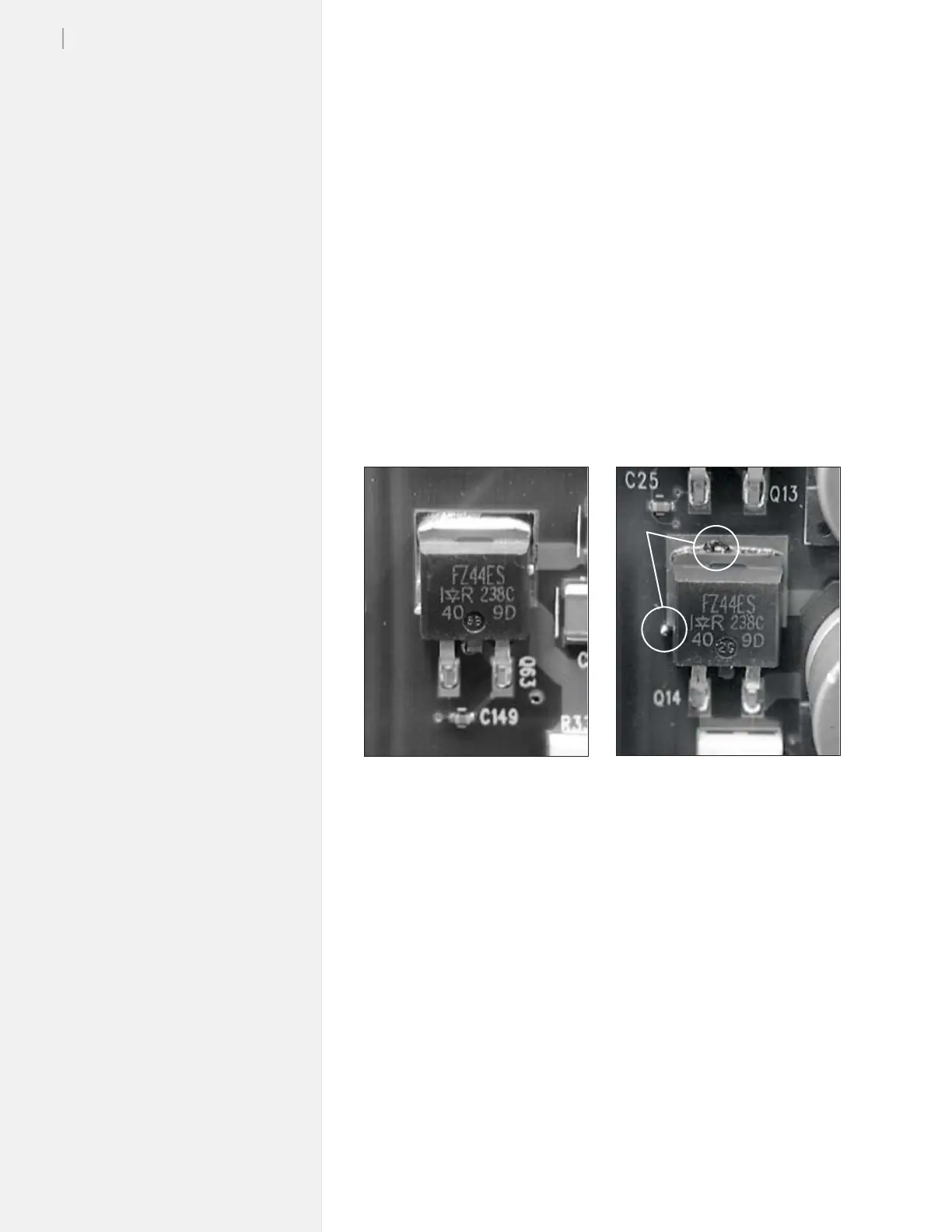
eventually fail. (Figure 40).
In most cases, both the transistor and motor will need replacement.
Contact Ioline Tech Support for more detailed instructions on testing
a transistor.
Troubleshooting sensors
The FlexJet uses the same sensor in multiple places for tracking pa-
per path status. The sensors are industrial-grade and will withstand
many years of use. If a sensor ever fails, the following conditions
might occur:
1. The paper take up motor will not stop rotating and will pull the
paper tight against the platen. This might result in an X motor
jam and a ‘popping’ noise during printing.
2. The Paper Out sensors will not detect that the paper feed roll is
empty and printing may continue with no paper in the printer.
Figure 40. A good transitor on the left; the one on the right is blown. The presence of
solder bubbling out of the chip indicates it overheated.
Solder



 To Next Page