54
Ioline FlexJet Service Manual
Simple electrical diagnostics test:
1. Turn the power to the machine off.
2. Inspect the FlexJet for any obvious damage or signs of mechani
-
cal malfunction.
3. Measure the voltage at the wall socket. Verify that the AC volt
-
age is between 85 and 250 VAC.
4. Clear all paper from the machine and make sure that nothing is
obstructing movement of the front take-up roll.
5. Move the carriage from side to side by hand. If the carriage
resists easy movement, the motor may be bad or there could be
a short on the main board. (See Motor Problems and Testing the
Logic Board later in this chapter.)
Motor problems
Perform the following simple test to determine if a motor problem
exists. The following are possible motor problems:
1. Bad or burned motor components.
2. The motor brushes are worn down.
3. A transistor has blown on the logic board.
4. The motor is unplugged.
5. The encoder is dirty, damaged or unreadable.
Testing a motor
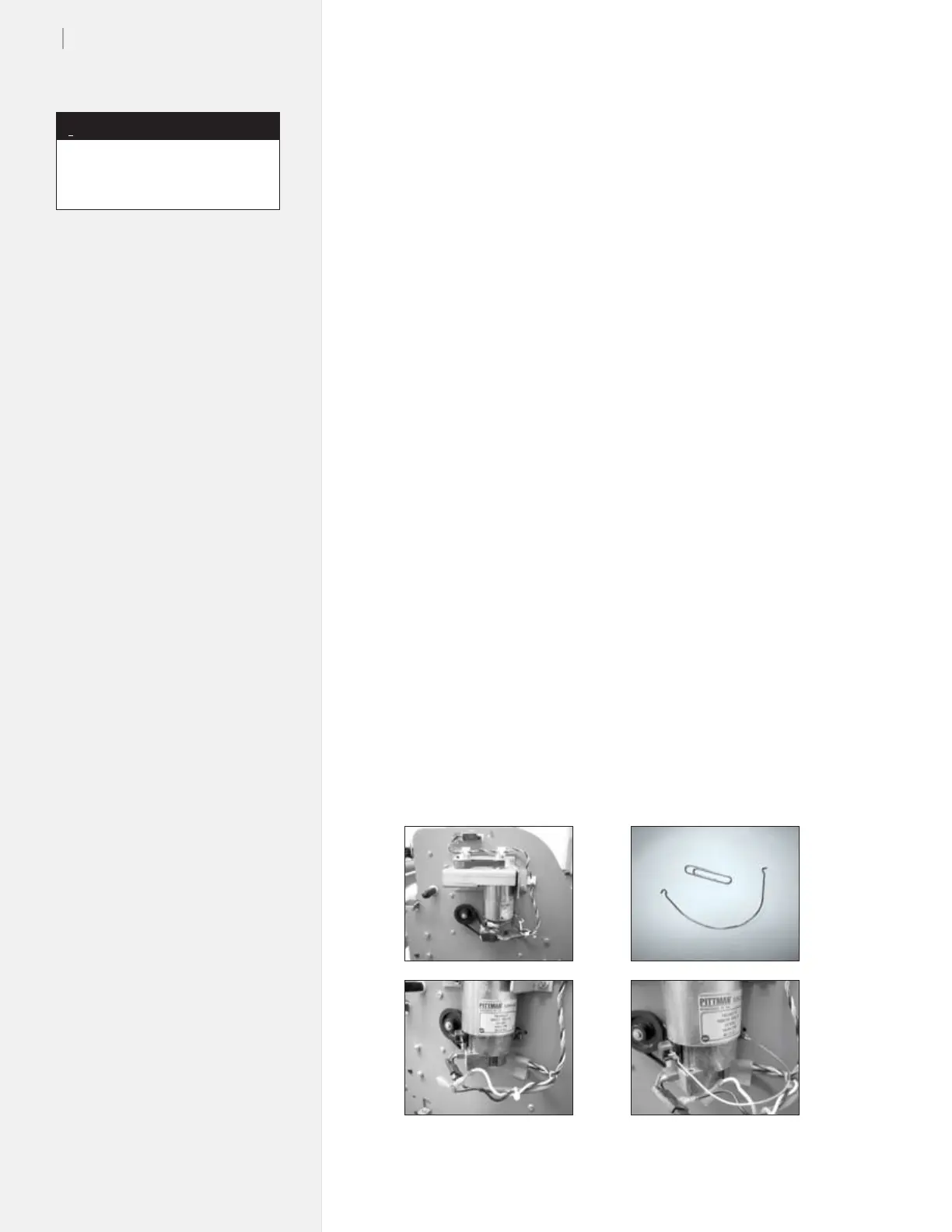
Test the motors on the FlexJet by following this procedure. The
Y-Axis motor (Figure 41a, on the left side of the machine) is shown
below.
1. Power the machine off and remove the left side cover.
2. Unplug the motor power wires. (Figure 41b).
a
b
c
d
Figure 41. Testing the Y-Axis motor.
This test applies to all the motors
on the FlexJet.
Note
i



 To Next Page