88
Ioline FlexJet Service Manual
Y-Axis procedures
Y-Axis transmission adjustment
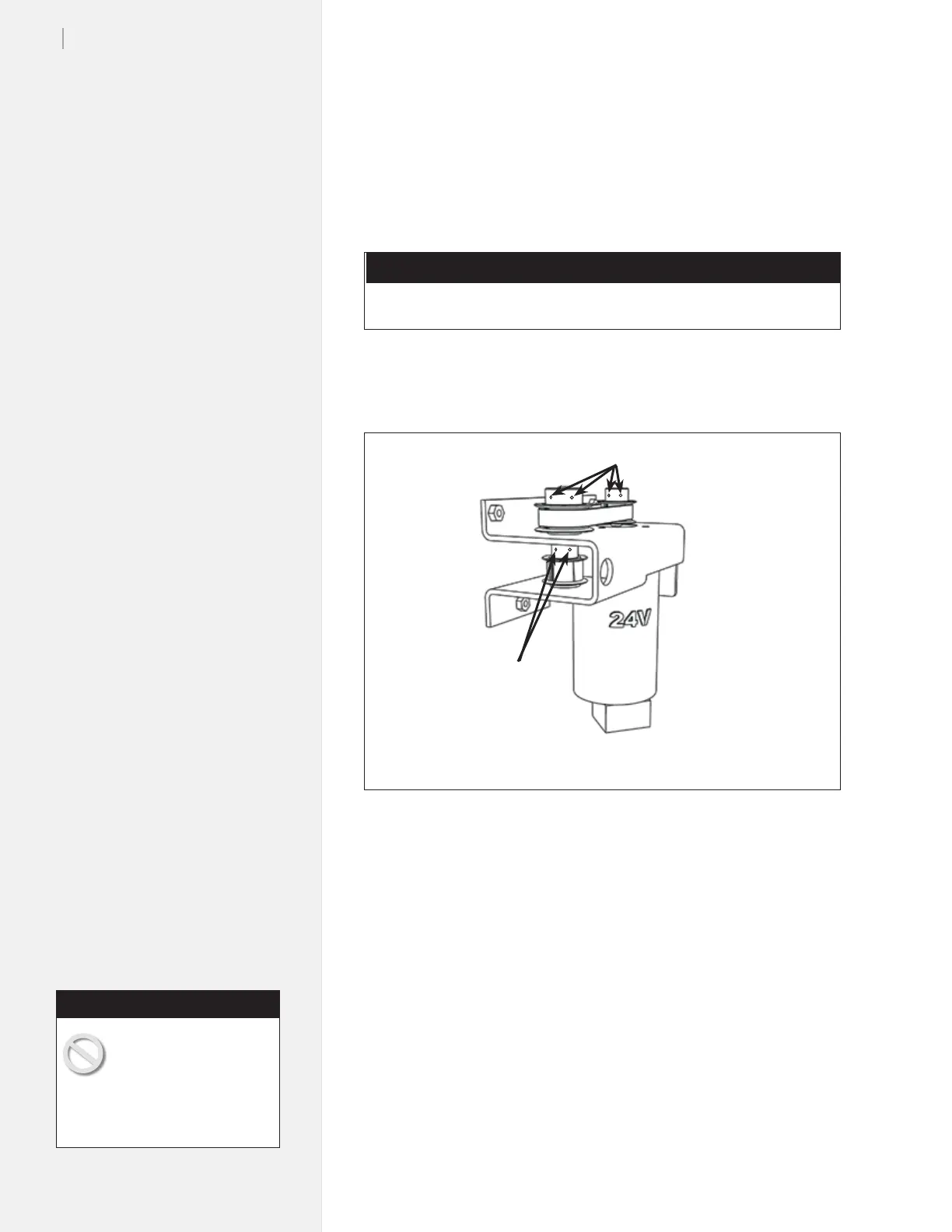
This procedure covers tightening the setscrews on the Y-Axis trans-
mission. If you are experiencing size or skipping problems while
printing, follow this procedure as one possible x.
Tools Required
n
5
/
64
-in Hex wrench
Tighten the setscrews shown on the Y-Axis transmission.
Figure 87. Try tightening the screws on the Y-Axis transmission if you see evidence
of skipping problems on your plots.
5
/
64
-in Screws
5
/
64
-in Screws
Y-Axis belt adjustment
A y-belt that is too loose can cause belt tooth skip resulting in inac-
curate plots. A y-belt that is too tight can generate excessive
noise. Follow these steps to adjust the Y-axis belt tension.
1. Send a plot to the printer.
2. Hold the motor with one hand and using a screwdriver loosen
the 3 screws that attach the motor to the transmission bracket.
3. Pull the motor to tension the belt. Excessive tension will create
a loud whining noise. Tension the belt so that the transmis-
sion sounds quiet, does not whine, and the belt teeth smoothly
engage the pulley teeth.
4. Securely tighten the 3 motor screws.
The following steps in-
volve machine adjustment
during printer operation.
Keep ngers and loose clothing
away from the y-motor transmis-
sion.
Caution



 To Next Page