Version V1.0
52
6.4 Frequency Analysis
6.4.1 Overview
To access the page, choose Wireless > Frequency Analysis.
This page allows you to analyze frequency and scan channels.
◼
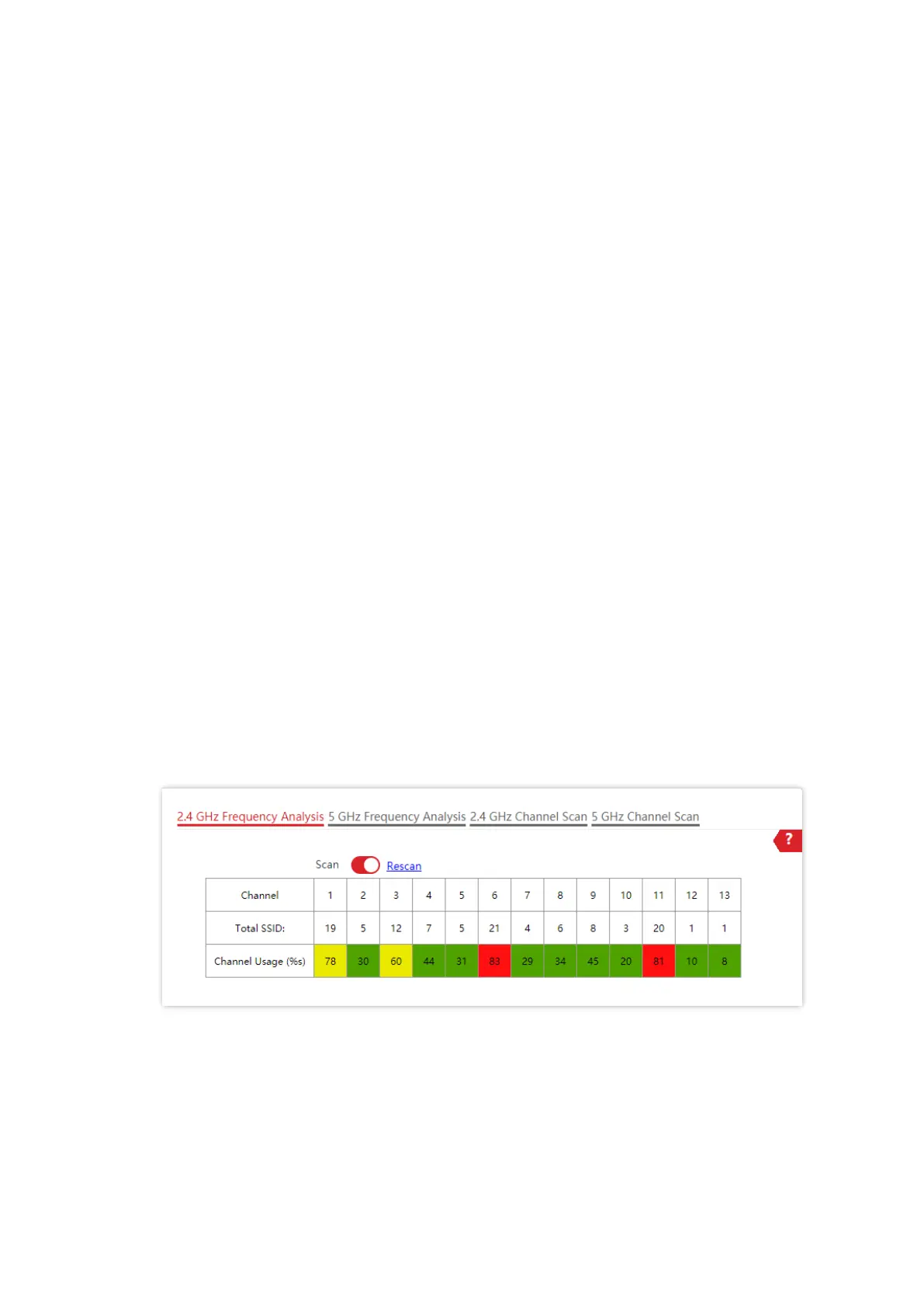
Frequency Analysis
From the intuitive result, you can check how many wireless networks (total SSIDs) use the
same channel and choose a channel with low usage as the operating channel of the device
for better wireless transmission efficiency.
◼
Channel Scan
The scan result list presents you with information about nearby wireless network, including
SSID, MAC address, channel, channel bandwidth, and signal strength.
6.4.2 View Frequency Analysis
1. Choose Wireless > Frequency Analysis.
2. Click 2.4 GHz Frequency Analysis or 5 GHz Frequency Analysis tab to select the wireless
network radio band for frequency analysis. 2.4 GHz Frequency Analysis is taken as an
example here.
3. Enable Scan.
---End
After scanning, you can select a channel with low usage as the AP operating channel.
− : High channel usage. The channel is not recommended.
− : Moderate channel usage.
− : Low channel usage. The channel is recommended.



 To Next Page