Version V1.0
7
3.1.2 Quick Setup
Before configuration, ensure that the upstream router has been connected to the internet.
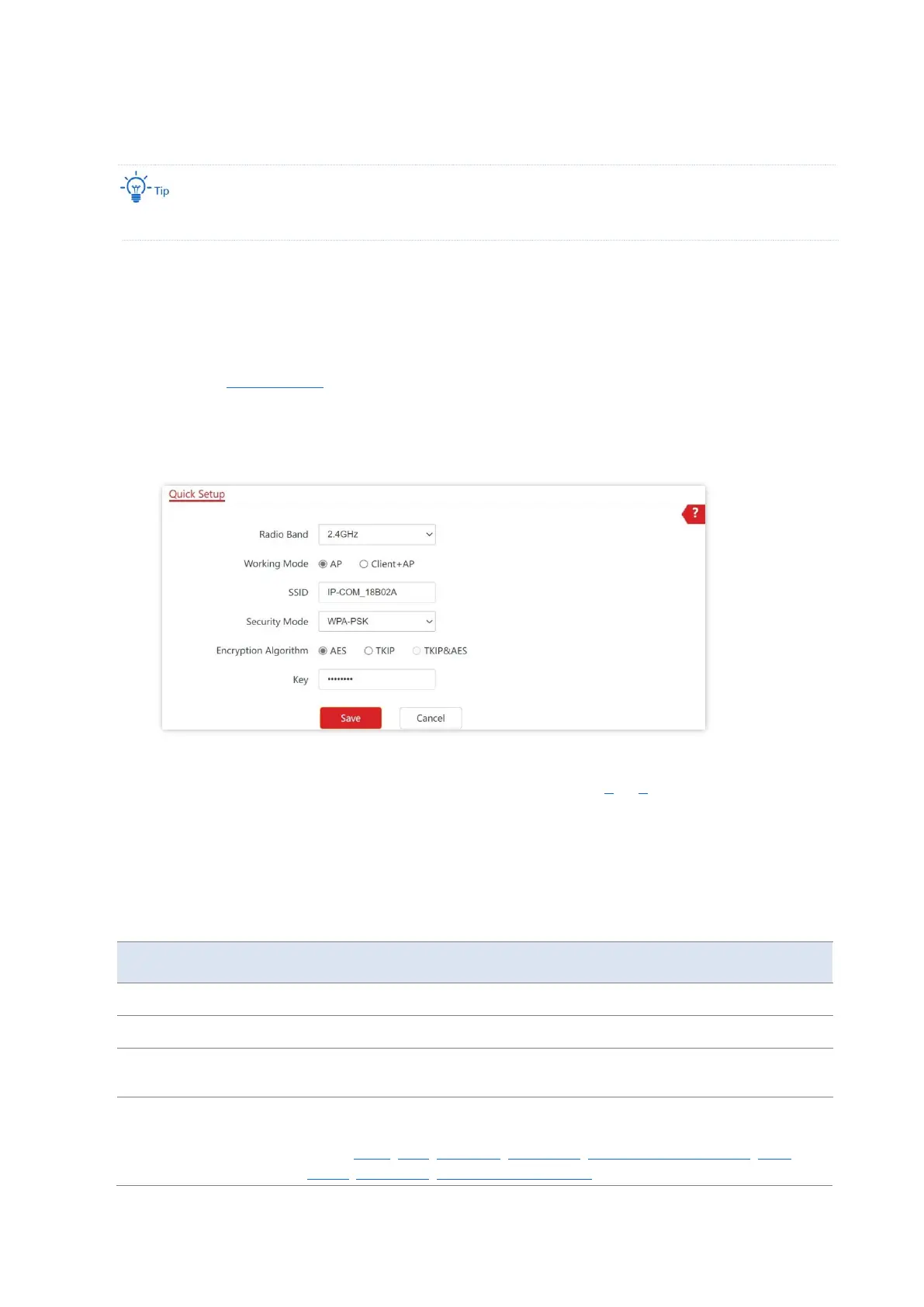
1. Click Quick Setup.
2. Choose the Radio Band you wish to configure, for example, 2.4GHz.
3. Set Working Mode to AP.
4. Set SSID (Primary SSID).
5. Select Security Mode and configure the incurred parameters.
6. Click Save.
7. If you need to configure the other radio band, repeat steps 2 to 6.
---End
Search and connect your wireless devices such as smartphones to the SSID you set. Enter the
wireless password (the Key you set) and you will be able to access the internet.
Parameter description
Select the radio band you wish to configure.
Choose the AP mode to convert wired networks into wireless networks.
Click to modify the WiFi name of the primary network under the selected
radio band.
Select the security modes for target wireless networks. Clicking the hyperlink
navigates you to the elaborated description of the corresponding security
mode: None, WEP, WPA-PSK, WPA2-PSK, Mixed WPA/WPA2-PSK , WPA,
WPA2, WPA3-SAE, WPA2-PSK&WPA3-SAE.



 To Next Page