iPECS UCM
Installation Manual Issue 1.1
74
3.6.2 LAN Cable Connection
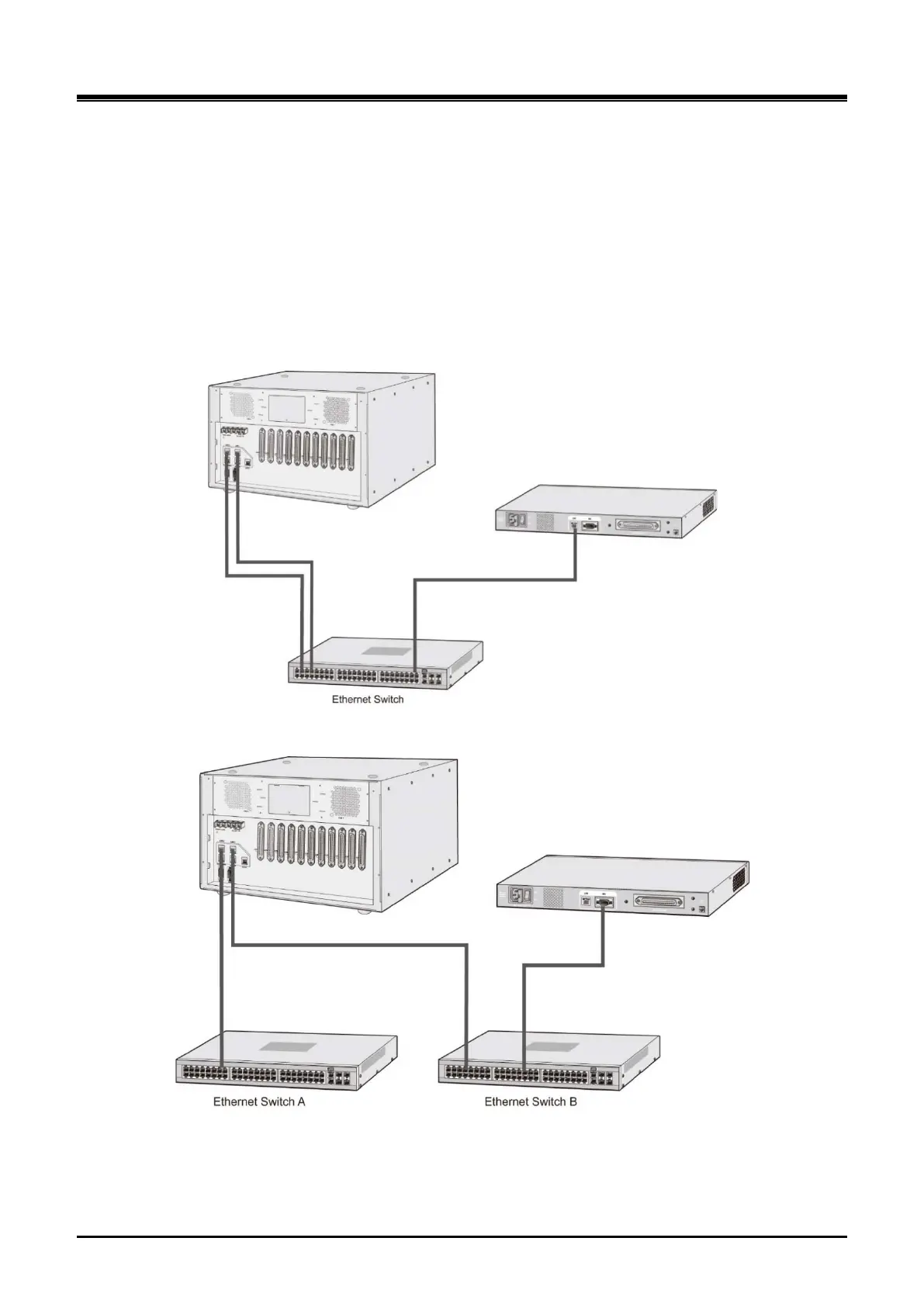
The UCM-MGC3 supports 10/100/1000Mbps Ethernet and is linked to Ethernet switch through duplicated RJ-
45 connectors. The UCM-1URMC supports 10/100 Base-T Ethernet and is linked to the Ethernet switch
through the RJ-45 connector. UCM-MGC3 and UCM-1URMC are connected to a single Ethernet switch as
shown in Figure 3-38. In a redundancy configuration, duplicated Ethernet link cables of UCM-MGC3 are
connected to each Ethernet switch as in Figure 3-39. Figure 3-40 shows LAN connector pin layout. Each
connector provides green Link/Activity LED and orange LAN speed LED (ON for 100 Base-T).
All LAN wiring should be category 5 Unshielded Twisted Pair (CAT 5 UTP) or category 6 Unshielded Twisted
Pair (CAT 6 UTP) and the length should not exceed 100 meters.
Figure 3-38 LAN Cable Connection of UCM-MGC3 and UCM-1URMC (si ngle switch i s used)
Figure 3-39 LAN Cable Connections of UCM-MGC3 and UCM-1URMC (dual switches are used)



 To Next Page