21
Part 3.Setup Functions
3-3 Audio
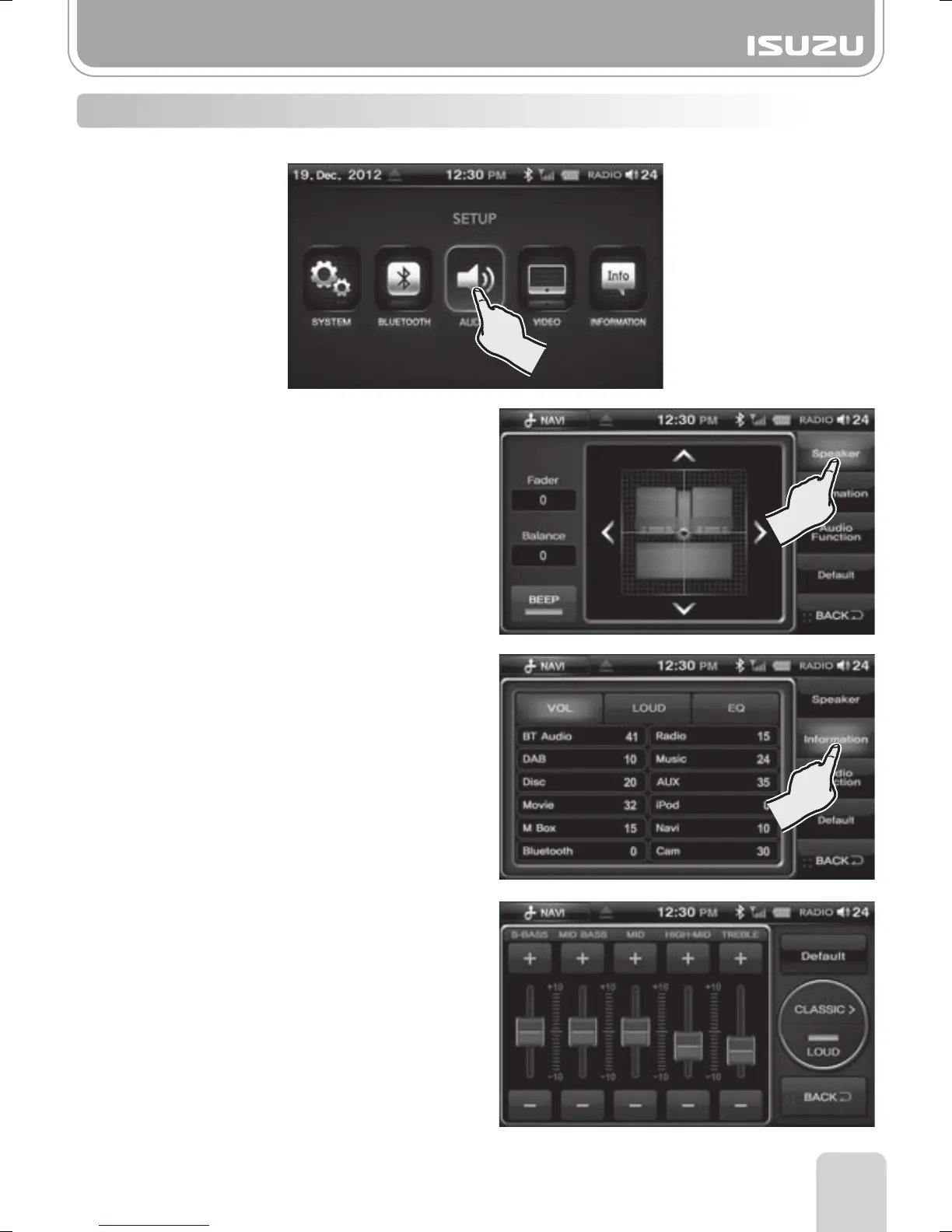
Press the AUDIO button on the SETUP mode screen.
Selecting this button restores all the settings to factory settings.
A. Select the Information button on the
right side of the Audio Settings window.
B. This displays all current audio settings
of each mode.
►
S-BASS : Increases/Decreases S-bass
►
MID BASS : Increases/Decreases MID BASS
range
►
MID : Increases/Decreases MID range
►
HIGH-MID : Increases/Decreases HIGH-MID
range
►
TREBLE : Increases/Decreases the TREBLE
►
Default : The Audio settings are restored to
factory settings
►
EQ Display : This shows the EQ mode
currently selected.
►
LOUD : Loud On / Off.
A. Select the Setting button on the
right hand side.
B. By using the Front, Left, and Right
button in the Audio Settings window,
you can adjust the volume.
■
Setting the Fader/Balance
■
Beep: Set the BEEP sound settings to either
ON or OFF.
●Speaker
●Information
●Audio function
●Default



 To Next Page