50
1
2
4
3
5
6
7
Part 11.M-Box-Recorded Audio
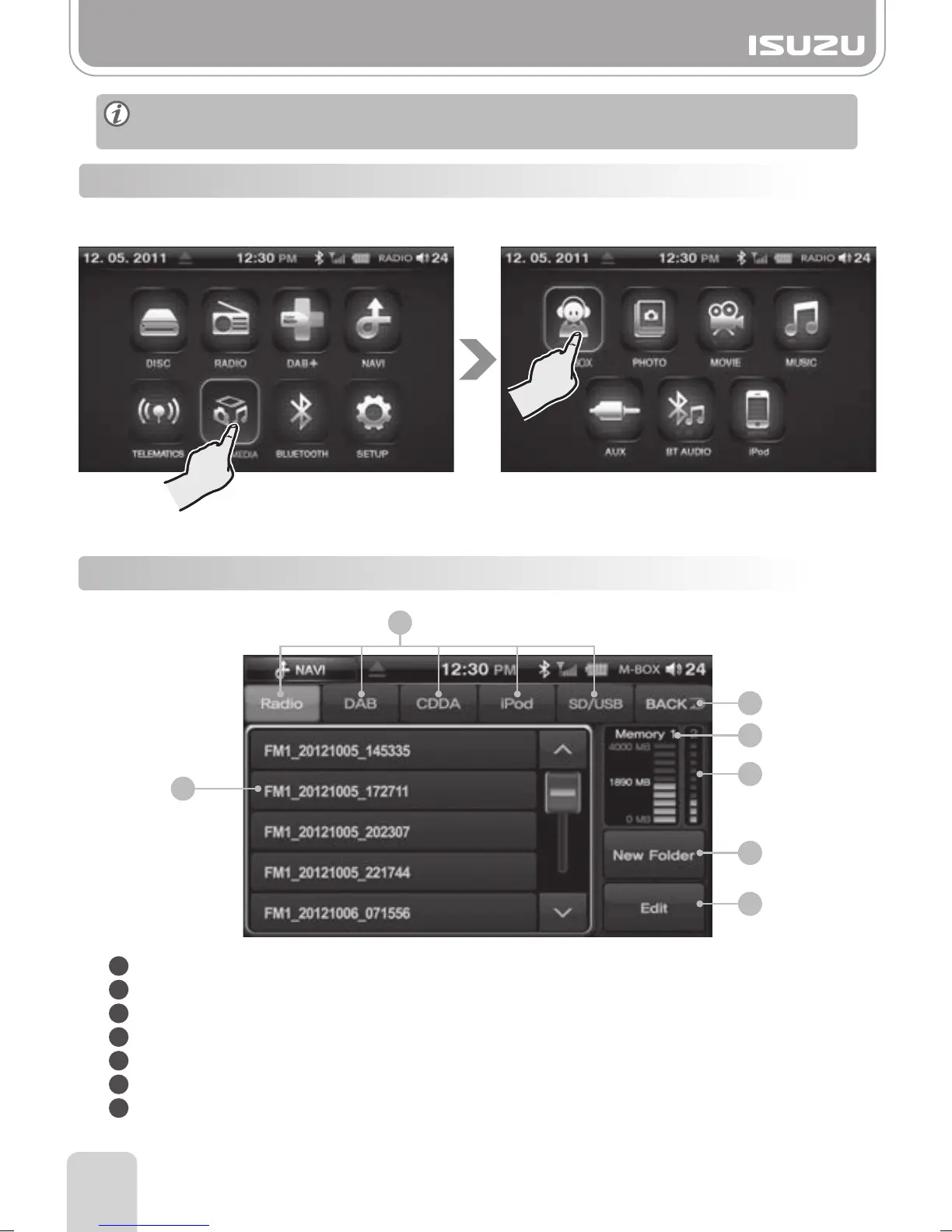
1. Press the MULTIMEDIA button in the Main menu.
2. Press the M-BOX button.
11-4. M-BOX mode
11-5. M-BOX List Mode Window Components
1
2
3
4
Mode list button: Individual tabs containing recorded audio.
Back button: Return to the previous mode.
Memory 1: Indicates the capacity of file that is recorded in radio, DAB, CDDA and iPod mode.
Memory 2: Indicates the capacity of an Audio mode file.
New Folder button: Create a new folder.
Edit Button: Edit a file.
List: Displays a List of folders and files inside the root directory of the selected tab.
5
6
7
Audio saved to the AVN hard drive cannot be copied to an external hard drive due to
copy right laws.



 To Next Page