59
1
2
3
4
5
6
7
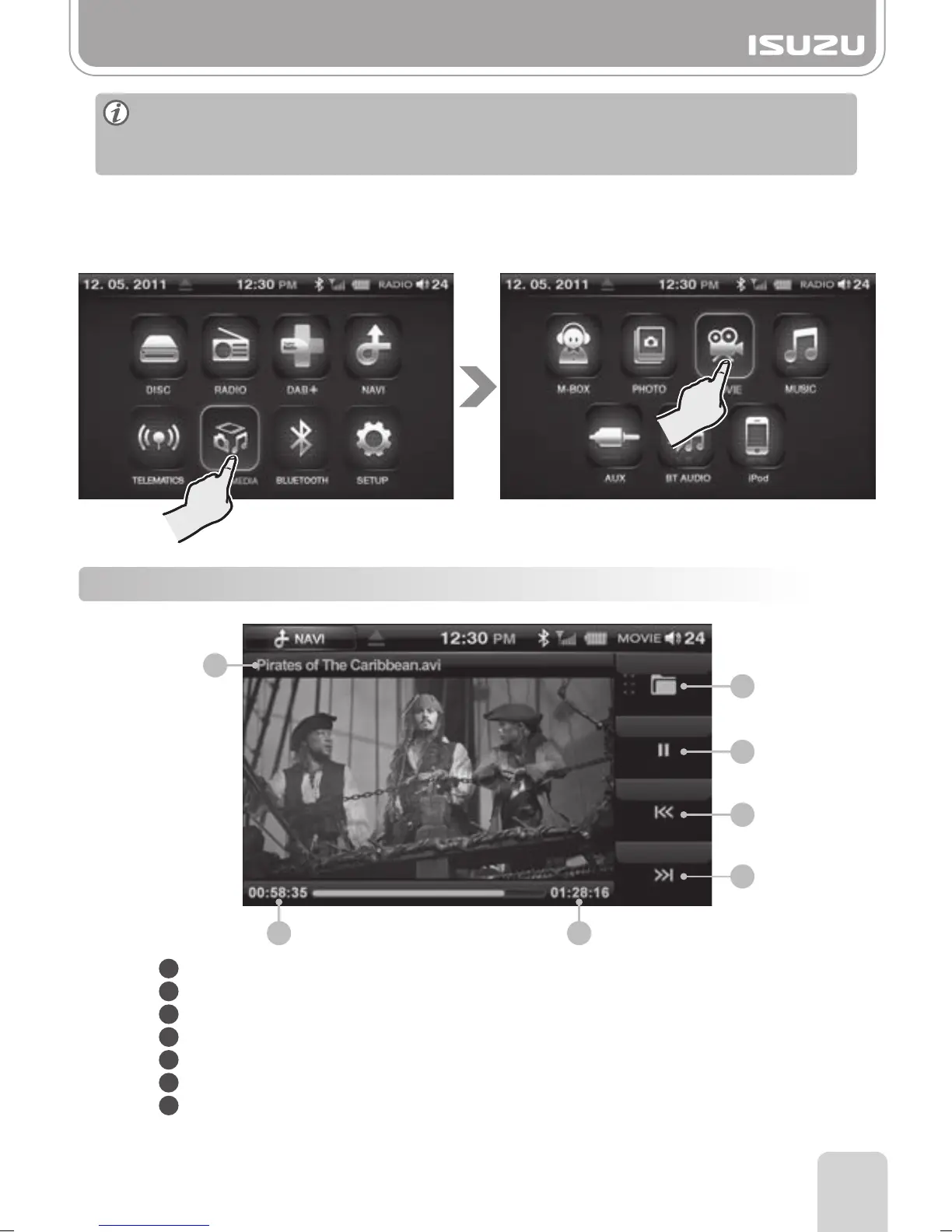
Title: Displays the time and title of the current file.
Folder Button: Return to the media folder list.
Play/Pause Button: Play or pauses your video.
Previous Button: Skips to the previous file.
Next Button: Skips to the next file.
Total Time: This displays the total play time of the video.
Play Time: This displays the play time of the video.
2
1
3
4
5
7 6
Part 13.Movie Mode via USB/SD
1. Insert USB or SD containing Movie files.
2. Press the MULTIMEDIA button in the main menu.
3. Press the MOVIE button on the multimedia screen.
4. Press Folder list button to select the storage device containing the files you require.
13-1. MOVIE Mode Window Components
►
Some DIVX files may not play.
►
Please ensure movie file resolution size is no larger than 720X480 otherwise movie
will not play! Available formats AVI and Open DIVX.



 To Next Page