30
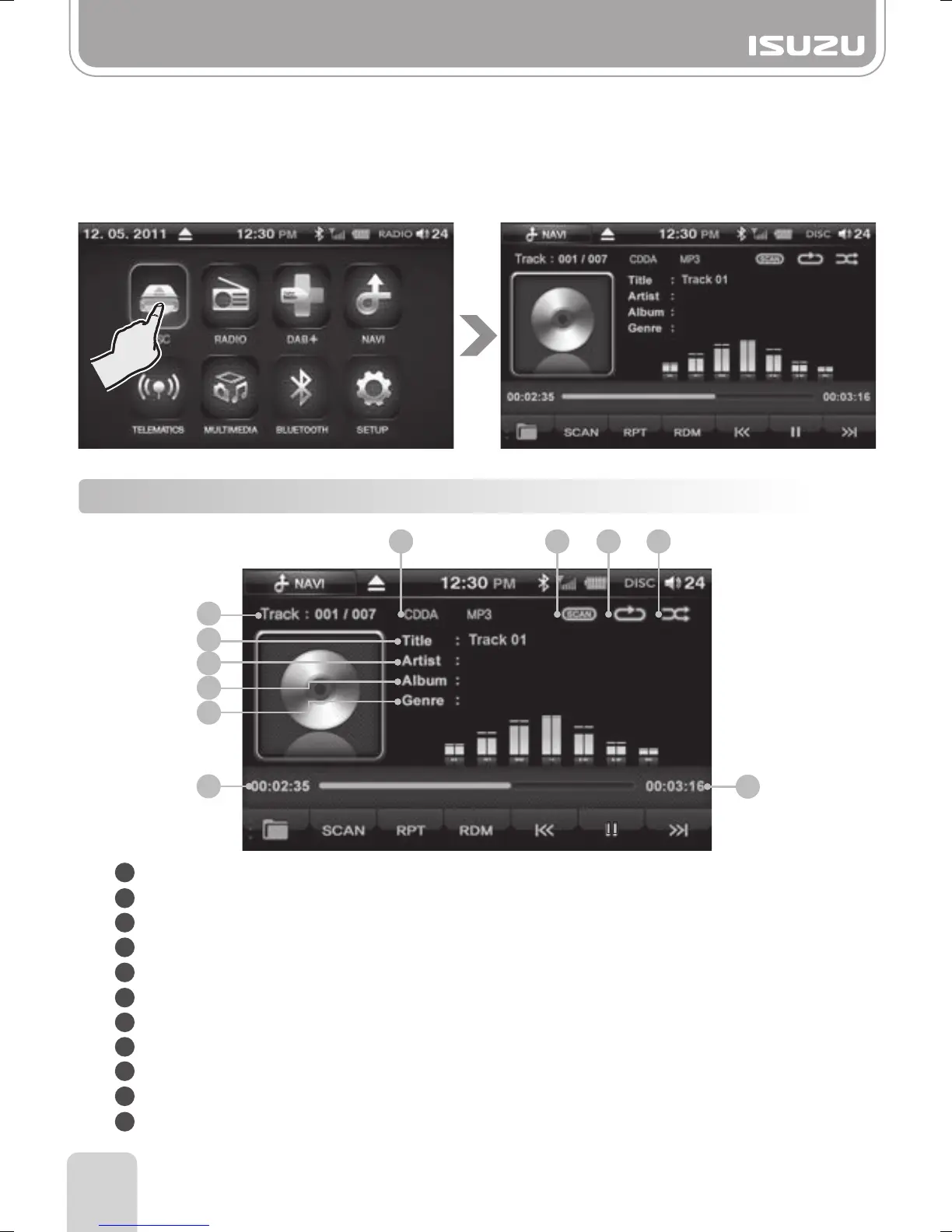
6-1. Components of the CD Mode Display
Part 6.CD Functions
1. When you insert a DISC, you are automatically transferred into DISC mode.
After reading the DISC, you are taken to the play window and the DISC starts playing
from track 1.
2. If a Disc is already inserted and you are in a different mode, select the DISC button
from the Main menu.
The unit will begin playing from where it left off.
1
2
3
4
5
6
7
8
9
10
11
6
5
7
8
9
11
10
1
2 3 4
Format: Indicates the current mode and format.
Scan Play: Indicates whether the scan function is on or off.
Repeat Play: Indicates whether the repeat function is on or off.
Random Play: Indicates whether the random function is on or off.
Track List: Displays the [current track/total tracks] number of the CD
Title: Displays the title of the song being played.
Artist: Displays the artist of the song being played.
Album: Displays the album of the song being played.
Genre: Displays the genre of the song being played.
Play Time: Displays the play time of the song.
Total Time: Displays the total play time of the song.



 To Next Page