49
Part 11.M-Box-Recorded Audio
Previously recorded audio must be saved before attempting to use M-BOX feature.
11-1. Before using the M-BOX
11-2. RIPPING of RADIO, DAB, CDDA and iPod mode
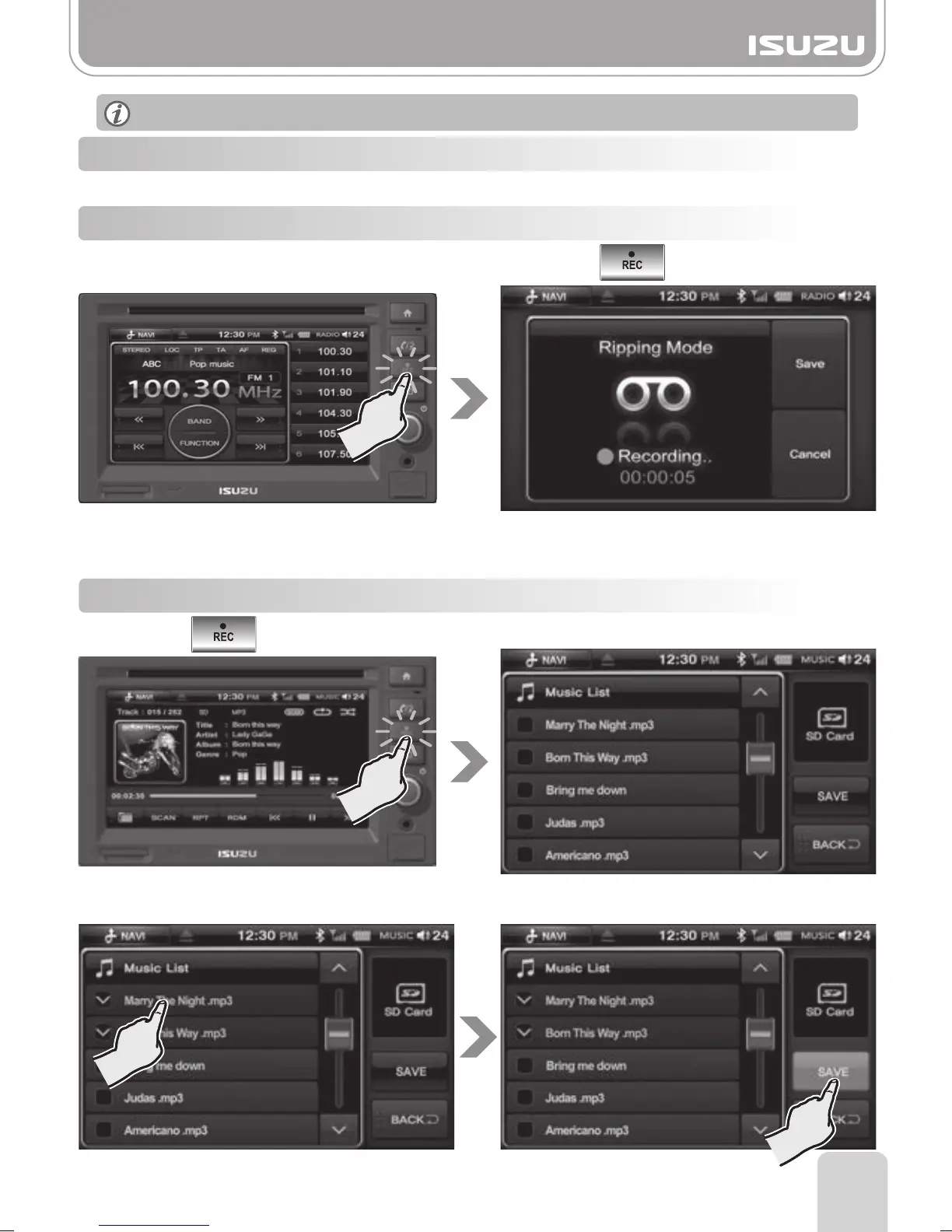
11-3. RIPPING of USB, SD Card mode
Press the button of AVN unit in USB, SD Play mode.
The screen will display USB, SD Ripping Mode screen.
Note! Ripping in USB, SD mode is a file copy.
Select the file/s to copy and press the "SAVE" button.
To return to the previous mode, press the "Back" button.
Video content cannot be recorded via AVN unit.
The screen will display "Ripping Mode" and start to record the Mode you are currently listening to.
To save the recorded sound, press the Save button. You can record audio up to 1 hour.
Press the Cancel button to cancel the recording.
To record audio via Radio, DAB, CDDA, and iPod press the button of AVN unit.
(The below image is shown when you record in radio mode.)



 To Next Page