64
Part 14.Music Mode via USB/SD
1
2
3
4
5
6
7
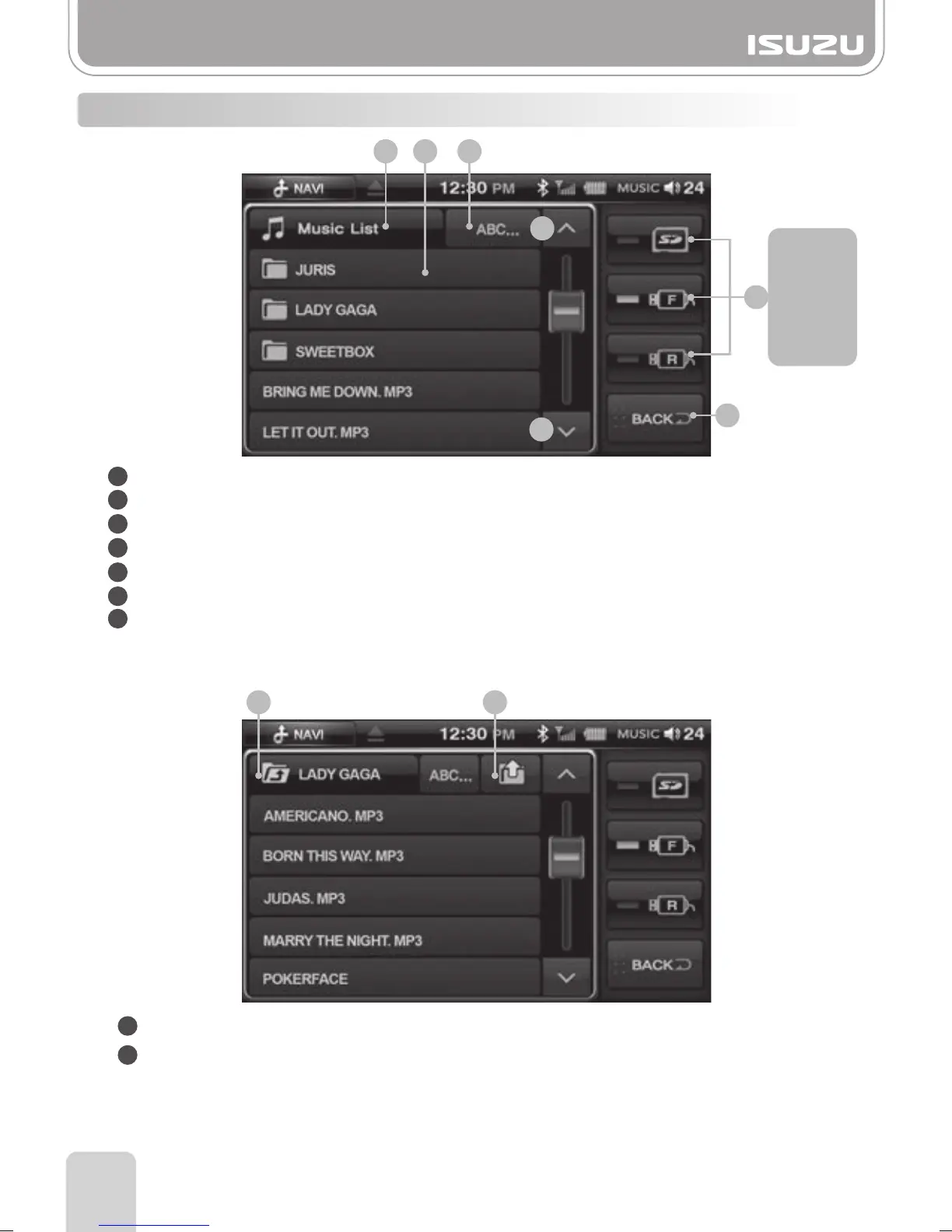
14-2. MUSIC Mode Folder List Window Components
Storage Device Selection Button: Selects the storage device containing the files you require.
BACK Button: Exits you out of the current window to the previous screen.
Folder List Title: Displays the title of the folder list.
Folder & File Title: Displays the title of the folder or file.
ABC.. Search Button: Search via alphabetical scroll bar.
Page UP Button: Displays the folder list on the previous page.
Page DOWN Button: Displays the folder list on the next page.
2
3 5
6
7
4
●After you’ve opened the folder
Upper Folder Button: Takes you to the folder above the current one.
ROOT Button: Takes you to the first page of the folder list.
1
2
1 2
SD Card
Front USB
Rear USB
1



 To Next Page