27
Part 5.DAB(Digital Audio Broadcasting)Functions
1
2
3
4
5
6
7
8
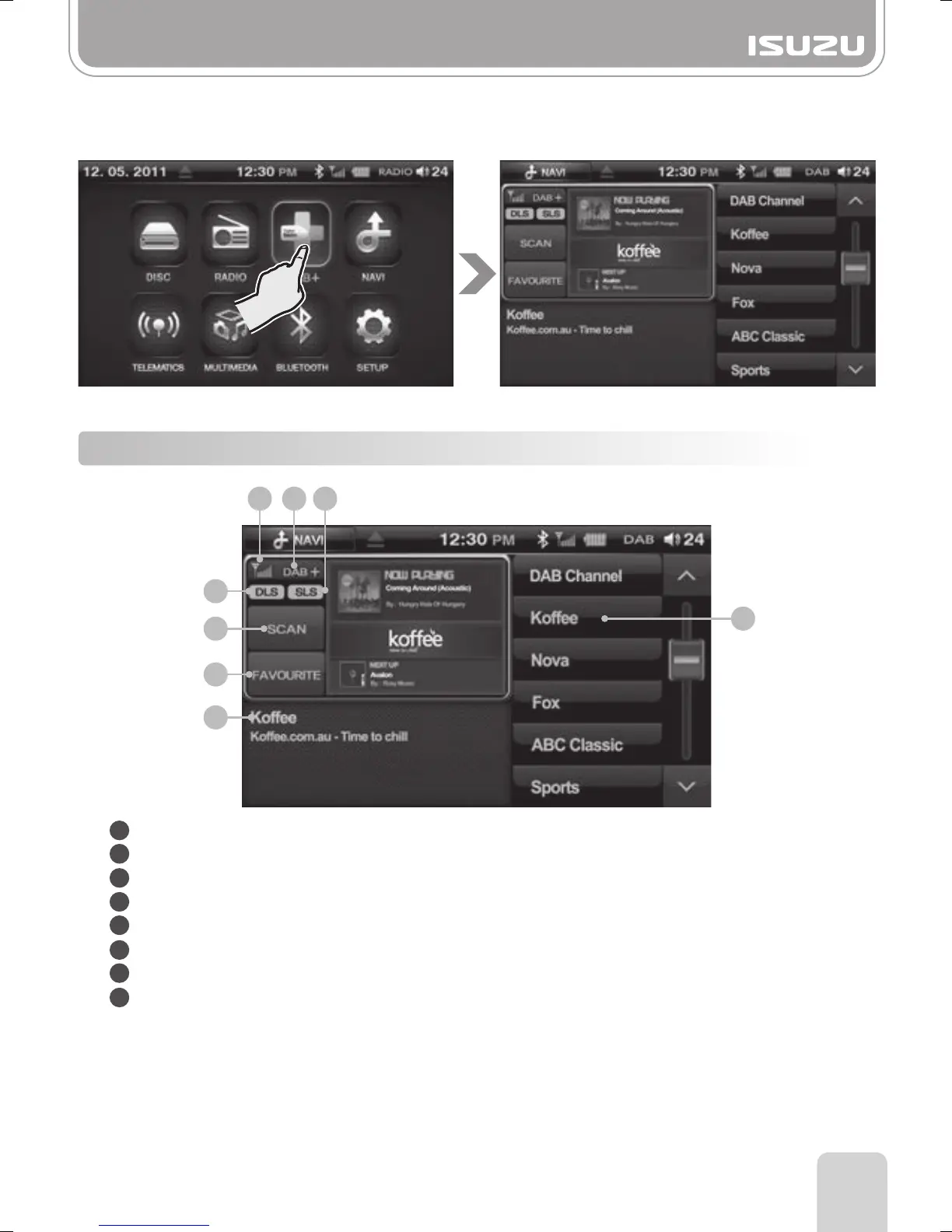
1. Select the DAB+ button.
2. This takes you to the DAB mode and the device begins to receive signals provided the unit
has been scanned for stations.
5-1. DAB Mode Window Components
Signal Strength Display: Indicates the signal strength of the digital Radio station.
Mode Display: Indicates the mode you are currently in.
SLS Display: Indicates the ON/OFF status of SLS (Broadcast of pictures).
DLS Display: Indicates the ON/OFF status of DLS (Broadcast of text).
Scan Button: Scans live DAB broadcast channels.
Favourite Button: Displays your favourites saved as presets.
Channel Name Display: Displays the name of the DAB station you are currently listening to.
Preset Button: Displays your favourites saved as presets.
4
5
8
6
7
31 2



 To Next Page