51
4
1
5
6
2 3
7 8 9 10 11 12
Part 11.M-Box-Recorded Audio
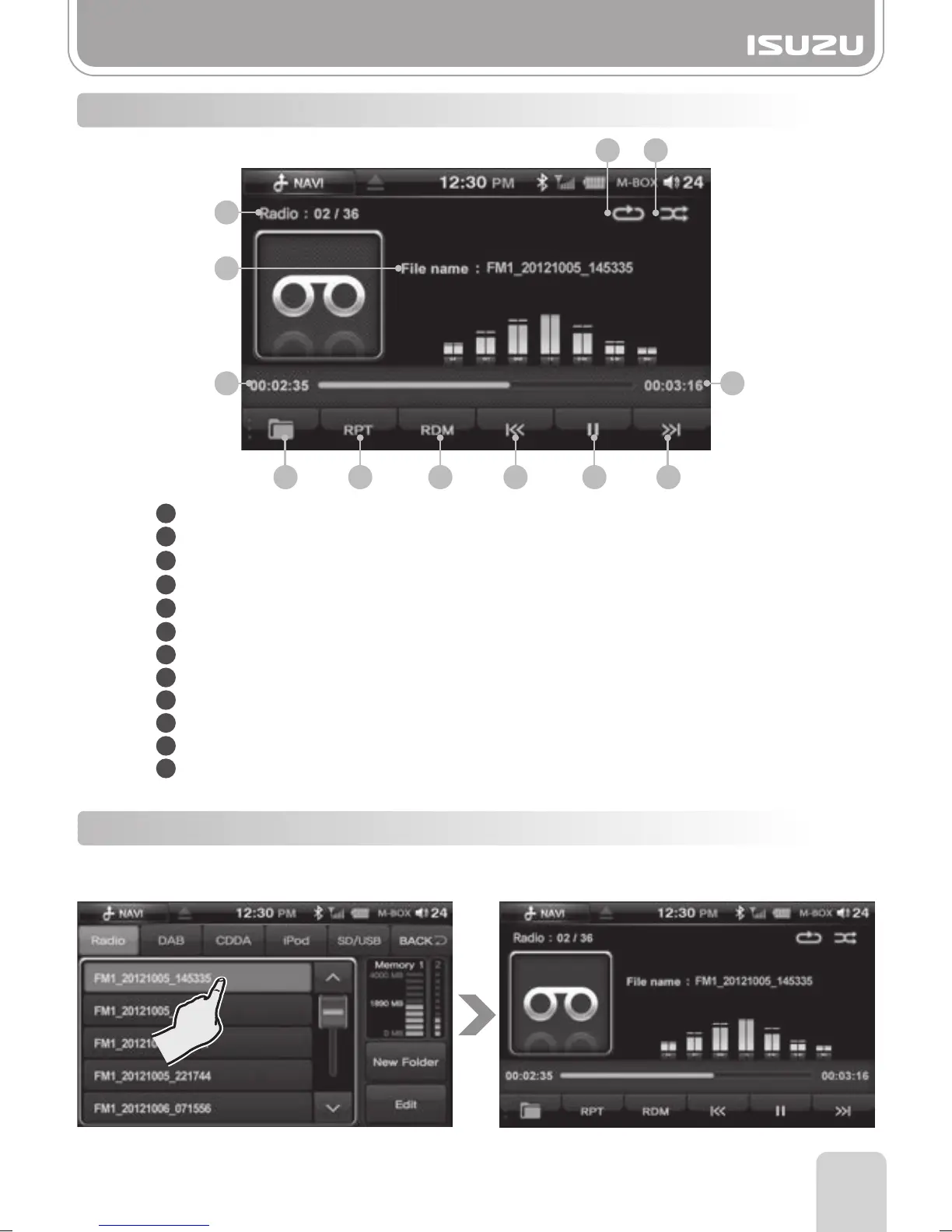
1. Select a file from one of the M-BOX LIST tabs.
2. M-BOX Player screen is displayed and the file will begin to play.
11-6. M-BOX Player Mode Window Components
11-7. M-BOX List mode Basic Actions
1
2
3
4
5
6
7
8
9
10
11
12
File List: Displays the [current file/total files] number of the storage device.
Repeat Play: Indicates whether the repeat function is ON/OFF.
Random Play: Indicates whether the random function is ON/OFF.
File name: Displays the file name of the current file.
Play Time: Displays the play time of the current file.
Total Time: Displays the total play time of the file.
Folder Button: Return to the media folder list.
RPT Button: Turns on and turns off the Repeat function.
RDM Button: Turns on and turns off the Random function.
Previous Button: Skips to the previous file.
Play/Pause Button: Play or pauses the file.
Next Button: Skips to the next file.



 To Next Page