31
Part 6.CD Functions
●Pause/Play
A. To pause a song, press the pause button on the display.
B. To begin playing again, press the play button on the display.
C. Forwarding and Rewinding with the progress bar.
To fast forward or rewind press the progress bar whilst the file is playing.
●Choosing the CD Track
To move to the next or previous track press or on the display.
●Choosing a track from the track list
6-2. CD Mode Basic Actions
1
2
3
4
5
6
7
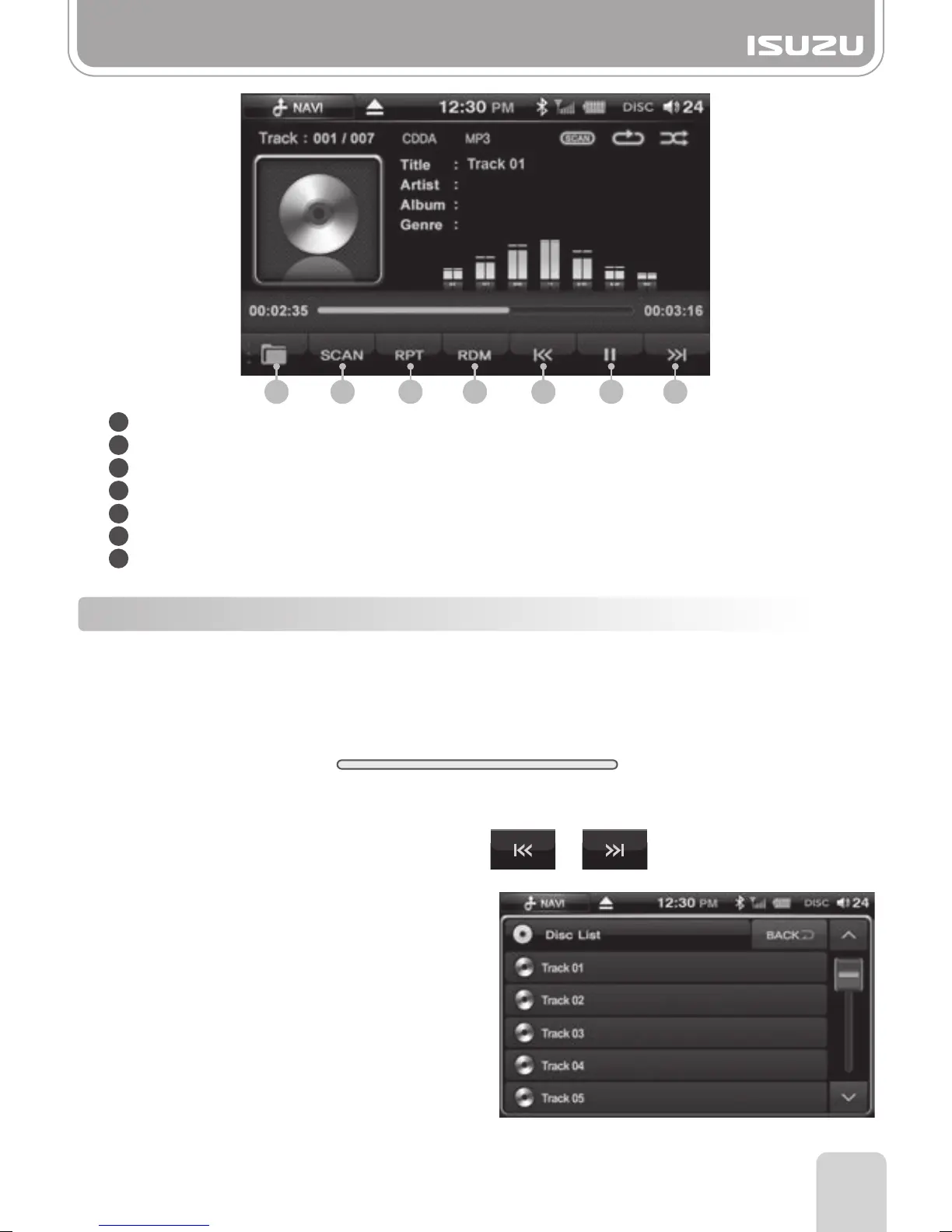
Folder Button: Enters the media folder list.
SCAN Button: Plays the first 10 seconds of the track and then moves onto the next one.
RPT Button: Repeat function on or off.
RDM Button: Random function on or off.
Previous Button: Skips to the previous track.
Play/Pause Button: Play or pauses the track.
Next Button: Skips to the next track.
1 2 3 4 5 6 7
A. Press the list folder button to display the
Disc track list.
B. Search the tracks by pressing the arrow
buttons up or down.
C. The selected track number appears on
the window and the song begins to play.
00:00 00:00



 To Next Page