33
Part 7.DVD Functions
1. When you insert a DISC, you are automatically transferred into DISC mode.
After reading the DISC, you are taken to the play window and the DISC starts playing from
main menu of the DVD.
2. If a Disc is already inserted and you are in a different mode, select the DISC button
from the main menu.
The unit will begin playing from where it left off.
1
2
3
4
5
6
7
8
9
10
11
12
13
7-1. DVD Mode Operations Menu Window Components
7
6
913
8
11
12
10
1 2 3 4 5
For your safety, this unit does not support
video clip replay whilst you are driving.
Warning
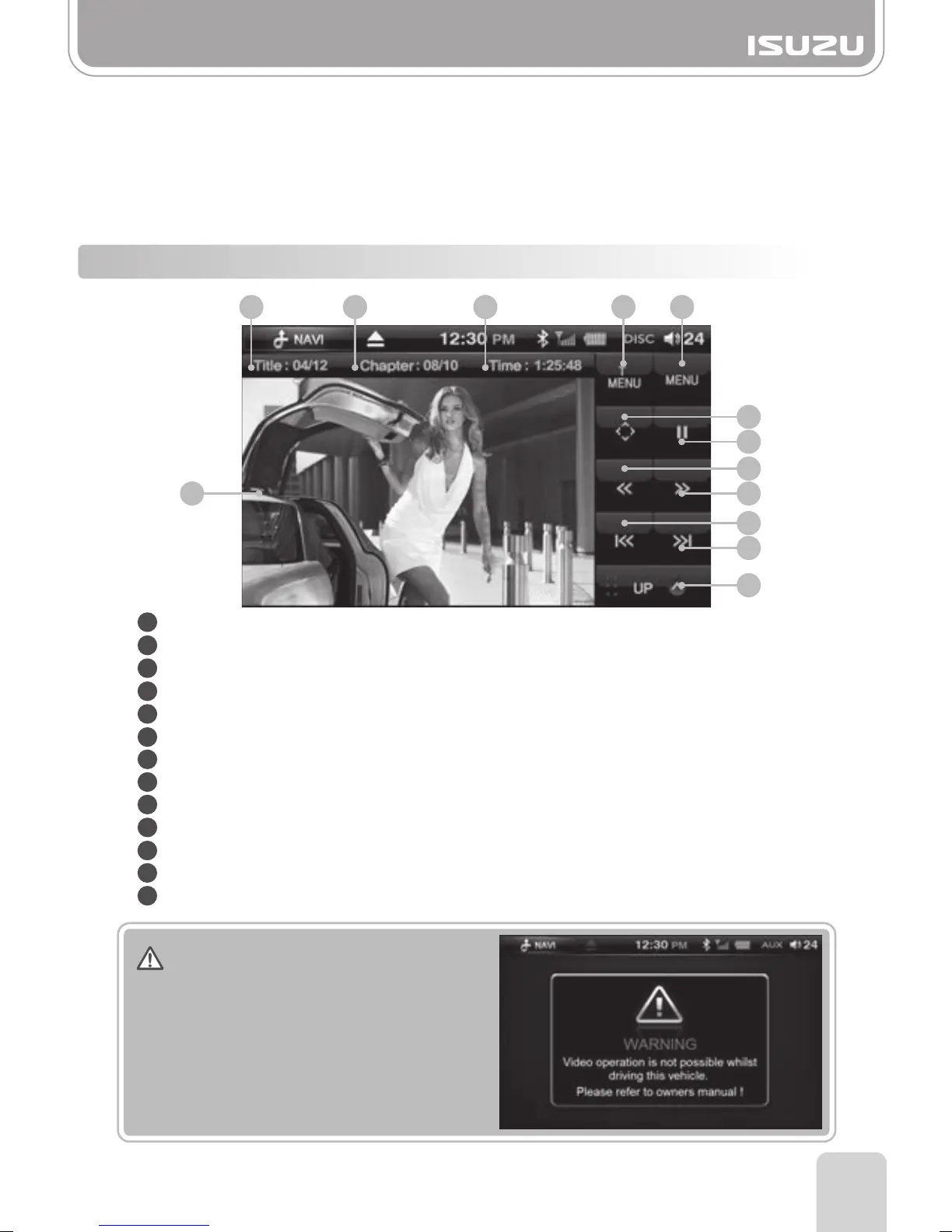
Title Number: Displays the number of the title being played.
Chapter Number: Displays the chapter number being played.
Play Time: Displays the play time of the title being played.
Title Menu Button: Enters the DVD title menu window.
Menu Button: Enters the DVD'S menu window.
Navigation Button: Displays the navigation keys used in the DVD menu.
Play/Pause Button: Pause or play the DVD.
Rewind Button: Plays the current chapter at speeds of x2, x4, x8, x16 backwards.
FF Button: Plays the current chapter at speeds of x2, x4, x8, x16 forwards.
Previous Button: Plays the previous chapter.
Next Button: Plays the next chapter.
Next Menu Button: Enters the next menu window.
Screen: To enter full screen mode, press the movie screen.



 To Next Page