TCP/IP configuration
Within an Ethernet, each device has a unique TCP / IP
address that can be assigned manually or from
a DHCP server. The 4-byte device address (0 to 3 byte)
can be extended in the TCP / IP configuration using
the subnet mask and gateway data.
Setting the TCP / IP device address (addr) manually
• Select in the programming mode as described.
The symbols for the programming mode PRG
and the current transformer mode CT appear
on the display.
• Press button 2 three times to get to the TCP / IP
settings for the device addressing.
• Press button 1 to select the desired digit. The selection
is indicated by a flashing digit.
• Press button 2 to adjust the selected digit.
• Use button 1 to select the next digit and set it again
by pressing button 2.
• If byte is set to 0, the TCP / IP address can be set from
1 to 3 by pressing button 1. Then the display jumps
back to Byte 0 (no digit is flashing).
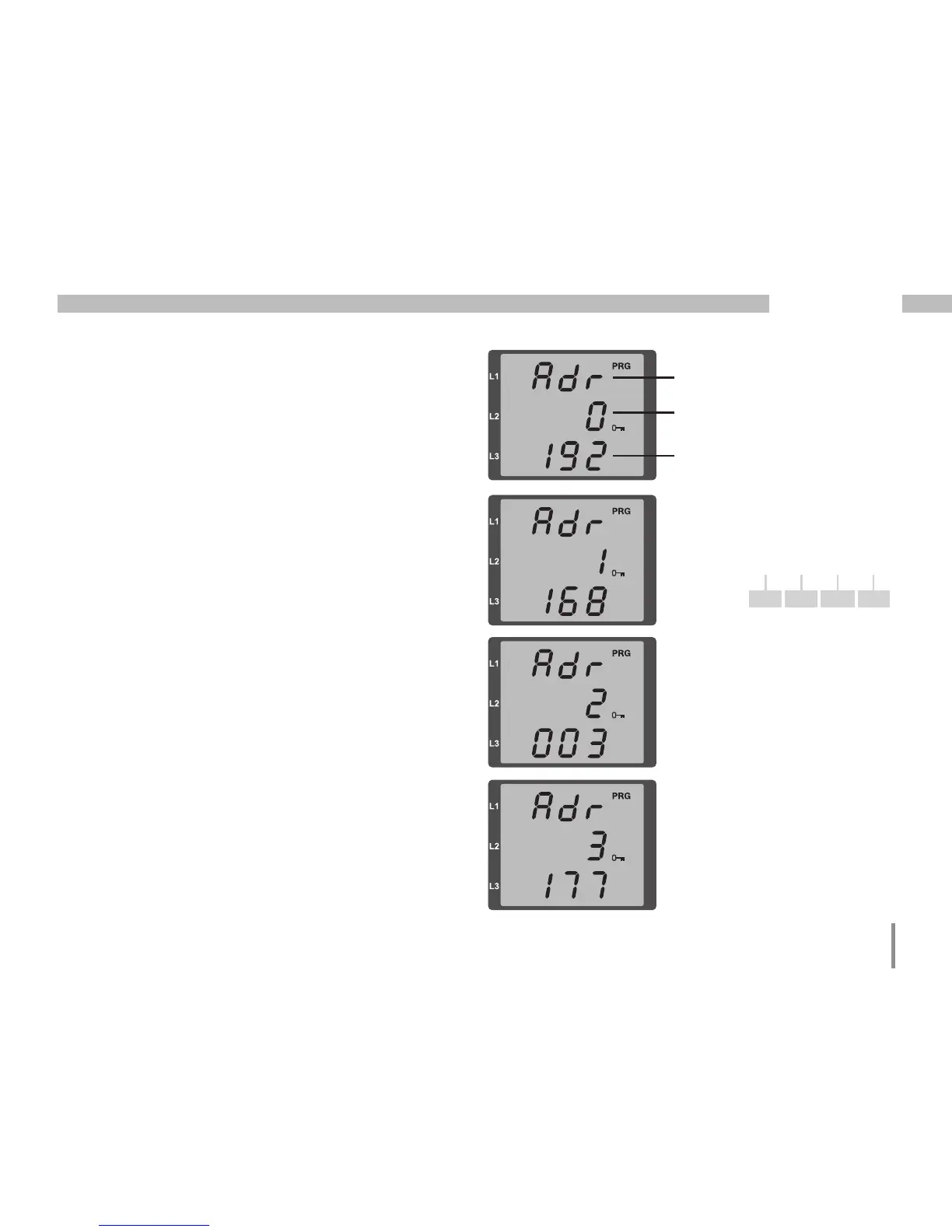
Description
Byte identification
(e.g. byte 0) of the address
Address value, byte 0
Fig. TCP/IP address, byte 1
A TCP / IP address consists
of 4 bytes with the following
structure:
xxx.xxx.xxx.xxx
Byte 1Byte 0 Byte 2 Byte 3
Fig. TCP / IP address,
byte 2, value 003
Fig. TCP / IP address,
byte 3, value 177
192.168.003.177Example:







 To Next Page