35
VM9424
XM
®
RADIO OPERATION
Listeners can subscribe to XM
®
Radio on the Web by visiting
www.xmradio.com, or by calling (800) 967-2346. Customers should have
their Radio ID ready (see “Displaying the Identification (ID) Code”).
Customers can receive a limited number of free-to-air channels without
activation.
Accessing XM Radio Mode
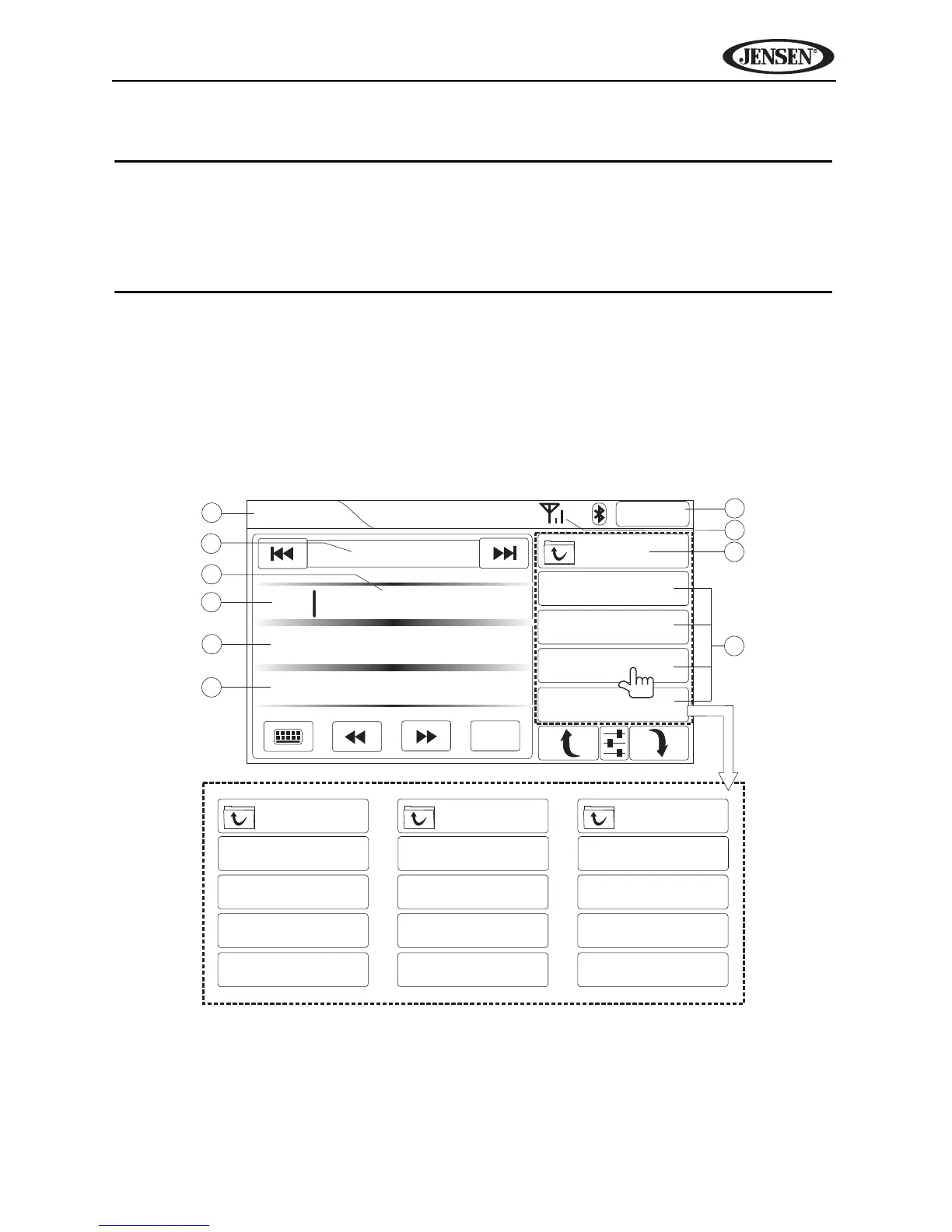
To access the XM screen, press the SRC button (10) on the front panel or
touch the top left corner of the screen to access the Source menu, and then
touch the XM icon. You can also press the SRC button (8) on the remote
control until “XM” appears at the top of the screen. The on-screen indicators
and touch key areas for XM Radio playback are outlined below.
3
4
5
6
2
7
8
9
10
1
XM
2:04AM
44 Classic Alternative
Modern English
I Melt With You
MENU
CHANNELS
CATEGORY
PRESETS
CHANNELS
62 Watercolors
63 The Blend
64 Oprah Radio
70 USA Today
CATEGORY
16 Traffic/Weather
1 Pop
12 Country
48 Rock
PRESETS
P1 80's Pop Hits
P2 Classic Country
P3 Bluegrass
P4 All Hit Music
Press to view options.
Rock
Jump



 To Next Page