COMPLEX RADIO CONTROL SYSTEM
available. In position 1 the altitude and horizon stabilisation is
enabled by default. Switching to position 2 (center), a simple
horizon stabilization mode with direct throttle is activated.
Switching to position 3 activates the aerobatics mode. Assign the
throttle channel. Make sure this channel on the indicator works
in the range 0-100% (1-2ms).
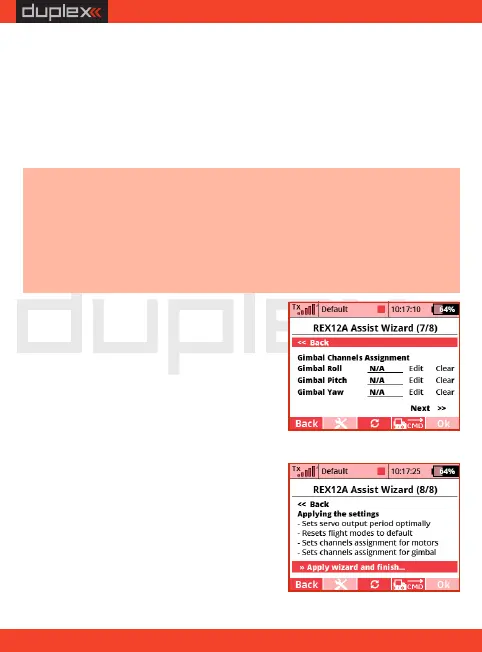
14. Finish the wizard and application
settings. After executing the "Apply
wizard and finish" command, the
parameters in the receiver are stored
and the stabilisation is reset to the
mode according to the data you've
entered.
Note: add the three-position switch as a new function (flight mode)
in the transmitter menu „Model/Functions Assignment”. Then
add this switch to the free channel in the menu „Model/Servo
Assignment”. After this you will be able to assign this three-position
switch according to reference . as a switch for stabilisation flight 12
modes.
13. If you have selected "Use gimbal"
in the previous steps, assign the
individual channels to control it. You
can skip this point and configure the
camera gimbal later in the menu
„ C o n f i g u r a t i o n / C h a n n e l
A s s i g n m e n t / A s s i g n g i m b al
channels”.
EN
20


 To Next Page