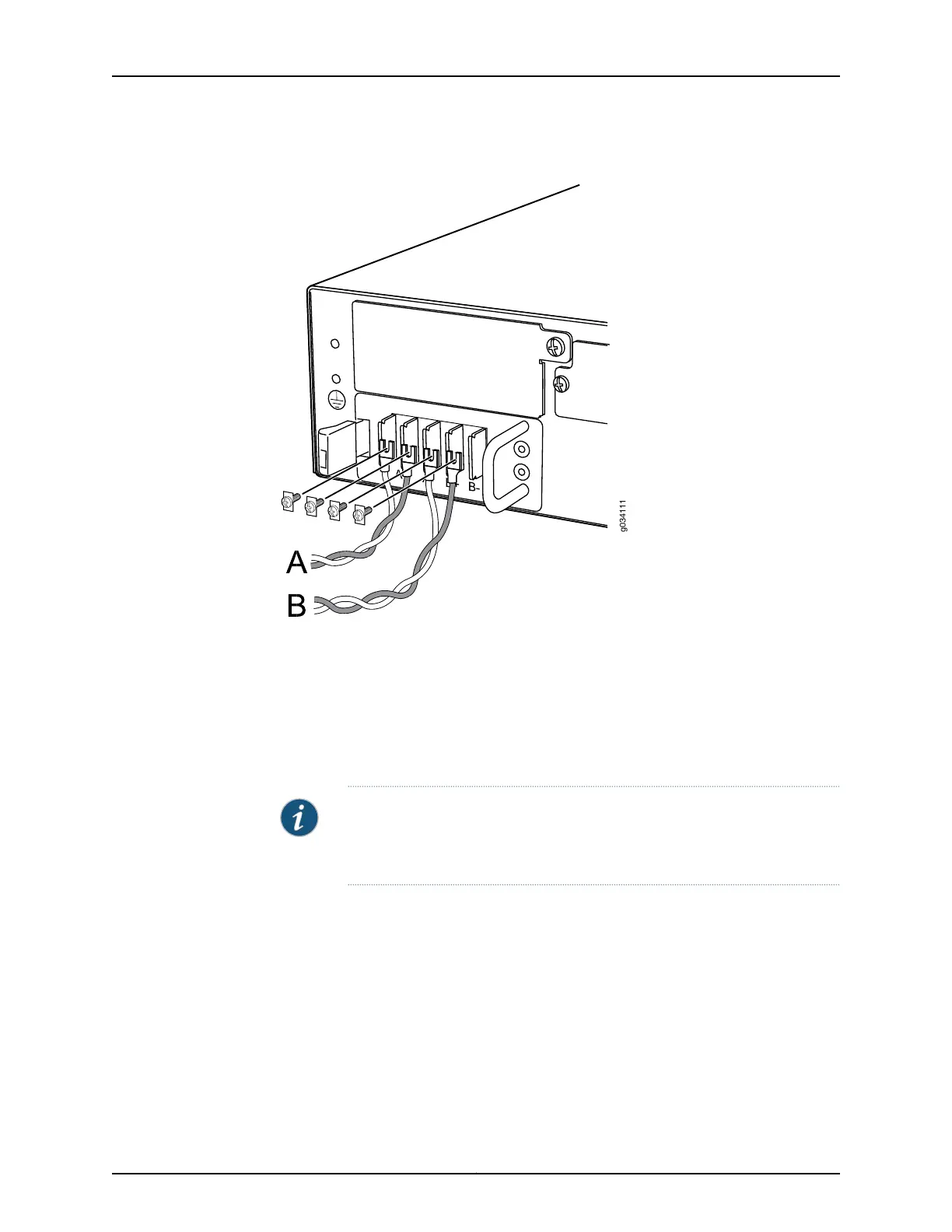
Figure 26: Connecting DC Power Cables
6. (Optional) If you have two DC power sources and wish to deploy A/B feed redundancy
for the services gateway, connect the DC power cables to B+ and B- terminals also.
7. Replace the clear plastic cover over the terminal studs on the faceplate.
8. Verify that the power cables are connected correctly, that they are not touching or
blocking access to services gateway components, and that they do not drape where
people could trip on them.
NOTE: The services gateway must be connected to earth ground during
normal operation. The protective earthing terminal on the back panel of the
chassis is provided to connect the services gateway to ground.
Related
Documentation
Preventing Electrostatic Discharge Damage to the SRX550 High Memory Services
Gateway on page 194
•
• Grounding the SRX550 High Memory Services Gateway on page 106
• Organizing Interface Cableson the SRX550 High Memory Services Gateway on page 109
• SRX550 High Memory Services Gateway General Safety Guidelines and Warnings on
page 191
119Copyright © 2016, Juniper Networks, Inc.
Chapter 17: Providing Power to the SRX550 High Memory Services Gateway



 To Next Page